How to Configure Sales Commissions in Odoo 19
Introduction
Sales commissions in Odoo 19 allow businesses to automate incentive calculations for their sales teams. Instead of tracking targets and payouts manually in spreadsheets, the Commissions module handles achievement tracking, tiered payouts, and payroll integration directly within the Sales app.
This guide covers how to enable commissions, create commission plans, configure targets and achievements, and generate commission reports in Odoo 19.
Enabling the Commissions Module
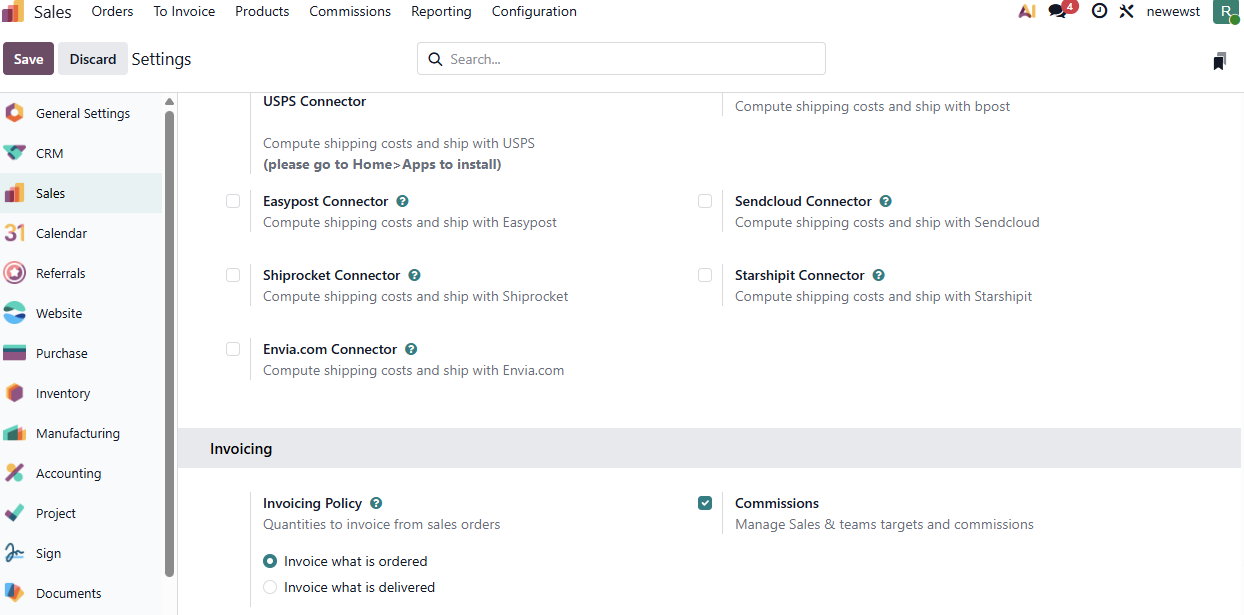
Go to Sales → Configuration → Settings. Under the Invoicing section, enable the Commissions checkbox and click Save.
Once enabled, a new Commissions menu appears under the Sales app with five sub-menus:
- My Commissions — view commission data for the logged-in user only
- Commissions — view calculated commission data for all salespeople
- Achievements — view achievement records across plans
- Commission Plans — create and manage commission plans
- Adjustments — make manual corrections to commission figures
Creating a Commission Plan
Sales → Commissions → Commission Plans → New
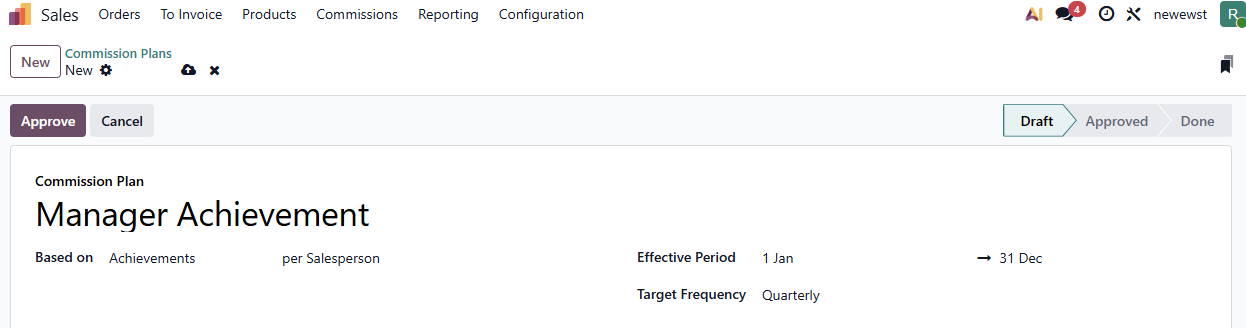
Fill in the following fields:
- Name — a descriptive label for the plan
- Type — select Targets (goal-based with tiers) or Achievements (flat rate on actuals)
- User Type — choose Salesperson (individual tracking) or Sales Team (collective tracking)
- On Target Commission — the payout amount at 100% target achievement
- Effective Period (From / To) — the plan’s start and end dates
- Target Frequency — how often targets reset: Monthly, Quarterly, or Yearly
Target-Based vs Achievement-Based Plans
| Feature | Target-Based | Achievement-Based |
| How it works | Set a sales goal per period; payout based on % achieved | Flat commission rate on actual performance |
| Commission Levels (tiers) | Yes — define payouts at 0%, 50%, 100%, 150% | No — single flat rate |
| Best for | Quarterly/yearly goals with escalating incentives | Ongoing, consistent commission structures |
| Target amounts required | Yes | No |
Setting Up Targets
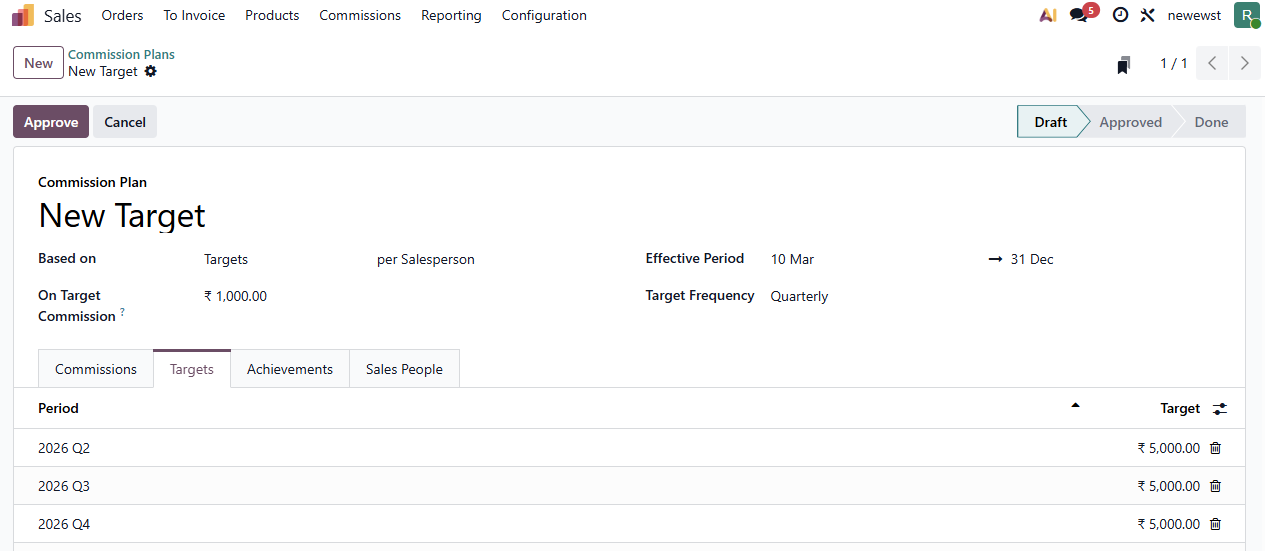
For target-based plans, The Targets tab shows the overall target amounts per period. Odoo auto-generates periods in the targets tab based on the selected target frequency. Each period includes a target amount that you can edit individually.
Setting Up Achievements
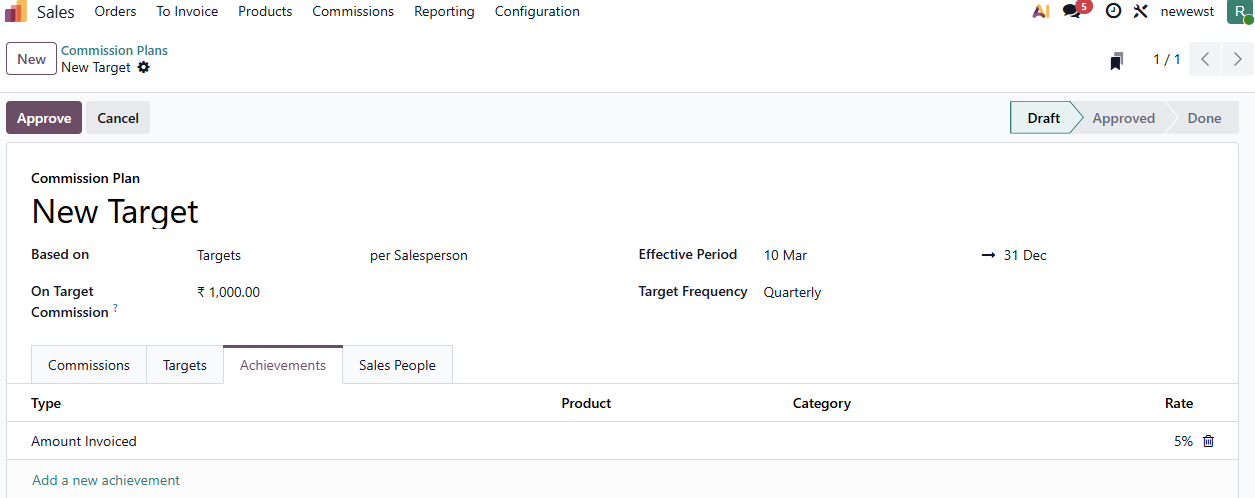
Go to the Achievements tab and configure:
- Type — Amount Invoiced, Amount Sold, Quantity Invoiced, or Quantity Sold
- Rate — multiplier applied to the achievement (default: 0.05 i.e. 5%)
- Product — optional specific product filter (Leave it blank to select all products)
- Category — optional product category filter to commission only specific product categories (Leave it blank to select all categories)
Assigning Salespeople
In the Sales People tab, add the salesperson who will be tracked under this plan. Each entry shows:
- Custom From and To dates for mid-period additions or removals
- Any other commission plans assigned to the salesperson

Commission Levels
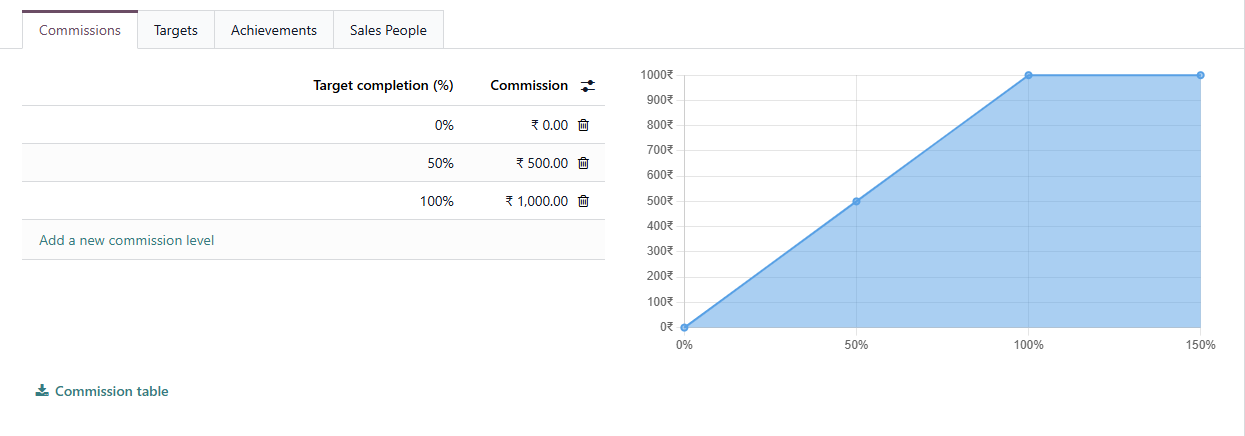
For target-based plans, the Commissions tab lets you define tiered payouts:
- 0% of target → ₹0
- 50% of target → ₹500
- 100% of target → ₹1000
Note: Odoo calculates the commission proportionally between the target levels.
Adjustments
Go to Sales → Commissions → Adjustments to make manual corrections. Adjustments are managed as a separate list, not as a tab on the plan form. Each adjustment records:
- Achieved — the correction value
- Add to — salesperson whose commission increases
- Reduce From — salesperson whose commission decreases (optional)
- Date and Note for audit trail
Approving the Plan
Click Approve to activate the plan. Once approved, Odoo begins tracking sales and calculating commissions automatically. The plan moves through four states: Draft → Approved → Done (or Cancelled). To make changes to an approved plan, it must be Reset to Draft first.
Payroll Integration
With the HR Payroll module installed, each plan gets a Payslip Input field. Link it to a payroll input type (e.g., “Sales Commission”) so that calculated commissions appear automatically in employee payslips.
Viewing Commission Reports
Go to Sales → Reporting → Commissions to view commission data in pivot or graph format. Filter by salesperson, plan, or date range. Each salesperson can also view their own data through the My Commissions menu under Commissions tab.

FAQs
1. Can a salesperson have multiple active commission plans?
Yes. Plans track independently. A salesperson can be part of both a target-based and an achievement-based plan at the same time.
2. What happens when a salesperson joins mid-quarter?
Use the custom From date in the Sales People tab. The salesperson will only be evaluated from that date onward.
3. Can I commission on specific product categories only?
Yes. Set the Category field on the achievement line to filter by product category.
Need help configuring sales commissions in Odoo 19? Connect with the experts at Infintor for a customized consultation