
If you are planning to implement an ERP system for your business, one of the first questions you are likely to ask is: How much does Odoo cost in India?
The answer depends on several factors, including the Odoo edition, number of users, Odoo apps, implementation requirements, customization, integrations, data migration, hosting, training, and ongoing support. Understanding Odoo pricing in India is therefore more than looking at the software subscription price. The total Odoo ERP investment usually consists of the Odoo license or subscription cost plus implementation and other professional services.
The first step is to understand the customer’s business requirements and determine whether Odoo Community or Odoo Enterprise is the right fit, while Enterprise customers can choose plans such as Standard and Custom, depending on their requirements. Once the Odoo edition and plan are selected, the remaining costs are based on the services the customer actually requires. These may include Odoo implementation, customization, custom development, data migration, third-party integration, hosting, training, support, maintenance, and other professional services.
Customers do not necessarily need to purchase every service. For example, if a business only requires Odoo implementation and configuration, it may only need to pay for the implementation services. However, most businesses typically require a combination of services to successfully deploy and operate their ERP system. A standard Odoo project may include implementation, configuration, data migration, user training, and post-implementation support, while more complex businesses may additionally require customization, custom module development, integrations, advanced reporting, hosting, and ongoing maintenance.
In simple terms, Odoo pricing in India is determined by what your business actually needs. The more complex the business processes and the greater the need for customization, development, integrations, migration, or ongoing support, the higher the overall Odoo ERP implementation cost can be.
This guide explains Odoo pricing in India, Odoo plans, Odoo Community vs Enterprise, Odoo ERP implementation cost in India, customization costs, development costs, migration, integrations, and the factors that determine the total cost of an Odoo ERP project.
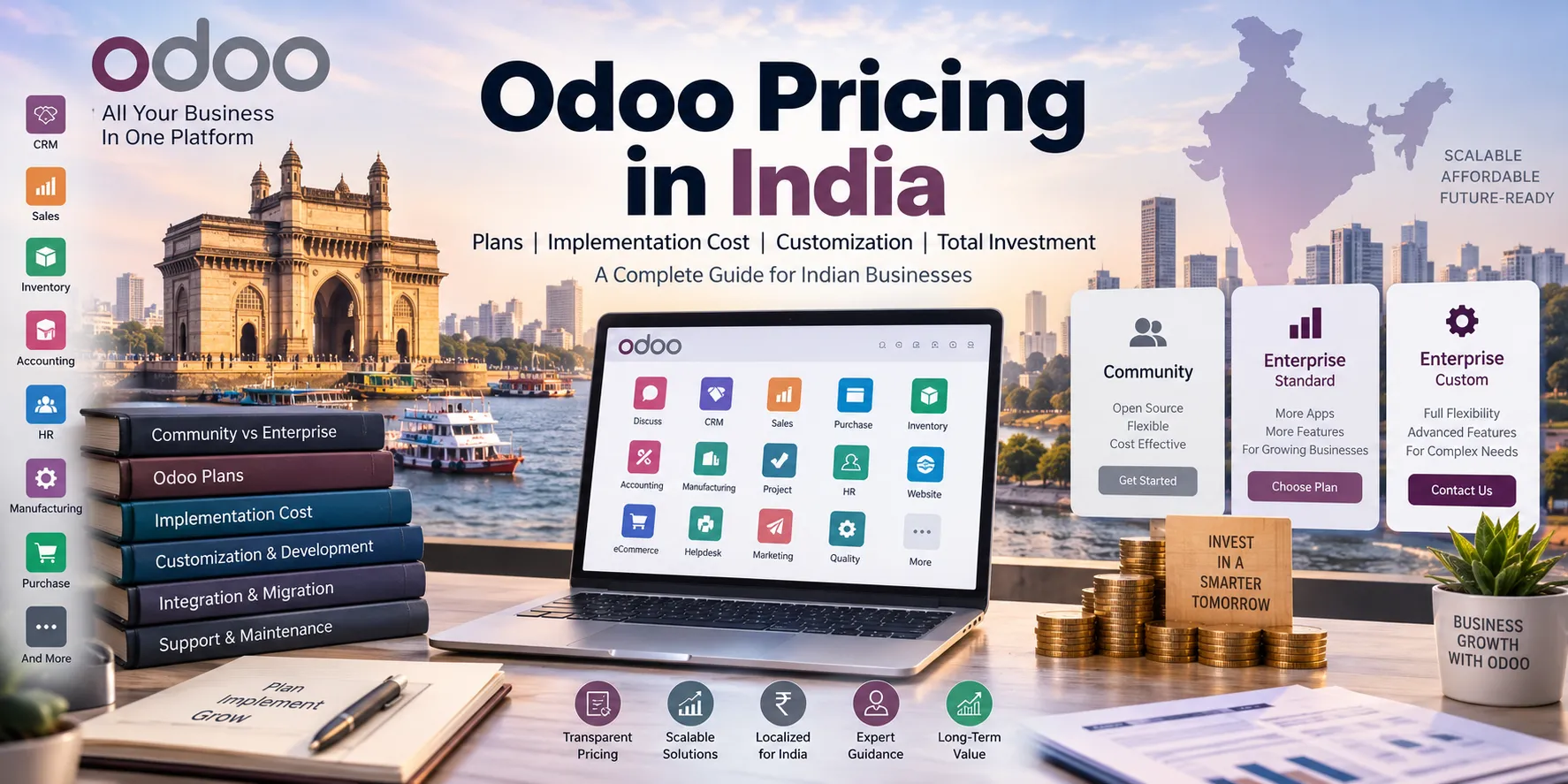
Odoo Pricing in India: Quick Overview
The total cost of implementing Odoo in India can generally be divided into the following components:
| Odoo Cost Component | What It Includes |
|---|---|
| Odoo Community | Open-source edition without an Odoo license fee |
| Odoo Enterprise | Paid Odoo subscription |
| Odoo Implementation | Requirement analysis, configuration, setup and deployment |
| Odoo Customization | Custom workflows, fields, reports and modules |
| Odoo Development | Custom applications and business logic |
| Data Migration | Migration from Excel, Tally, SAP, legacy ERP and other systems |
| Integration | APIs, payment gateways, eCommerce, shipping, banking and third-party systems |
| Training | Functional and user training |
| Hosting | Odoo Online, Odoo.sh, on-premise or cloud infrastructure |
| Support & AMC | Ongoing functional and technical support |
Therefore, Odoo subscription cost and Odoo implementation cost are two different expenses.
For an accurate Odoo ERP cost estimate, businesses should evaluate the complete project scope instead of comparing only software subscription prices.
What Is Odoo?
Odoo is an integrated ERP platform that provides business applications for CRM, Sales, Purchase, Inventory, Accounting, Manufacturing, Website, eCommerce, Point of Sale, Project Management, Human Resources, Marketing, Helpdesk and other business processes.
One of the major advantages of Odoo ERP is that businesses can start with the applications they need and expand the system as their requirements grow.
For example, a small business may initially implement:
- CRM
- Sales
- Purchase
- Inventory
- Accounting
A manufacturing company may additionally require:
- Manufacturing
- Quality
- Maintenance
- PLM
- Barcode
- Inventory
- Accounting
This difference in business requirements is one of the reasons why Odoo implementation cost in India varies from one organization to another.
Odoo Community vs Enterprise: What Is the Difference?
One of the most important decisions when calculating Odoo pricing in India is choosing between Community and Enterprise.
Odoo Community Edition
Odoo Community is the open-source edition of Odoo. It does not require an Odoo Enterprise subscription fee.
However, free software does not necessarily mean a zero-cost ERP implementation.
A business using Odoo Community may still incur expenses for:
- Server or cloud hosting
- Odoo installation
- Configuration
- Custom development
- Custom modules
- Data migration
- Third-party integrations
- Security
- Backups
- Upgrades
- Technical support
- Maintenance
Therefore, the correct way to look at Community Edition is:
Odoo Community = No Enterprise license fee, but implementation and operational costs may still apply.
Community can be suitable for businesses with technical resources that want greater control over their Odoo environment and are comfortable managing development, hosting and maintenance.
Odoo Enterprise
Odoo Enterprise is the commercial edition of Odoo and uses a subscription-based pricing model.
Enterprise provides access to additional Enterprise functionality and services depending on the selected plan and deployment model.
Odoo currently offers plans including One App Free, Standard and Custom. Standard and Custom provide access to Odoo applications under a subscription model, while the Custom plan adds capabilities such as Odoo Studio, multi-company, external API access and additional deployment options.
Enterprise can be a better choice for businesses looking for a professionally supported ERP platform with advanced capabilities and a broader range of deployment and customization options.
Odoo Community vs Enterprise Comparison
| Feature | Odoo Community | Odoo Enterprise |
|---|---|---|
| License | Open source | Subscription |
| Odoo Apps | Available depending on edition | Broad application access |
| Enterprise Features | Limited | Available |
| Odoo Studio | No | Available with Custom |
| Multi-company | Depends on implementation/version | Available with Custom |
| External API | Depends on setup | Available with Custom |
| Odoo.sh | No | Available with Custom |
| On-Premise | Yes | Available with Custom |
| Custom Development | Possible | Possible |
| Official Enterprise Services | No | Yes |
The right option depends on your business requirements, technical capabilities, budget and long-term ERP strategy.
Odoo Plans in India
Odoo’s pricing structure includes One App Free, Standard and Custom plans.
One App Free
The One App Free option is designed for businesses that need one application and want to start with minimal software cost.
Standard Plan
The Standard plan is suitable for businesses that want to use Odoo applications through Odoo’s standard online environment without requiring the additional capabilities available in the Custom plan.
Custom Plan
The Custom plan is intended for businesses that require more flexibility, including capabilities such as:
- Odoo Studio
- Multi-company
- External API
- Odoo.sh
- On-premise deployment
- Advanced customization requirements
Because Odoo pricing can change, businesses should verify the current subscription price before purchasing.
How Much Does Odoo Implementation Cost in India?
The Odoo ERP implementation cost in India depends on the specific requirements of each business. There is no fixed Odoo implementation price that applies to every customer because businesses differ in the number of users, applications, business processes, customization requirements, data migration needs, integrations, reporting requirements, and training needs.
Before calculating the implementation cost, the customer’s requirements are first evaluated to determine whether Odoo Community or Odoo Enterprise is the appropriate choice. Once the Odoo edition and plan are selected, the implementation scope is defined based on the customer’s actual business requirements.
A customer who requires only Odoo implementation and configuration may only need to pay for implementation services. However, most businesses typically require additional services such as data migration, user training, customization, integration, reporting, support, and maintenance.
The following table provides an indicative Odoo implementation cost in India, from basic to advanced implementations:
| Odoo Implementation Level | Typical Business Requirements | Implementation Scope | Training Hours | Indicative Implementation Cost* |
| Basic Odoo Implementation | Small businesses and startups with simple processes | Requirement analysis, basic configuration, 2–3 Odoo apps, users & access rights, basic workflows, testing, go-live assistance | 3–6 hours | ₹ 50 K – ₹1.5 lakh |
| Standard Odoo Implementation | SMEs requiring multiple integrated business functions | Requirement analysis, CRM, Sales, Purchase, Inventory, Accounting, configuration, workflows, reports, testing, training and go-live support | 6–12 hours | ₹1 lakh – ₹4 lakh |
| Advanced Odoo Implementation | Growing and mid-sized businesses with complex processes | Multiple Odoo applications, Manufacturing/Quality/Maintenance, advanced inventory, accounting, multi-warehouse, workflow configuration, master data migration, reports, testing, training and go-live support | 10–25 hours | ₹2.5 lakh – ₹8 lakh+ |
| Complex / Enterprise Odoo Implementation | Large organizations, multi-company or highly integrated businesses | Multi-company implementation, multiple warehouses/locations, advanced manufacturing, complex workflows, third-party integrations, data migration, custom reports, extensive testing, training and deployment support | 30–80+ hours | ₹5 lakh – ₹15 lakh+ |
| Enterprise / Custom Odoo ERP Project | Large-scale digital transformation and highly customized ERP requirements | Business process transformation, multiple Odoo applications, custom modules, API integrations, advanced automation, historical data migration, dashboards, custom reports, extensive training, deployment and ongoing support | 80+ hours | ₹15 lakh+ / Custom Quote |
These are indicative implementation ranges, not official Odoo license prices. Actual Odoo implementation pricing in India depends on the project scope and implementation partner.
What Is Included in Odoo Implementation Cost?
A professional Odoo implementation generally involves several stages.
1. Requirement Analysis
The implementation team studies the company’s existing business processes, challenges, reporting requirements and ERP objectives.
2. Business Process Mapping
Existing processes are mapped to standard Odoo functionality.
3. Odoo Configuration
The system is configured for:
- Users
- Access rights
- Companies
- Warehouses
- Taxes
- Accounting
- Products
- Pricelists
- Workflows
- Approvals
- Documents
- Reports
4. Data Migration
Existing business data is prepared, cleaned and imported into Odoo.
5. Customization
If standard Odoo functionality does not meet a specific requirement, custom development may be introduced.
6. Integration
Odoo can be integrated with external systems through APIs and connectors.
7. Testing
The configured ERP environment is tested before production deployment.
8. Training
Employees and key users are trained to use the new ERP system.
9. Go-Live
The production system is launched and users begin operating their business processes in Odoo.
10. Post-Go-Live Support
The implementation partner provides functional and technical assistance after deployment.
Odoo Customization Cost in India
Odoo customization cost in India depends on how much the standard Odoo system needs to be modified.
Customization can range from simple configuration to complex custom software development.
Configuration
Configuration does not normally require programming.
Examples include:
- Custom fields
- User permissions
- Email templates
- Approval rules
- Sequences
- Pricelists
- Taxes
- Standard workflows
This is generally the most cost-effective approach.
Odoo Studio Customization
Odoo Studio can be used for certain business-specific changes such as:
- Custom fields
- Forms
- Views
- Automated actions
- Basic workflow modifications
Custom Odoo Development
Complex requirements may require professional Odoo custom development.
Examples include:
- Custom Odoo modules
- Industry-specific applications
- Advanced reports
- Complex approval workflows
- Custom dashboards
- Business-specific automation
- API development
- Third-party integrations
The more complex the business logic, the greater the Odoo development cost in India.
Odoo Module-Wise Implementation Cost
The implementation effort also varies depending on the Odoo modules being deployed.
| Odoo Module | Typical Complexity |
|---|---|
| CRM | Low |
| Sales | Low–Medium |
| Purchase | Low–Medium |
| Inventory | Medium |
| Accounting | Medium–High |
| Manufacturing | High |
| Quality | Medium–High |
| Maintenance | Medium |
| HR | Medium |
| Payroll | Medium–High |
| POS | Medium |
| Website | Medium |
| eCommerce | Medium–High |
| Project | Low–Medium |
| Field Service | Medium–High |
For example, Odoo Manufacturing implementation cost is usually higher than a basic CRM implementation because manufacturing involves Bills of Materials, work centers, operations, routing, planning, inventory movements and potentially Quality and Maintenance processes.
Odoo Data Migration Cost in India
Data migration is another important part of the total Odoo ERP implementation cost in India.
Businesses may migrate data from:
- Tally
- Excel
- SAP
- QuickBooks
- Zoho
- Legacy ERP systems
- Custom software
- Existing Odoo databases
Migration can include:
Master Data
- Customers
- Vendors
- Products
- Pricelists
- Chart of Accounts
- Employees
- Opening balances
Transactional Data
- Sales orders
- Purchase orders
- Invoices
- Payments
- Stock movements
- Accounting transactions
The complexity of migration depends on data quality, volume, historical records and the source system.
Odoo Integration Cost in India
Many businesses need Odoo integration with external platforms.
Common integrations include:
- Shopify
- WooCommerce
- Amazon
- Payment gateways
- Shipping providers
- Banks
- Tally
- Barcode systems
- Biometric systems
- CRM platforms
- E-commerce marketplaces
- Custom APIs
A simple one-way API integration can be relatively straightforward, while real-time two-way synchronization, error handling, reconciliation and complex business rules can significantly increase Odoo integration cost.
Odoo GST and Indian Localization
For Indian businesses, Odoo implementation may also need to address local accounting and taxation requirements.
Depending on the Odoo version and business requirements, an implementation may involve:
- GST configuration
- GST invoices
- Tax configuration
- TDS requirements
- e-Invoicing
- e-Way Bill
- Indian accounting requirements
- GST reporting
- Tax reports
Therefore, Odoo GST implementation cost in India depends on the accounting processes, integrations and compliance requirements of the organization.
Odoo Hosting Cost
Hosting is another factor to consider when calculating the total Odoo ERP cost.
Businesses can choose different deployment approaches, including:
Odoo Online
A cloud-based Odoo environment managed by Odoo.
Odoo.sh
A cloud platform designed for Odoo development and customized deployments.
On-Premise
Odoo is deployed on the company’s own infrastructure.
Cloud Infrastructure
Businesses can also use cloud infrastructure depending on their technical and deployment requirements.
The best option depends on customization, technical control, security, performance and operational requirements.
Odoo Support and AMC Cost
After implementation, businesses may require ongoing Odoo support and maintenance.
Support can include:
- Functional support
- Technical support
- Bug fixing
- Custom module maintenance
- Performance optimization
- Server maintenance
- Database maintenance
- Security updates
- Upgrades
- User assistance
- Report modifications
An Odoo subscription should not automatically be considered the same as an implementation partner’s Odoo AMC or support contract.
How to Reduce Odoo Implementation Cost
Businesses can reduce their overall Odoo implementation cost by following a few practical principles.
Start With Standard Odoo
Use standard Odoo functionality wherever possible before requesting custom development.
Prioritize Requirements
Separate requirements into:
- Must Have
- Should Have
- Nice to Have
Clean Data Before Migration
Clean and validate legacy data before importing it into Odoo.
Avoid Unnecessary Customization
Every custom module can introduce additional development, testing, upgrade and maintenance requirements.
Implement in Phases
A phased Odoo ERP implementation can allow businesses to start with critical processes and expand later.
Train Internal Users
Well-trained employees can reduce ongoing support requirements and improve ERP adoption.
What Is the Total Cost of Odoo in India?
The most important thing to remember is that Odoo pricing in India is not simply the subscription price.
Your total Odoo ERP investment may include:
Total Odoo ERP Cost
For this reason, businesses should request a detailed Odoo quotation that clearly separates Odoo license/subscription costs from implementation and development services.
Is Odoo Worth the Cost for Indian Businesses?
Odoo can be a cost-effective ERP solution for Indian startups, SMEs, mid-sized companies and enterprises when the implementation is properly planned.
Instead of maintaining separate software for CRM, sales, purchasing, inventory, accounting, manufacturing, HR and other processes, businesses can consolidate multiple functions within an integrated ERP platform.
However, the cheapest Odoo quotation is not always the best option.
The right implementation should focus on:
- Business requirements
- Standard Odoo functionality
- Scalability
- Data quality
- Customization requirements
- Integration requirements
- User adoption
- Long-term maintenance
- Total cost of ownership
The goal should not be to find the cheapest Odoo implementation. The goal should be to build the right Odoo ERP solution at a predictable and sustainable cost.
Get an Odoo Pricing & Implementation Estimate
Every business has different ERP requirements. Instead of choosing an Odoo package based only on the subscription price, it is important to evaluate your business processes, users, modules, customization, integrations and data migration requirements.
Infintor Solutions provides Odoo consulting, implementation, customization, development, integration, migration, training, support and maintenance services for businesses in India.
Whether you are looking for Odoo ERP implementation in India, Odoo customization, Odoo migration, Odoo integration, Odoo development or ongoing Odoo support, our team can help you determine the appropriate Odoo architecture and implementation approach.
Talk to an Odoo expert today and get a customized Odoo implementation cost estimate for your business.
FAQ | Odoo Pricing in India
Odoo cost in India depends on the selected plan, number of users, implementation scope, customization, integrations, migration, hosting and support requirements.
Odoo Community is an open-source edition and does not require an Enterprise subscription fee. However, businesses may still have implementation, hosting, development and maintenance expenses.
Odoo implementation cost can range from a few lakh rupees for a basic implementation to significantly higher amounts for complex manufacturing, multi-company, integration-heavy or highly customized ERP projects.
Community is the open-source edition, while Enterprise is the commercial subscription edition with additional Enterprise functionality and services.
Odoo Custom is designed for businesses requiring additional capabilities such as Studio, multi-company, external API and flexible deployment options.
Not necessarily. Odoo subscription costs and implementation partner charges are generally separate components of the overall ERP investment.
Odoo customization cost depends on whether the requirement can be handled through configuration, Studio or custom development. Complex custom modules and integrations generally require more development effort.
Yes. Odoo can be configured and customized to support business-specific workflows, accounting requirements, GST-related processes, integrations and industry-specific requirements.
Odoo migration cost depends on the source system, data volume, data quality, historical transactions and migration requirements.
Yes. Odoo can be implemented progressively, allowing smaller businesses to start with essential applications and expand their ERP capabilities as they grow.
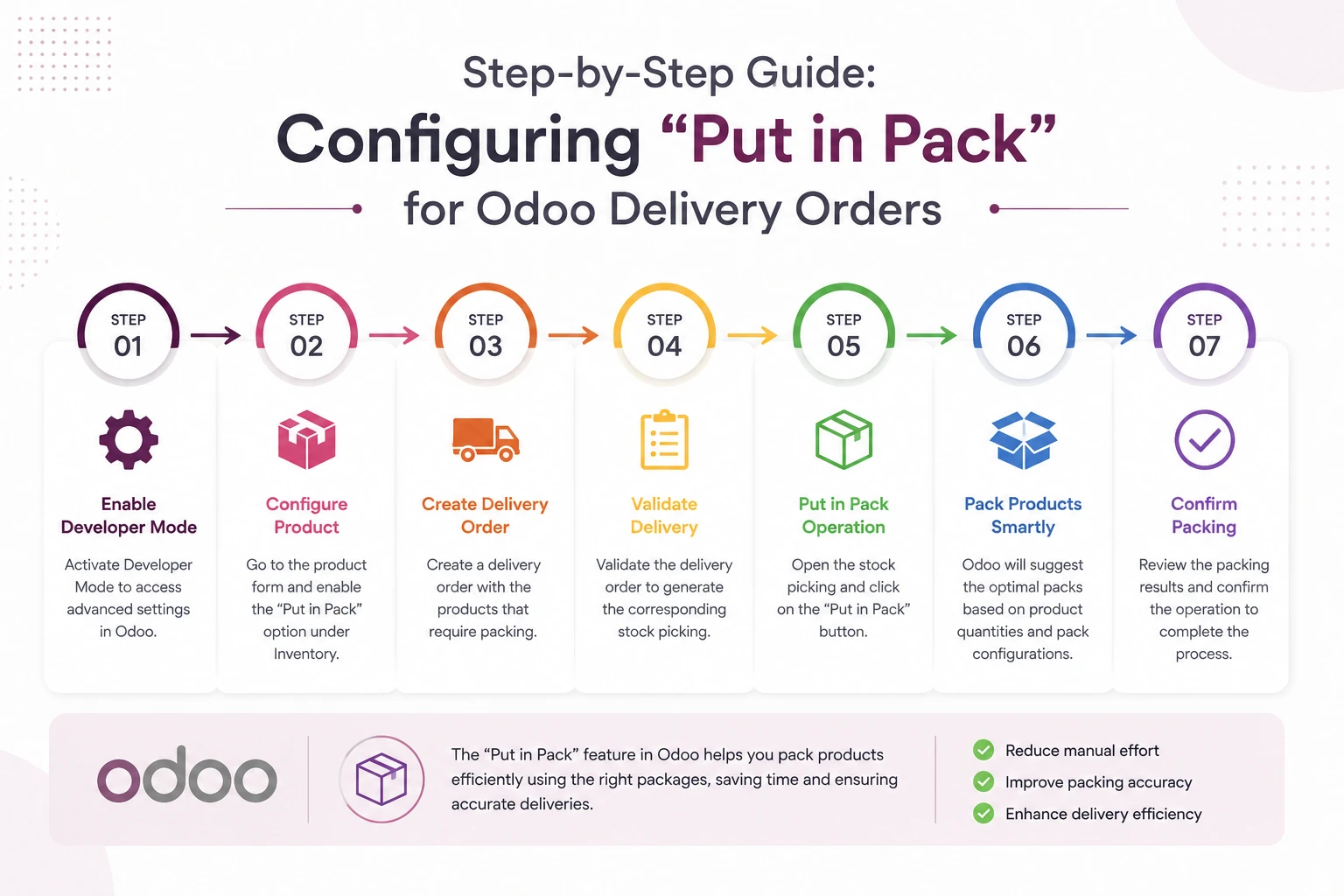
Introduction
Efficient packaging is an essential part of the order fulfillment process, especially when customer deliveries involve multiple products or large quantities. Organizing items into packages not only simplifies handling during shipping but also improves warehouse operations, inventory tracking, and package traceability.
Odoo 19 streamlines this process with the Put in Pack feature, allowing warehouse users to group products into packages directly from a delivery order before validating the transfer. Whether you’re creating packages on the fly or using predefined package types, the feature helps standardize packaging workflows while providing better visibility into product movements across the warehouse.
In this step-by-step guide, we’ll walk through how to configure the Put in Pack feature in Odoo 19, create and manage package types, package products during delivery operations, and track package movements to improve inventory accuracy and warehouse efficiency.
Enable Packages in Inventory
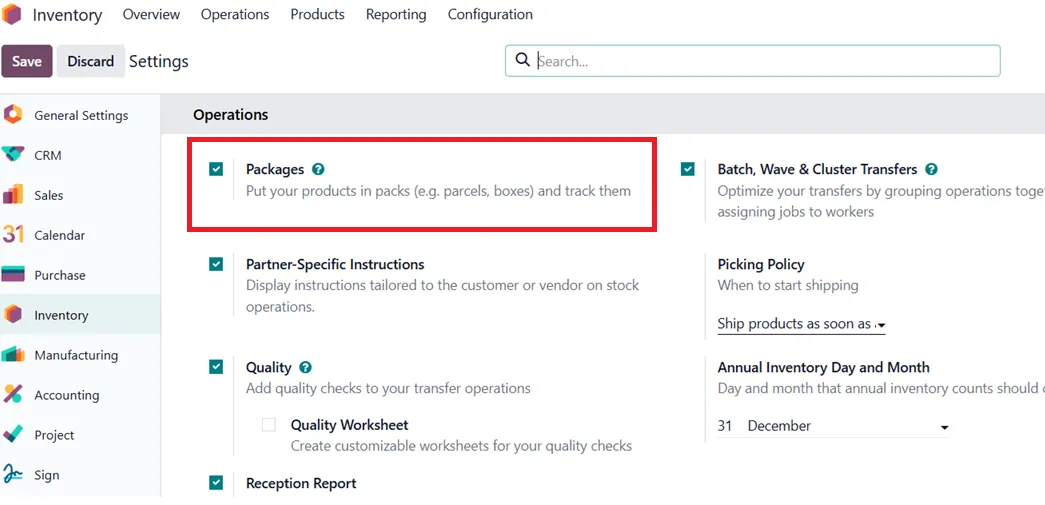
Before using the Put in Pack feature in delivery orders, you must first enable package management in Odoo. This feature allows products to be grouped into packages during inventory operations, making it easier to organize, handle, and track shipments.
To enable it, navigate to Inventory → Configuration → Settings. Under the Operations section, enable the Packages option. Once enabled, click Save to apply the changes.
Enabling this feature activates package management across inventory operations, allowing you to create packages, assign products to them, and manage packaged goods throughout the warehouse workflow.
Configure Package Types
Configuring Package Types is optional but helps standardize the packaging process. Businesses can create package types such as Boxes, Cartons, Pallets, or Totes. Each package type can include dimensions, weight capacity, and other shipping-related details.
To create a package type, navigate to Inventory → Configuration → Package Types and click New. Enter a suitable Package Type Name, and configure details such as the Reference Sequence, Sequence Prefix, Package Use (Disposable Box or Reusable Box), Carrier, Carrier Code, Dimensions (Length, Width, Height), Max Weight, and Barcode, if required.
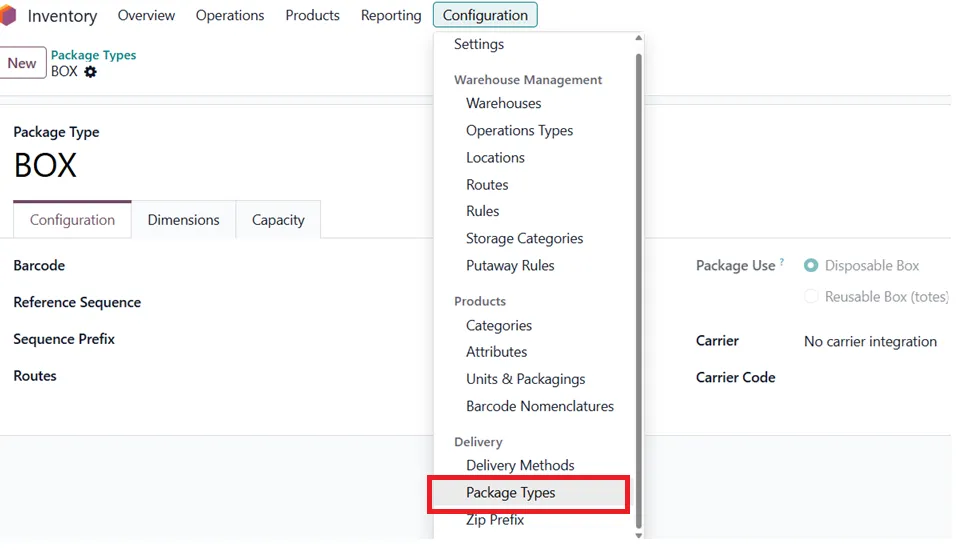
Once saved, these package types can be selected during inventory operations, providing consistency in how products are packaged and helping warehouse teams follow standardized packing procedures.
Configure the Set Package Type Option
To make package types available during delivery operations, Odoo provides the Set Package Type option within the operation type configuration.
Navigate to Inventory → Configuration → Operation Types, and open Delivery Orders. Under the operation settings, enable the Set Package Type option and Save the configuration.
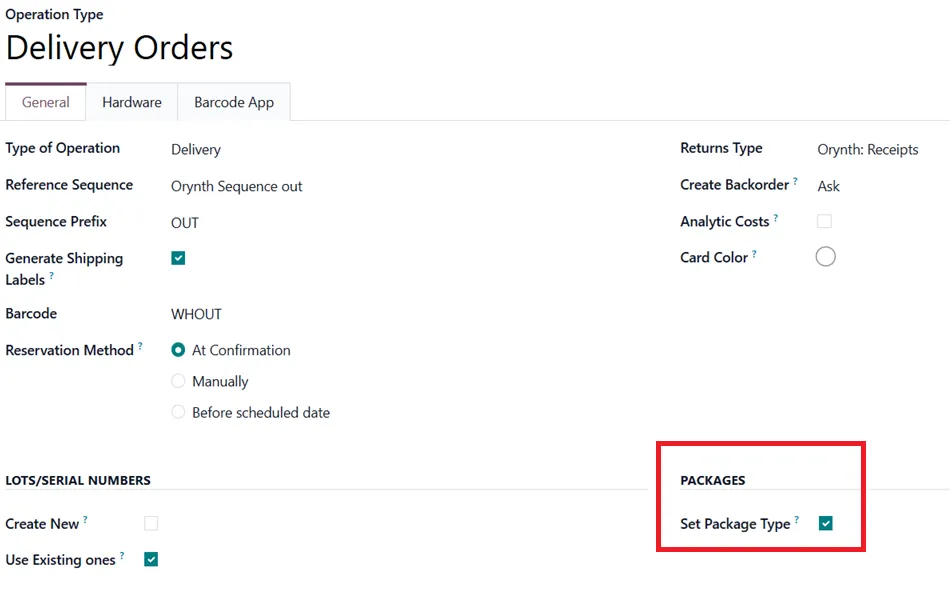
Once enabled, the Put in Pack window displays Package Type and Package fields. Users can select a package type and assign products to an existing package. They can also leave the Package field empty to let Odoo create one automatically.
Package Products Using Put in Pack
Once the required configurations are complete, you can begin packaging products directly from a delivery order.
Navigate to Inventory → Delivery Orders and open the desired delivery order. Verify the products and quantities to be delivered. Before validating the transfer, click the Put in Pack button.
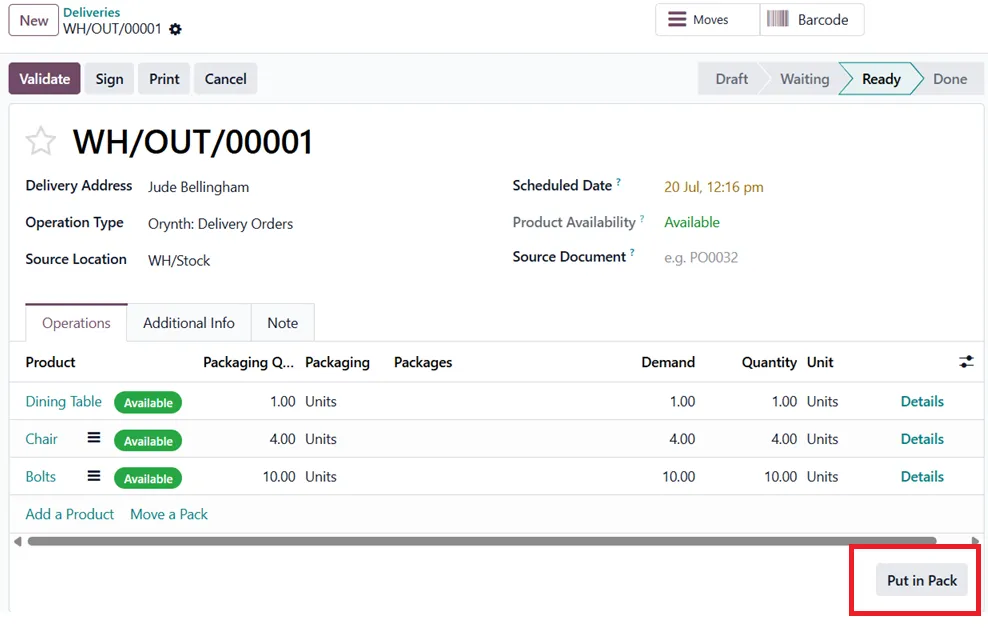
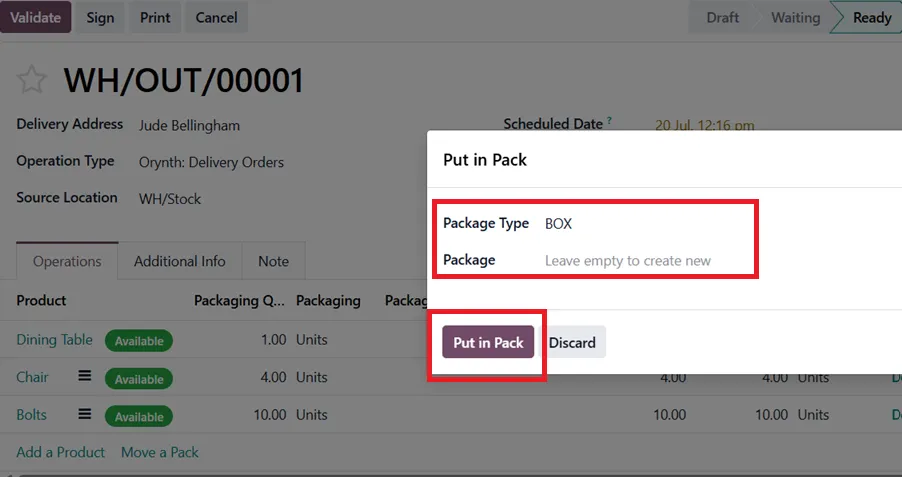
If Set Package Type is enabled, the Put in Pack window includes Package Type and Package fields. Leave Package blank to create a new package automatically. Otherwise, select an existing package.
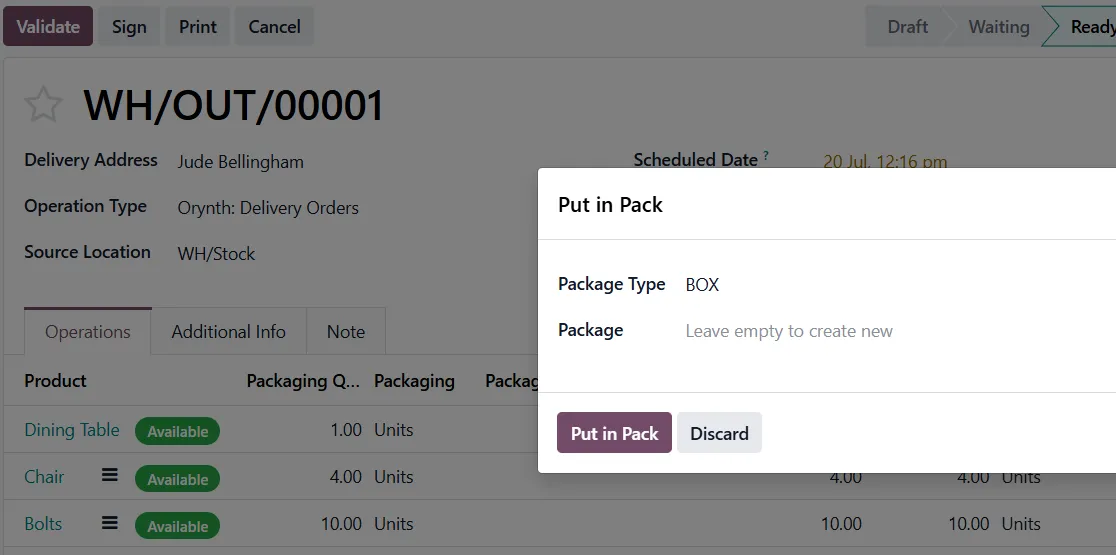
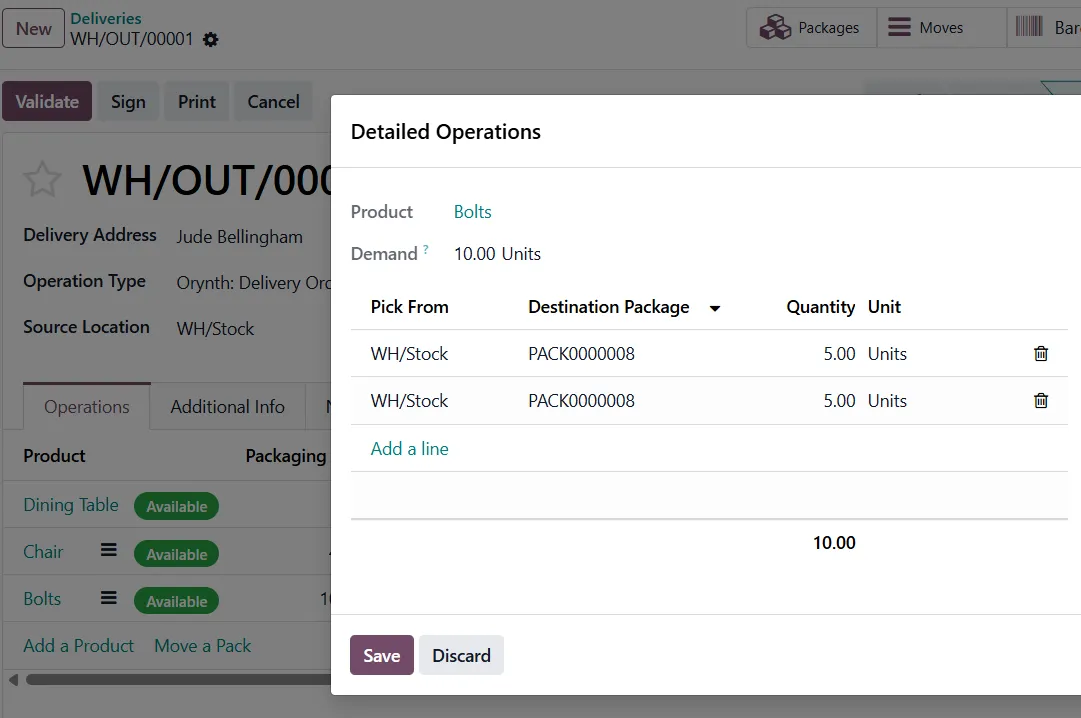
Odoo then assigns the selected products to the package. If multiple products are included in the delivery order, Odoo initially groups them into the same package. To assign products to different packages, click Details on the respective order lines and select an existing package or create a new one.
You can also split the quantity of a single product across multiple packages. For example, if a delivery contains 10 bolts, they can be packed as 5 units in one package and the remaining 5 units in another package, depending on your packaging requirements.
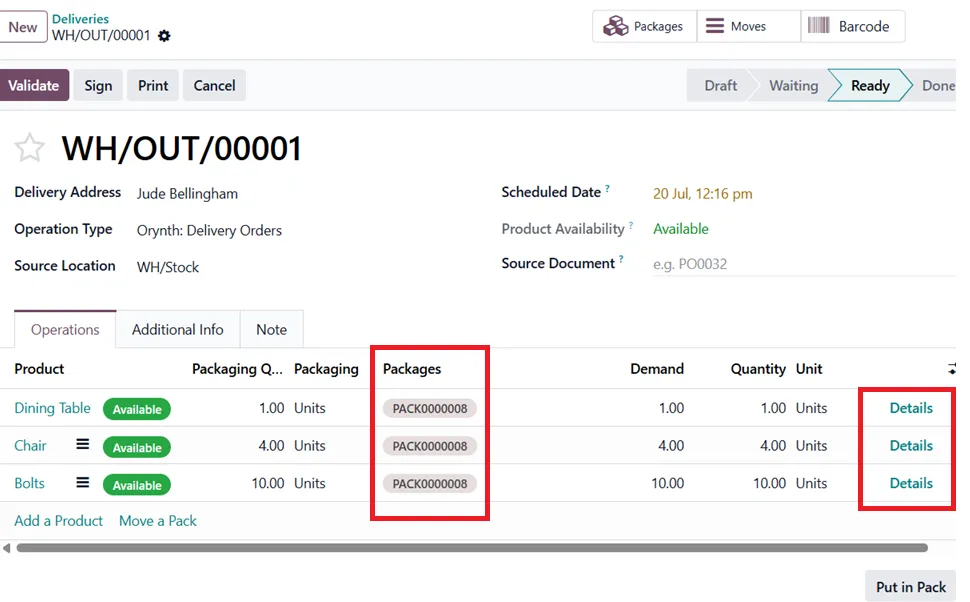
Once all products have been assigned to their respective packages, click Validate to complete the delivery order. Click on the Packages smart button at the top of the delivery order for quick access to the package information.
Managing Packages
To view all packages in the warehouse, navigate to Inventory → Products → Packages. Here, you can access a list of all existing packages and open any package to view its details.
Each package record displays information such as the assigned products, package type, shipping weight, pack date, and barcode. If required, you can also click Unpack to remove the products from the package.
Conclusion
The Put in Pack feature in Odoo 19 simplifies the packaging process by allowing warehouse users to organize products into packages before validating a delivery order. Whether you’re packing multiple products together or distributing items across different packages, the feature provides greater flexibility, improves shipment organization, and streamlines warehouse operations.
By combining package management with configurable package types, businesses can establish standardized packing workflows while ensuring products are packaged efficiently for delivery.
Ready to optimize your warehouse and delivery operations with Odoo?
Partner with Infintor Solutions to implement tailored Odoo solutions that streamline inventory management, improve warehouse efficiency, and simplify order fulfillment.
Introduction
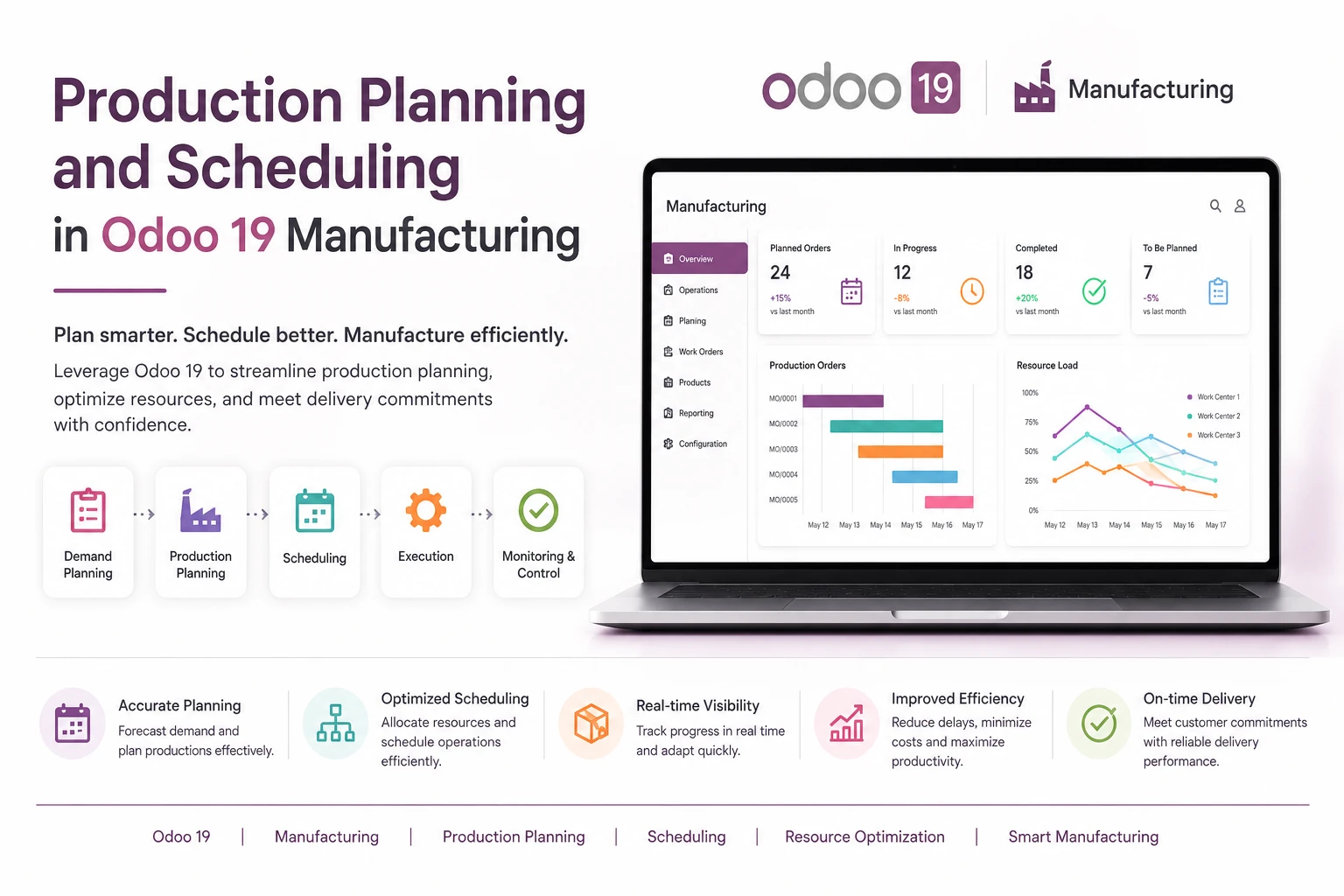
Production Planning and Scheduling in Odoo 19 helps manufacturers organize production, allocate resources efficiently, and deliver products on time. As production volumes increase, manually planning manufacturing activities becomes increasingly difficult. Odoo 19 simplifies this process by providing intelligent planning and scheduling tools within a single ERP platform.
Odoo 19 introduces enhanced production planning capabilities that help manufacturers organize manufacturing orders, allocate work center capacity, and create realistic production schedules directly within the ERP system.
What is Production Planning and Scheduling?
Production planning is the process of determining what products need to be manufactured, how many units should be produced, and when production should begin based on demand and available resources.
Production scheduling is the process of assigning those manufacturing operations to specific work centers, machines, and time slots so production can be completed efficiently and on time.
In simple terms:
| Process | Answers the Question |
|---|---|
| Planning | What should be produced and when? |
| Scheduling | Who will do it, where, and in what sequence? |
For example, a furniture manufacturer receiving an order for 100 chairs must first plan the production quantity and start date, then schedule cutting, assembly, and finishing operations across available work centers.
Why Manufacturers Need Production Planning
Many growing manufacturers face common operational problems:
- Delayed customer deliveries
- Machine overloads
- Idle work centers
- Material shortages during production
- Difficulty prioritizing urgent orders
- Frequent rescheduling due to unexpected changes
Without a proper planning system, production decisions are often made manually using spreadsheets or verbal coordination, which becomes unreliable as order volume increases.
Odoo 19 addresses these issues by connecting sales orders, inventory, bills of materials, work centers, and manufacturing orders into a single planning workflow.
Enable Master Production Schedule (MPS) in Odoo 19
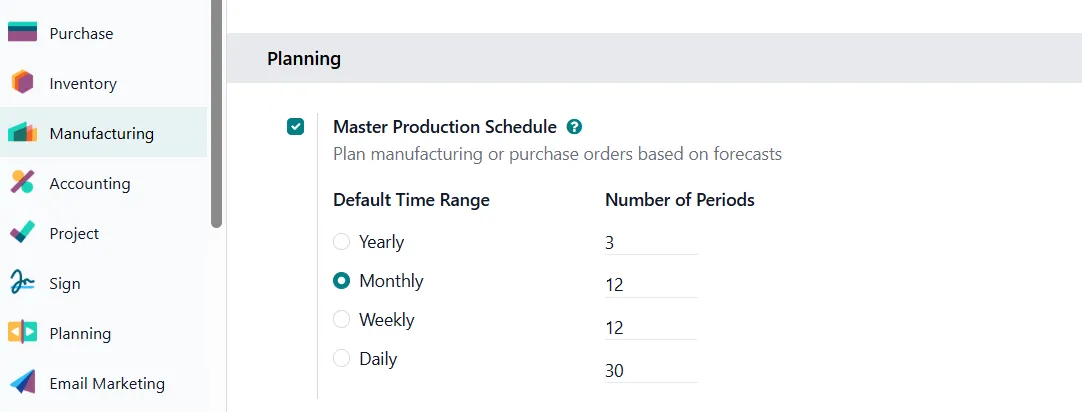
Before using Production Planning and Scheduling, the Master Production Schedule (MPS) feature must be enabled in Odoo Manufacturing.
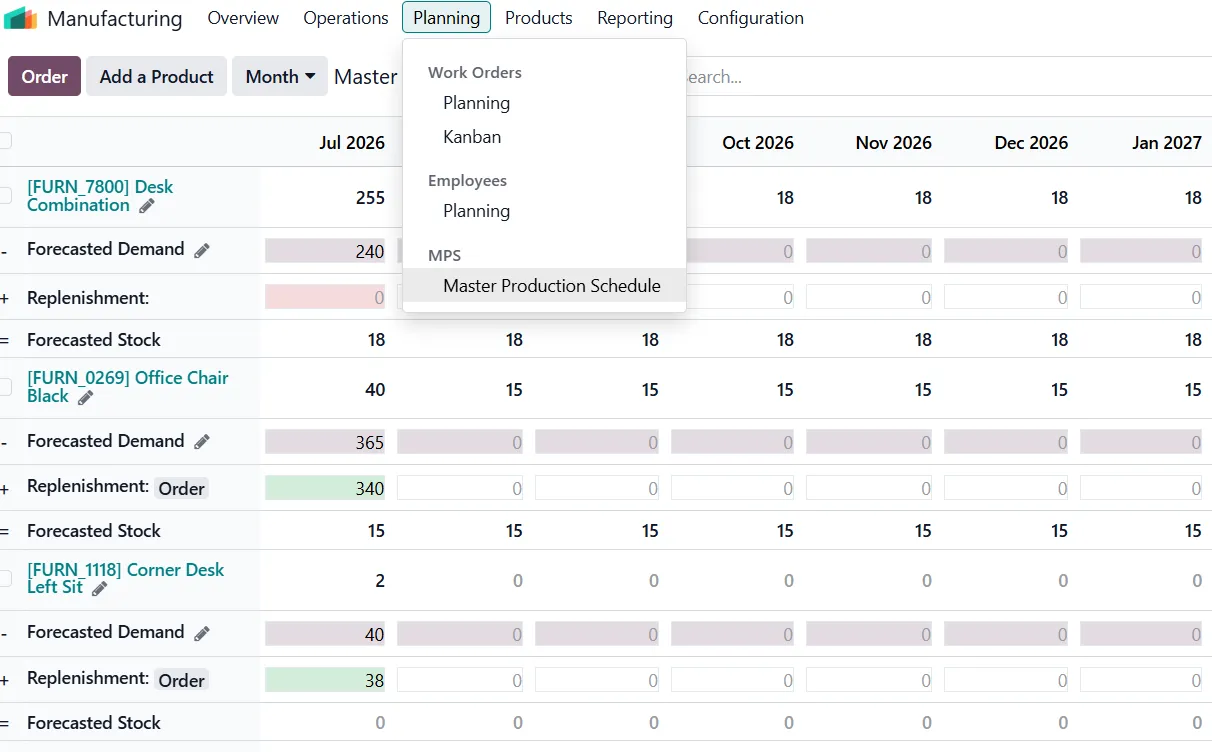
Navigate to: Manufacturing → Configuration → Settings → Enable the Master Production Schedule (MPS) option and save the changes.
Once activated, Odoo provides a dedicated planning interface where manufacturers can forecast production requirements, monitor inventory levels, and determine the quantities that need to be produced based on expected demand.
How Production Planning and Scheduling in Works in Odoo 19
Once the Master Production Schedule (MPS) is enabled, manufacturers can begin planning production based on forecasted demand, available inventory, and replenishment requirements.
The Master Production Schedule dashboard provides a centralized view of products, allowing planners to monitor projected stock levels, forecast demand, and recommended replenishment quantities. This enables manufacturers to determine what products should be produced, how many units are required, and when production should begin.
Instead of relying on manual calculations or spreadsheets, production planners can review inventory forecasts directly within Odoo and make informed manufacturing decisions before creating Manufacturing Orders.
When additional stock is required, Odoo can generate the necessary Manufacturing Orders (MOs) based on the planned quantities, ensuring production aligns with customer demand while maintaining optimal inventory levels.
Visual Production Scheduling in Odoo 19
Once Manufacturing Orders have been generated, Odoo allows production managers to schedule them across available work centers using the Work Orders Planning board.
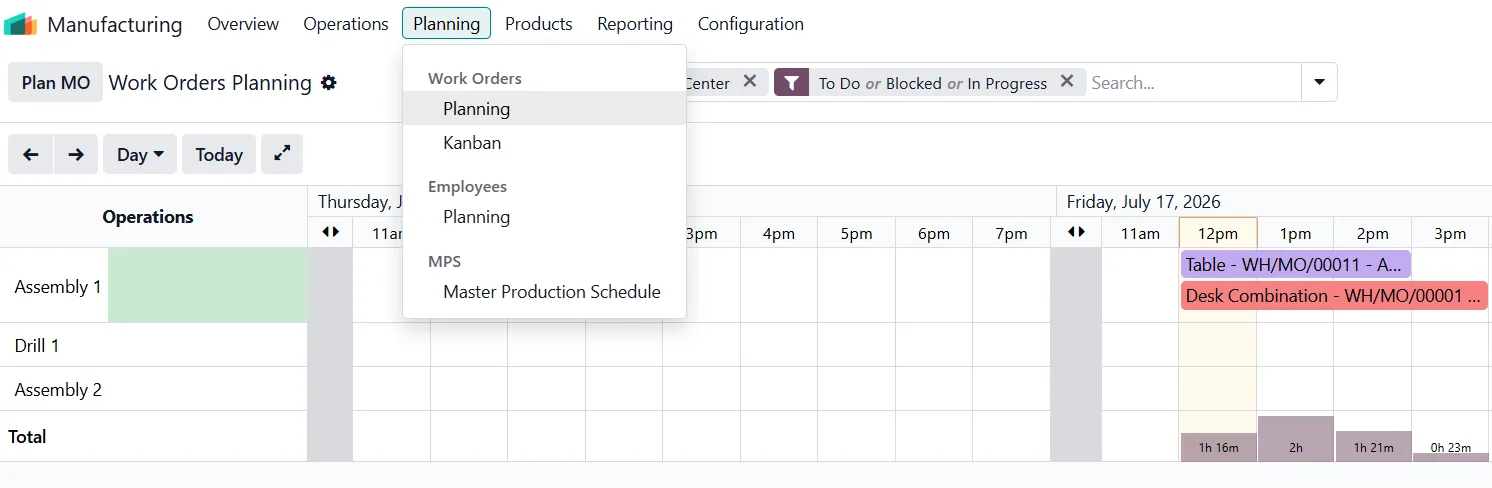
By clicking Plan MO, Odoo automatically schedules work orders based on the configured work centers, operation durations, and resource availability. The planning board then provides a visual timeline of manufacturing operations, making it easy to monitor and manage production schedules.
Production managers can:
- View operations by day or week
- Identify overloaded work centers
- Drag and drop operations to reschedule them
- Prioritize urgent orders
- Balance workload across available machines
Instead of manually adjusting spreadsheets, scheduling can be done directly from the visual planning interface, enabling manufacturers to respond quickly to changing production priorities.
Manufacturing → Planning → Work Orders/Planning
Capacity Planning and Work Centers
In Odoo, each machine or production area is configured as a Work Center.
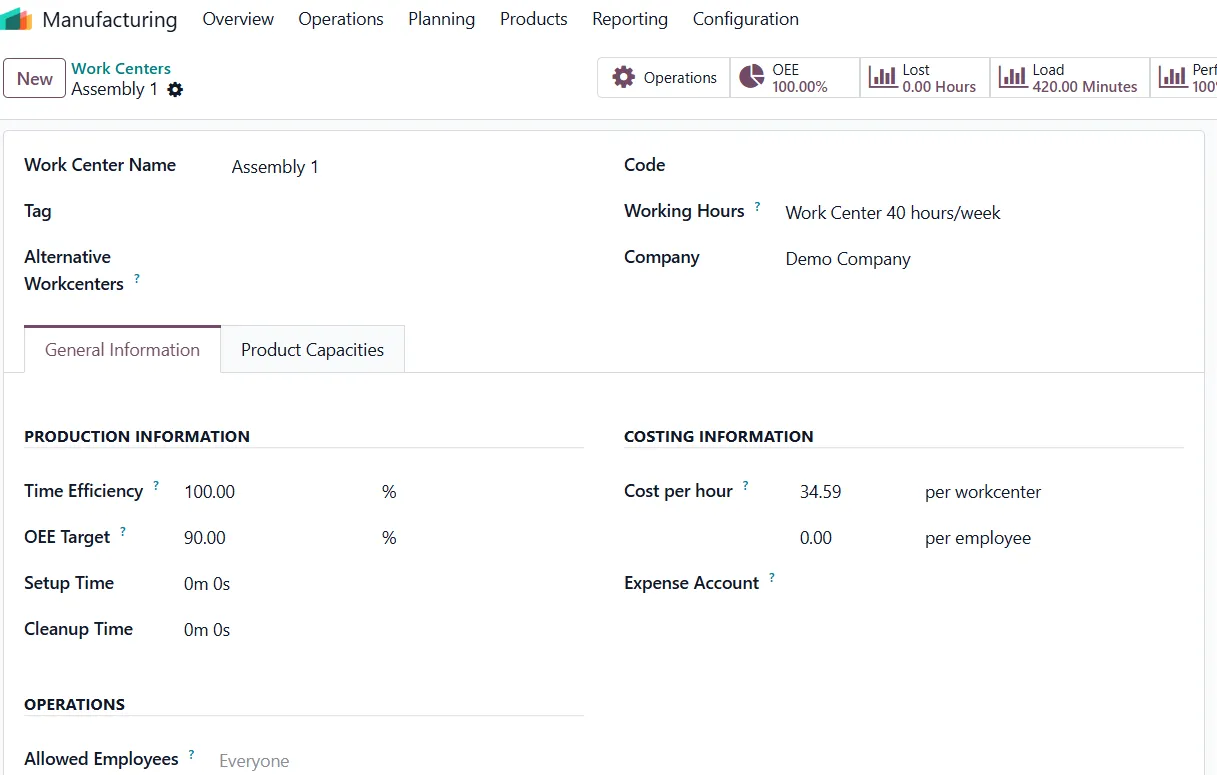
A work center can have:
- Working hours
- Capacity (number of operations it can handle simultaneously)
- Efficiency factor
- Setup and cleanup times
When scheduling operations, Odoo checks the available capacity of the selected work center and places operations in the next available time slot.
Odoo schedules each operation according to these calendars, helping avoid unrealistic production plans.
Rescheduling Production Orders
Manufacturing priorities often change due to urgent customer requests, machine breakdowns, or material delays.
Odoo 19 allows planners to quickly reschedule operations:
- Drag an operation to a new time slot
- Change the planned start date
- Recompute the schedule automatically
- Update dependent operations
This makes the production plan much more flexible than traditional spreadsheet-based scheduling.
Integration with Inventory and Procurement
Planning is most effective when connected to inventory, before production starts, Odoo checks whether required components are available.
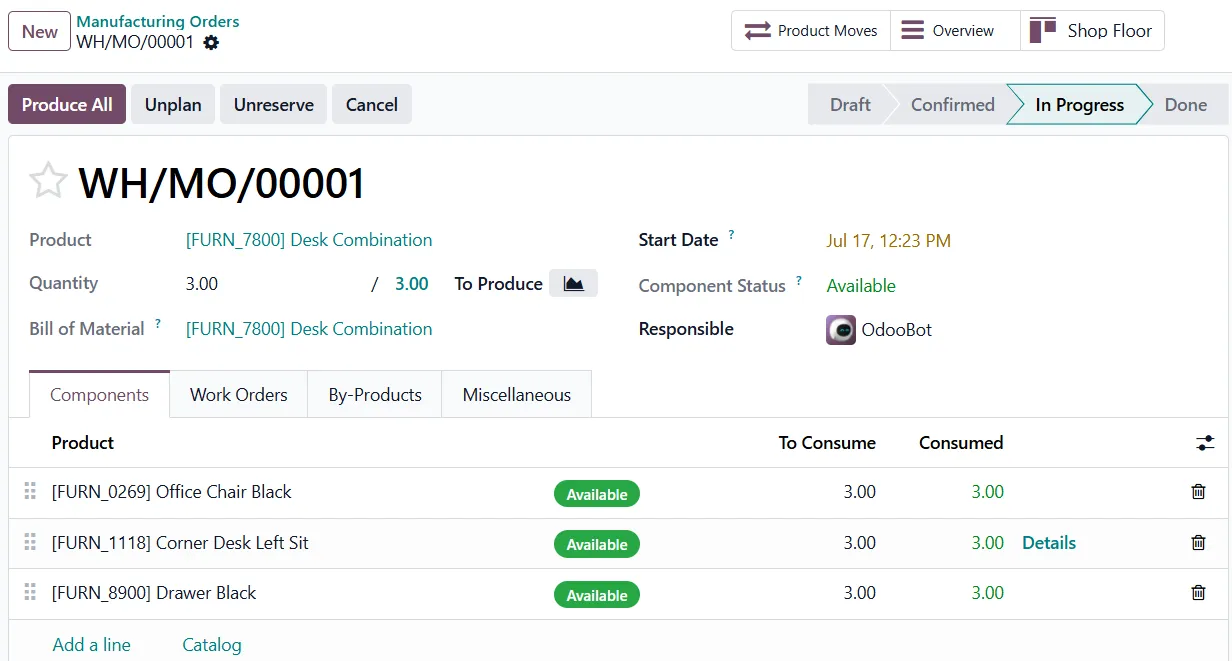
If materials are missing, the system can:
- Generate purchase orders
- Trigger replenishment rules
- Reserve available stock for the manufacturing order
This reduces the risk of production stopping midway due to component shortages.
Business Benefits of Odoo 19 Production Scheduling
Companies using structured production planning typically gain:
- Better delivery performance
- Improved machine utilization
- Reduced production downtime
- Fewer scheduling conflicts
- Greater visibility of production workload
- Faster response to changing priorities.
For small and medium-sized manufacturers, these improvements can significantly increase operational efficiency without requiring separate planning software.
Conclusion
Production planning and scheduling is no longer just an advanced feature for large factories. Odoo 19 brings visual, capacity-based production scheduling into the core Manufacturing application, allowing businesses to organize manufacturing orders, allocate work center capacity, detect bottlenecks, and adjust production plans in real time.
By combining manufacturing, inventory, procurement, and planning in a single system, Odoo helps manufacturers create realistic production schedules and improve on-time delivery performance while making better use of available resources.
Ready to optimize your production operations with Odoo 19?
Partner with Infintor Solutions to implement intelligent production planning and scheduling workflows that improve efficiency, reduce delays, and provide complete visibility into your manufacturing process.
Introduction
Managing fixed assets manually becomes increasingly challenging as a business grows. Businesses need to accurately record, capitalize, and depreciate purchases of equipment, machinery, vehicles, computers, and furniture throughout their useful life. Odoo 19 simplifies this process by helping organizations configure fixed assets, create reusable Asset Models, and automate asset creation through Vendor Bills.
Odoo 19 streamlines fixed asset management with an integrated Assets module. Businesses can configure Asset Models, capitalize purchases through Vendor Bills, automatically generate asset records, and manage the entire asset lifecycle—from purchase to depreciation—all within a single system.
In this blog, we will walk through the complete configuration required for fixed assets, followed by the process of capitalizing assets through vendor bills and automatically generating asset records in Odoo 19.
What is Asset Capitalization?
Asset capitalization is the process of recording the cost of a long-term asset on the Balance Sheet instead of recognizing the entire purchase cost as an expense immediately. Rather than expensing the asset upfront, businesses spread its cost over its useful life through depreciation, ensuring more accurate financial reporting.
In Odoo, posting a Vendor Bill capitalizes the asset purchase by recording it in the configured Fixed Asset Account. Based on the automation settings, Odoo can also create the corresponding asset record simultaneously. When you enable the Create in Draft option, Odoo creates the asset in the Draft state, giving users the flexibility to review the asset, configure the depreciation settings, and validate it before generating the depreciation schedule.
Asset Configuration in Odoo 19
Before you enable automatic asset creation through Vendor Bills, configure the required accounting settings in Odoo.
The system allows you to configure each asset individually by specifying its accounting information, depreciation settings, journal, and other required details directly on the asset record. This approach works well when you manage only a few assets or when each asset requires a unique configuration.
However, when multiple assets share the same accounting treatment, configuring each one separately becomes repetitive. In such cases, Odoo provides Asset Models, which act as reusable templates for similar assets.
An Asset Model acts as a reusable template for assets with similar accounting and depreciation settings. Instead of configuring each asset individually, you can define these settings once in the Asset Model and apply them whenever you create a new asset of the same type.
Example: For this demonstration, we’ll create an IT Equipment Asset Model and use it for assets such as laptops, desktop computers, printers, monitors, and other electronic devices with similar accounting and depreciation settings.
To create an Asset Model, navigate to Accounting → Configuration → Asset Models, then click New.
Enter an appropriate name for the Asset Model. In this example, we’ll create an Asset Model named IT Equipment, which can be assigned to assets such as laptops, desktop computers, printers, and monitors. Since these assets typically follow the same accounting and depreciation rules, defining a common Asset Model eliminates the need to configure each asset individually.
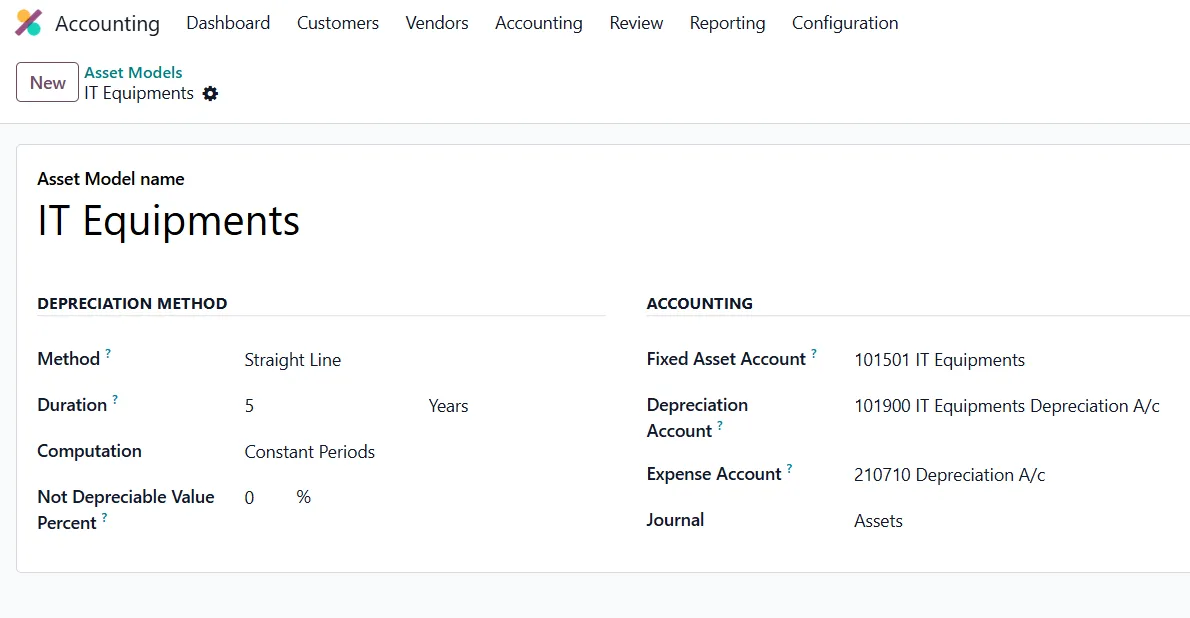
Configuring the Required Accounts
Before creating an Asset Model, ensure that the required accounting accounts have been configured in the Chart of Accounts.
Note: If you do not see the Fixed Asset Account field while configuring the Asset Model, enable Developer Mode by navigating to Settings and activating Developer Mode. Once enabled, the field will become visible.
The following accounts should be configured:
- Fixed Asset Account: Create an account with the Fixed Assets account type and assign it as the Fixed Asset Account. This account records the acquisition cost of the asset and represents its value on the Balance Sheet.
- Accumulated Depreciation Account: Create an account with the Fixed Assets account type to record the total depreciation accumulated over the asset’s useful life. This account reduces the carrying value of the asset on the Balance Sheet while preserving its original cost.
- Depreciation Expense Account: Create an account with the Depreciation account type and assign it as the Expense Account. Each depreciation entry generated by Odoo is posted to this account, allowing depreciation expenses to be reflected in the Profit and Loss statement.
It is recommended to create a dedicated Assets Journal with the Miscellaneous journal type. This helps keep all asset-related journal entries organized and makes them easier to review and track separately from other accounting transactions.
Once you create an Asset Model, you can reuse its accounting and depreciation settings for similar assets. You only need to enter the details unique to each asset, such as the Asset Name, Original Value, and Acquisition Date.
Note: Creating an Asset Model is optional in Odoo 19. Assets can be created manually by configuring all the required accounting details individually. However, Asset Models are considered a best practice for organizations managing multiple assets with similar accounting configurations, as they improve consistency, reduce manual effort, and minimize configuration errors.
Automatic Asset Creation through Vendor Bills
Once the required Asset Model or Fixed Asset configuration has been completed, Odoo can automatically generate assets from Vendor Bills.
Navigate to the Automation tab of the Asset Model (or the individual asset configuration). Here, Odoo provides two options for automating asset creation:
- Create in Draft: Enable this option to let Odoo create the asset in the Draft state when you post the Vendor Bill. You can then review the asset, configure the depreciation settings, and validate it before generating the depreciation schedule.
- Create and Validate: Enable this option to let Odoo create and validate the asset automatically when you post the Vendor Bill. This option works best for organizations that use standardized asset configurations and do not require manual review before depreciation begins.
Enable Manage Items to create an individual asset record for each purchased item.
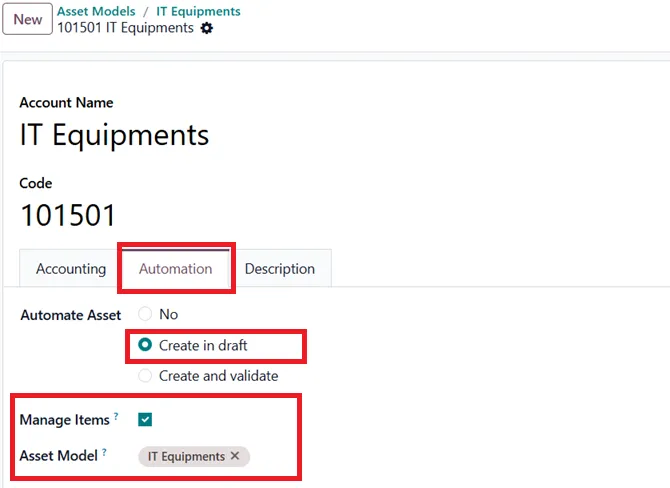
Next, create a Vendor Bill for the asset purchase. While adding the bill line, ensure that the Account selected is the corresponding Fixed Asset Account configured for that asset or Asset Model.
Post the Vendor Bill to trigger automatic asset creation based on the selected automation option. You can then access the newly created asset using the Asset smart button on the Vendor Bill.
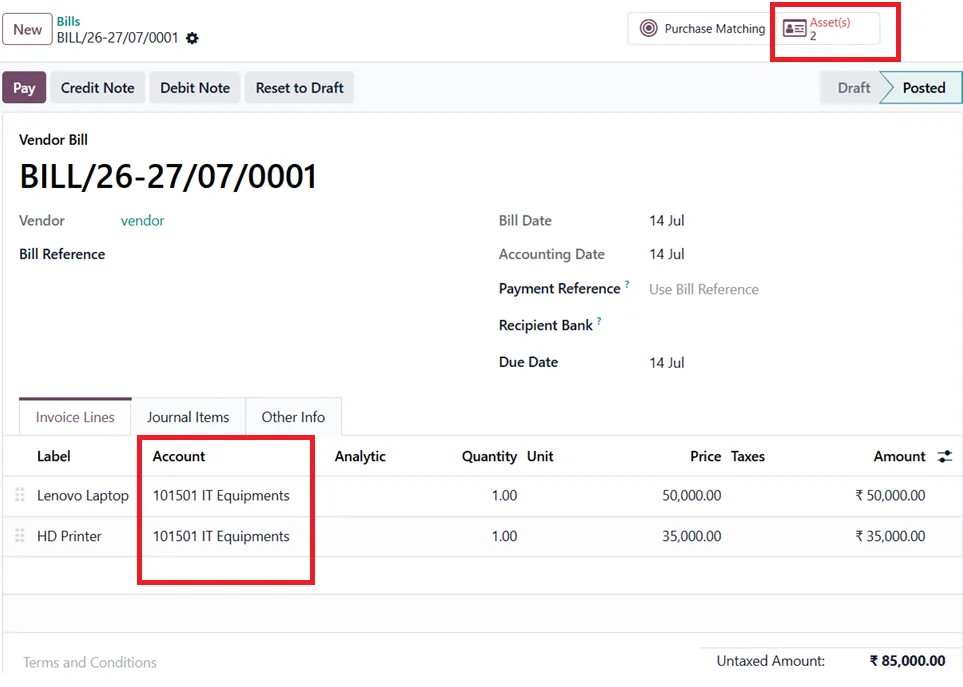
If you choose the Create in Draft option, review the asset details, configure the depreciation method and duration, and update any other required settings before validating the asset.
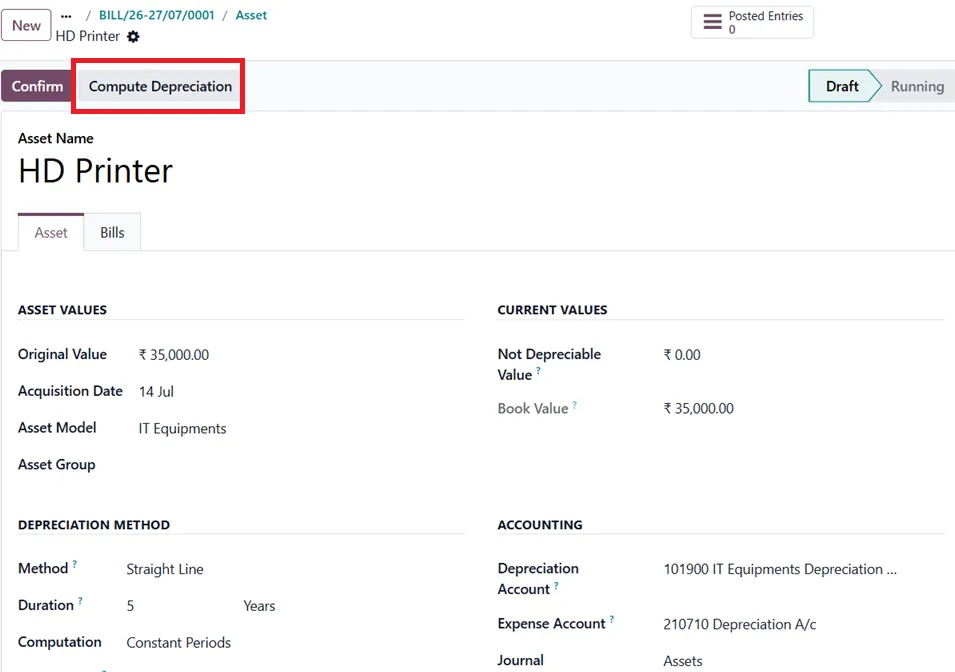
Once the information has been verified, validate the asset and click Compute Depreciation to generate the depreciation schedule. If the schedule is fine, then click on confirm.
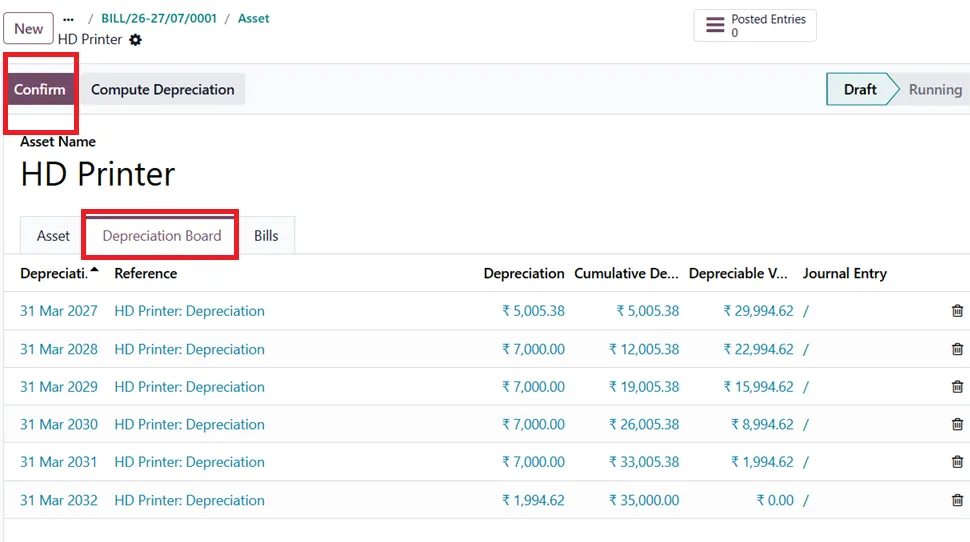
Odoo then generates future-dated depreciation journal entries according to the configured schedule. Odoo automatically posts depreciation journal entries on their scheduled dates.
Conclusion
Efficient fixed asset management begins with the right configuration. Whether you configure assets individually or use Asset Models, Odoo 19 lets you choose the approach that best suits your business.
For organizations managing multiple assets, Asset Models reduce repetitive configuration, while Vendor Bill integration automates asset creation and capitalization.
Looking to streamline your fixed asset management in Odoo 19? Partner with Infintor Solutions to implement a tailored Odoo solution that automates asset creation, simplifies depreciation management, and improves accounting accuracy.
Introduction
If you rent out apartments, offices, or commercial spaces, you already know the pain: chasing rent, tracking who lives where, and sharing water and electricity bills across units. Odoo Property Management puts all of it in one place. Built into Odoo 19, it manages your properties, tenants, monthly rent, and utility bills from a single, connected system — so nothing slips through the cracks. This blog walks through the full workflow, screen by screen, so you can see exactly how property management in Odoo 19 runs a rental business from start to finish.
What You Get with Odoo Property Management
Odoo Property Management is a ready-to-run setup for landlords and property managers. Once it is active, you get a dedicated Properties app with everything a rental operation needs, organised into four simple menus: Rental Contracts, Availability, Properties, and Configuration. Rent is handled automatically, tenant enquiries flow in from your website, and utility billing is built in.
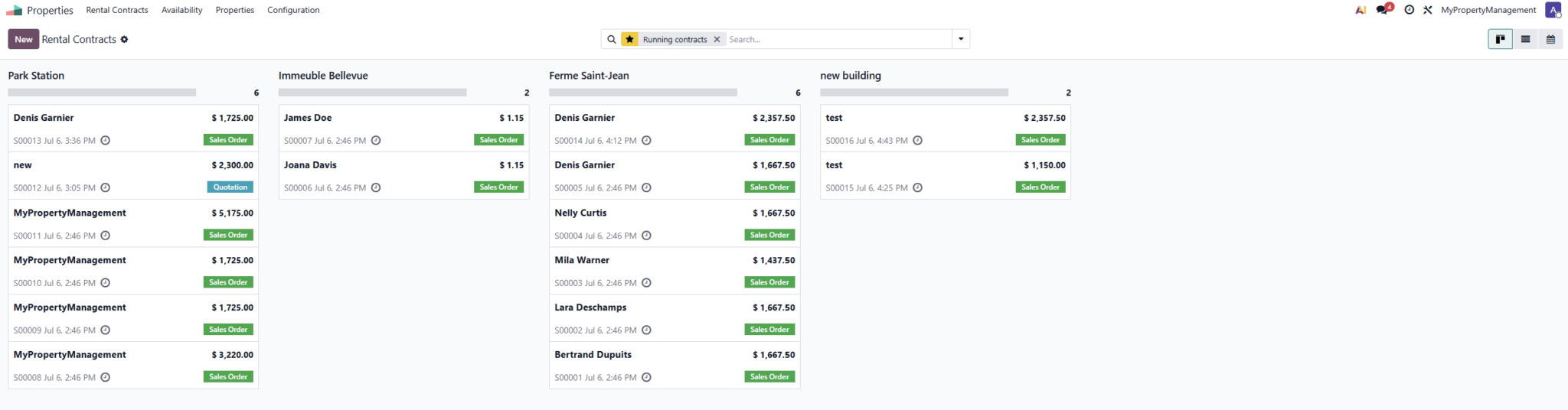
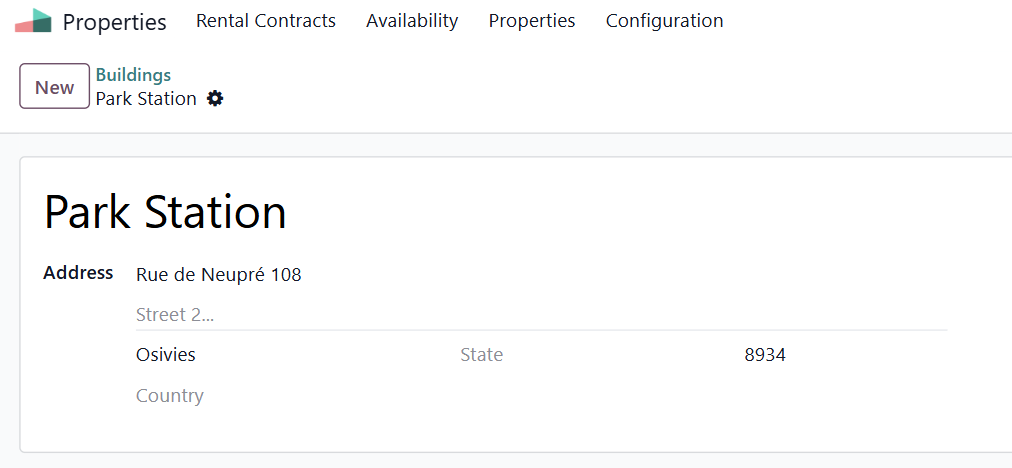
Step 1: Set Up Your Buildings
Navigate to: Properties ▸ Properties ▸ Buildings ▸ New
Start by adding each building — the physical address that holds your units. Enter the name and full address, then save. Buildings keep a large portfolio organised, so you can group and find every unit under the right location.
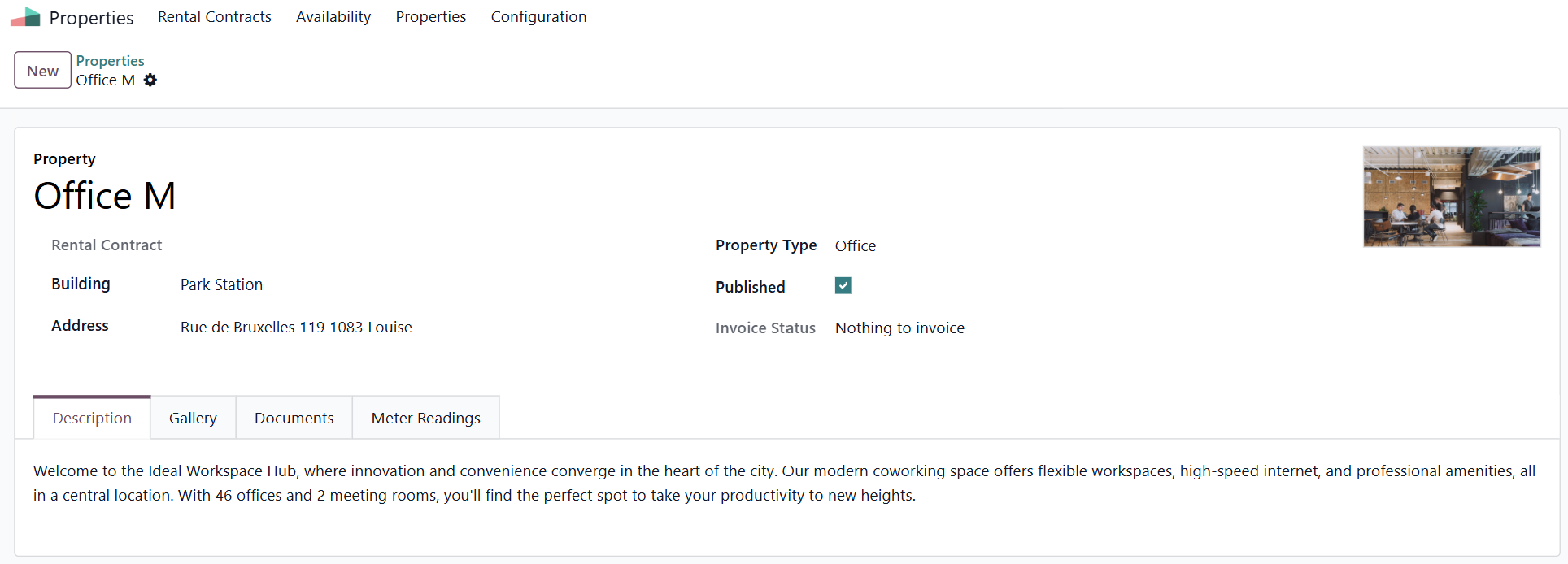
Step 2: Add Your Rental Properties
Navigate to: Properties ▸ Properties ▸ Properties ▸ New
Now create each rentable property — an apartment, office, studio, warehouse, and more. Choose its Building, set the Property Type, add the address, and upload a main photo. Four tabs let you complete the record: Description for the website text, Gallery for photos, Documents for files such as the lease, and Meter Readings for utilities. Tick Published to make the unit visible online.
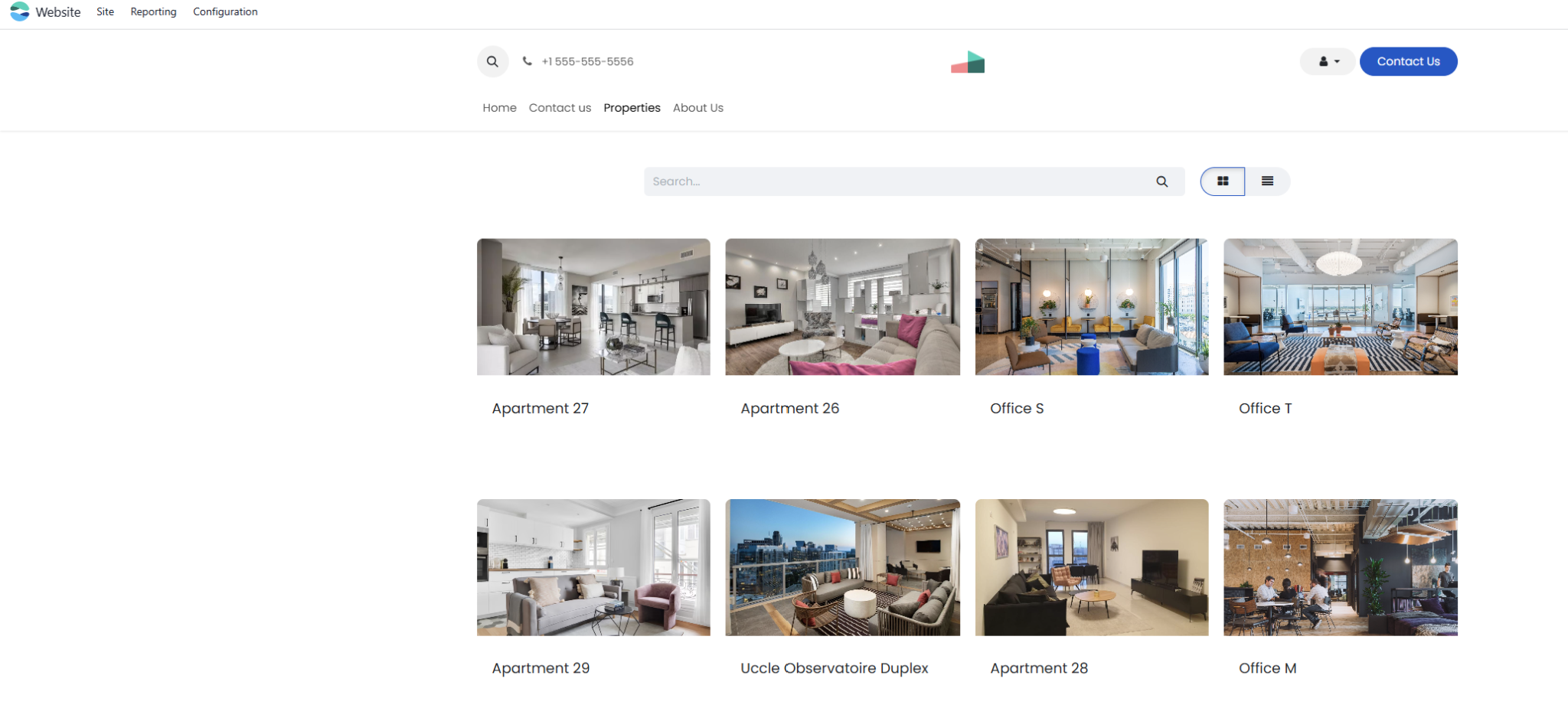
Step 3: Publish Properties on Your Website
Every published property appears on your public website with its photos, address, and rent. Each listing includes a ready-made enquiry form, so anyone interested can request a visit in seconds — turning your website into a lead source that works around the clock.
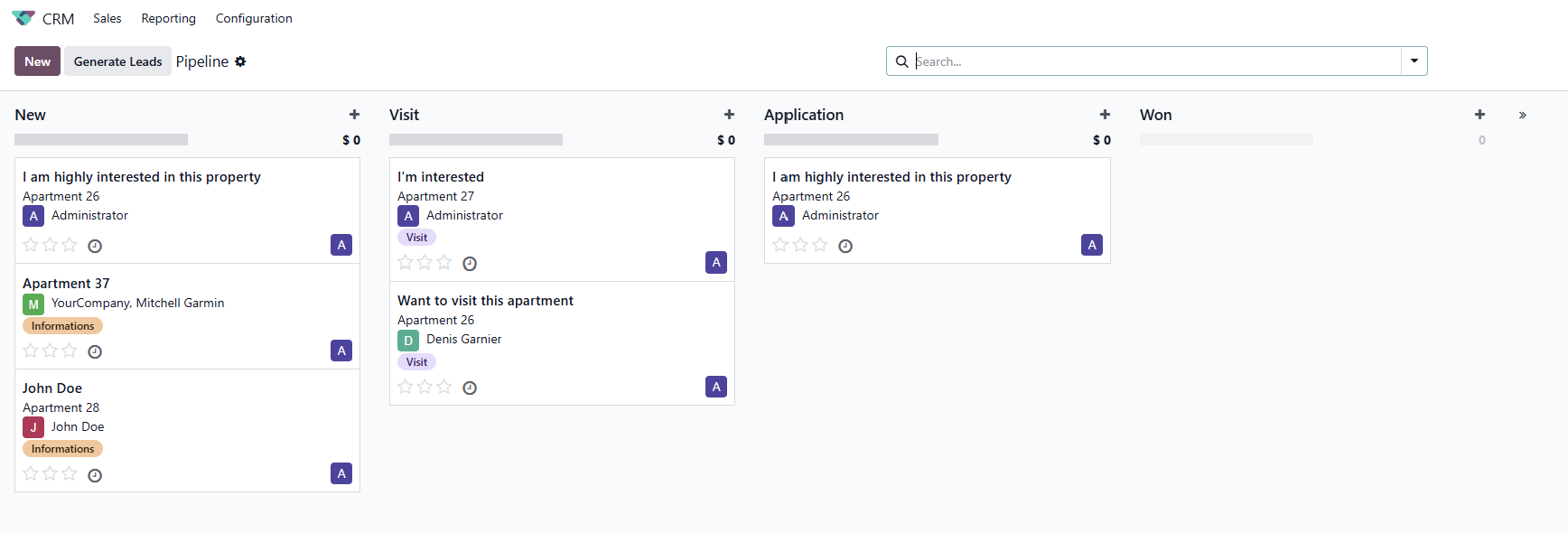
Step 4: Capture Tenant Enquiries
The moment someone fills the enquiry form, Odoo creates a lead that is already linked to the property they asked about. You move each prospect through clear stages — New, Visit, Application, and Won — so every enquiry is followed up and no potential tenant is lost.
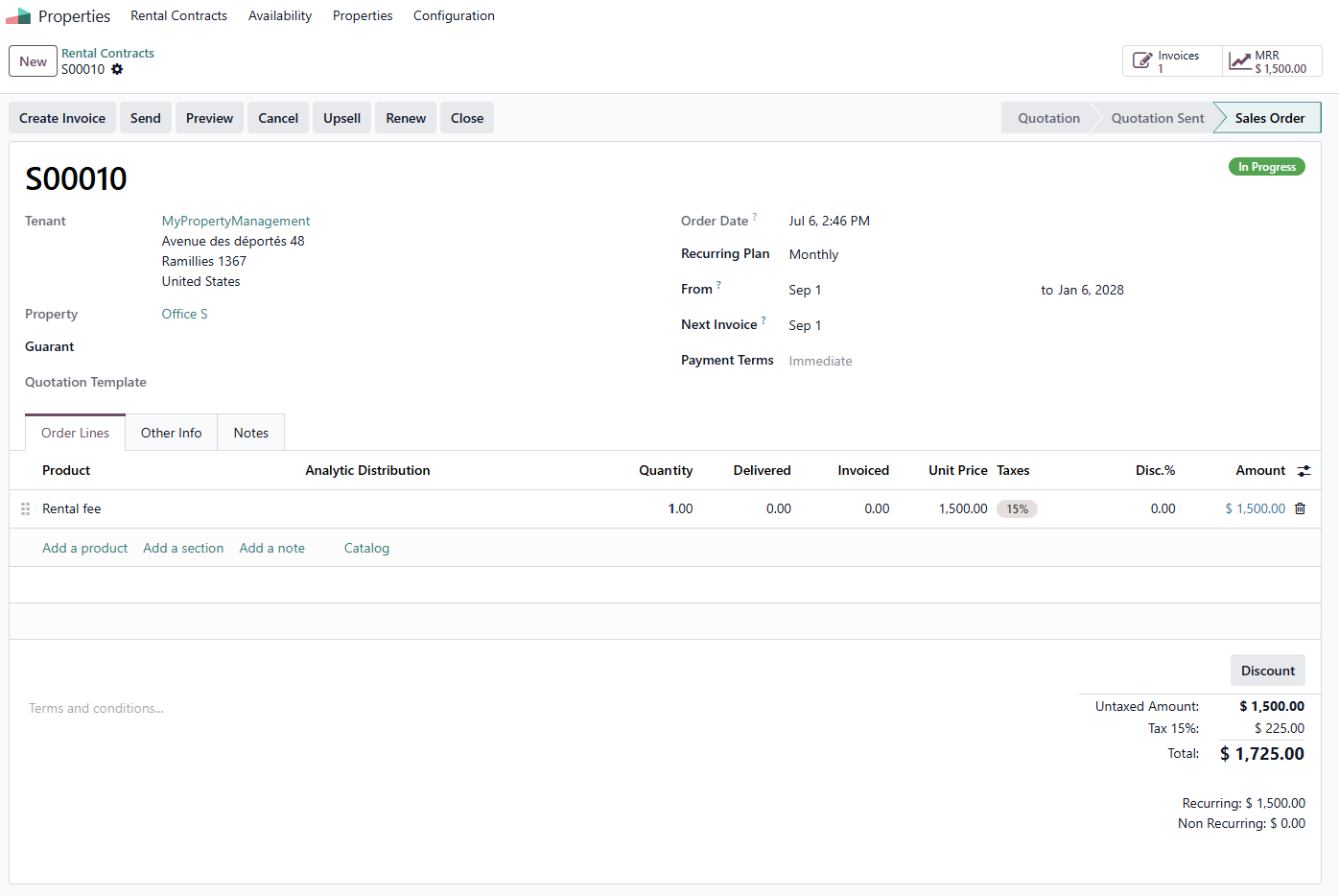
Step 5: Create Leases and Collect Rent Automatically
Navigate to: Properties ▸ Rental Contracts ▸ New
When a tenant signs, create a rental contract. Set the Tenant, the Property, an optional guarantor, the Recurring Plan (Monthly or Yearly), and the start and end dates. Add the rent and any extras such as a security deposit on the order lines, then confirm.
From here, rent takes care of itself. Odoo’s Automatic Invoicing raises the rent invoice every period and can email it straight to the tenant . You also see live MRR (Monthly Recurring Revenue) — your total monthly rent at a glance. Need to raise the rent or add a service? Use Upsell. Tenant staying on? Renew in one click. Tenant moving out? Close the contract to stop billing.
Step 6: Bill Tenants for Utilities
Navigate to: Properties ▸ Configuration ▸ Meters
Set a price for each utility — water, electricity, and gas. Then open any property, go to the Meter Readings tab, and record the meter number each month. Odoo works out the usage automatically, and a single Create Invoice button bills the tenant for exactly what they used. No more manual calculations or disputes over utility charges.

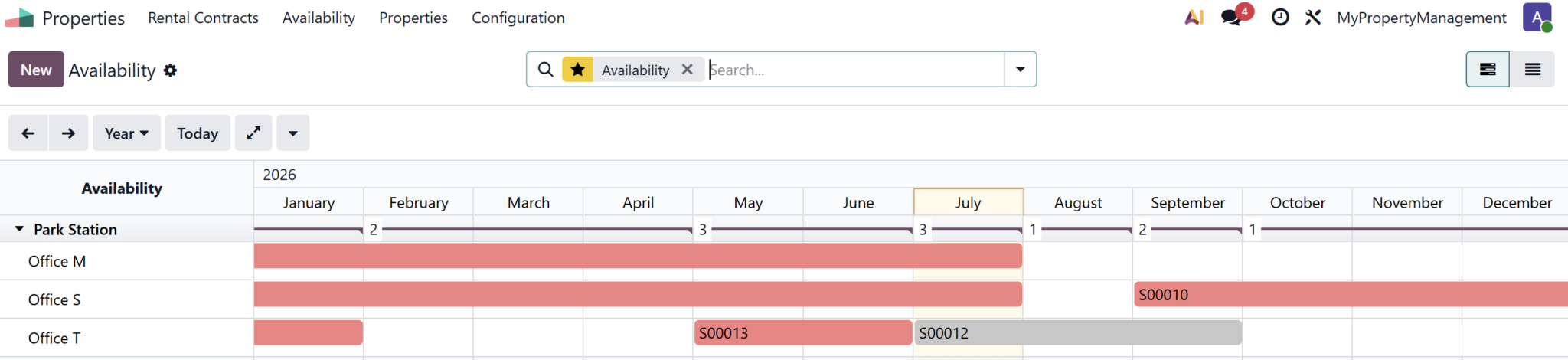
Step 7: Track Availability at a Glance
Navigate to: Properties ▸ Availability
The Availability view shows every contract on a timeline, so you can instantly see which units are occupied and which are free during any period. Planning viewings and forecasting income becomes simple.
Why Choose Infintor for Odoo Property Management
Property management in Odoo 19 is powerful out of the box, and even better when it is set up around your rules — your lease terms, deposits, and local tax requirements. Infintor is an Official Odoo Partner in India that helps rental businesses go live fast and stay supported. From first Odoo implementation to tailored Odoo customization and reliable Odoo support, we make Odoo fit the way you run your properties.
Frequently Asked Questions
What is Odoo Property Management?
It is a ready-to-run rental management setup in Odoo 19. It gives you a Properties app to manage buildings, units, tenants, leases, rent, and utility billing from one place — ideal for landlords and property managers.
Does Odoo create monthly rent invoices automatically?
Yes. Each lease runs on a recurring plan, and Odoo’s Automatic Invoicing raises the rent invoice every period and can email it to the tenant. You do not have to generate rent invoices by hand.
Can tenants pay their rent online?
Yes. Odoo sends tenants a secure payment link or gives them portal access to view and pay their rent invoices online, which speeds up collection and cuts down on follow-ups.
Can I bill tenants for water and electricity?
Yes. Set a price per utility under Configuration, record each unit’s meter readings, and Odoo calculates the usage and bills the tenant for the exact amount consumed.
How do I raise the rent or renew a lease?
Use the Upsell button on the contract to increase the rent or add a service, and the Renew button to continue a tenancy for a new term. When a tenant leaves, the Close button stops the billing.
Do I need Odoo Enterprise for property management?
Property management uses the Subscriptions app, which is part of Odoo Enterprise and available on Odoo Online and Odoo.sh. An Odoo partner can advise on the right edition for your rental business.
Ready to Run Your Rentals on Odoo?
Bring your properties, tenants, rent, and utilities into one system with Odoo Property Management. As an Official Odoo Partner in India, Infintor will set it up, tailor it, and support it for your business. Talk to our Odoo experts today.
One of the reasons Odoo has grown into one of the most widely used ERP platforms in the world is that it doesn’t try to be a one-size-fits-all solution. It’s modular — meaning businesses pick what they need and leave out what they don’t. That flexibility makes it genuinely useful across a wide range of industries, not just for large enterprises but for small and mid-size businesses too.
If you’re wondering whether Odoo is relevant to your industry, this blog walks through the sectors where it delivers the most impact — and why.

1. Manufacturing
Manufacturing is where Odoo genuinely stands out. Running a production operation involves coordinating raw materials, production schedules, quality checks, workforce, and delivery — all at the same time. When these processes run on different tools or spreadsheets, things fall through the cracks.
Odoo’s Manufacturing module brings it all together. It supports multi-level bills of materials, work orders, work centres, capacity planning with Gantt charts, and a dedicated shop floor interface that workers can use on a tablet without needing to go back to a desk. Subcontracting, quality control, and preventive maintenance are all handled within the same system.
For Indian manufacturers specifically, real-time inventory updates during production and built-in GST compliance remove two of the biggest operational headaches.
Whether you’re in textiles, metal fabrication, food production, furniture, or corporate manufacturing — Odoo scales to fit the complexity of your operation.
2. Trading and Distribution
Businesses that buy, store, and sell goods — distributors, wholesalers, import-export firms — live and die by their inventory accuracy and order fulfilment speed. Odoo’s Inventory module is built precisely for this.
It supports multiple warehouses, real-time stock tracking with serial and lot numbers, automated reordering rules so you never run out of stock, and barcode scanning with offline functionality for warehouse staff. Smart put-away strategies and batch or wave picking allow teams to process significantly more orders with the same headcount.
The system connects directly with purchasing and sales, so the moment you confirm a sale, it updates inventory and triggers procurement when stock falls below threshold. No manual intervention needed between departments.
3. Retail
Retail businesses deal with high transaction volumes, multiple product variants, pricing rules, loyalty programmes, and increasingly — both physical and online sales at the same time.
Odoo handles retail through its Point of Sale module, which works on any device and can operate offline during connectivity issues. It connects seamlessly with the inventory and accounting modules, so every sale updates stock levels and the books in real time.
For businesses selling online as well, Odoo’s eCommerce module integrates directly with the same backend — meaning one system manages products, pricing, orders, and fulfilment across both channels. No separate platforms, no manual syncing.
4. Professional Services and Consulting
Consulting firms, law firms, marketing agencies, IT service companies, and accounting practices all share a common challenge — managing projects, tracking billable hours, and ensuring invoices accurately reflect the work done.
Odoo’s Project and Timesheet modules address this directly. Teams can manage projects through Kanban, Gantt, or list views based on their preferences. Employees log time directly against tasks and link it to invoices, making client billing straightforward rather than a manual month-end exercise.
Real-time profitability tracking per project means service businesses always know whether an engagement is on track financially, not just operationally.
5. Food and Hospitality
Restaurants, hotels, fast food chains, and beverage distributors have some of the most demanding operational requirements — high transaction volumes, perishable inventory, multiple revenue streams, and regulatory compliance.
Odoo’s Point of Sale module is widely used in food service for table management, order tracking, and end-of-day reporting. Combined with Inventory for perishable stock management and Accounting for financial consolidation across outlets, it gives food businesses a single view of their entire operation.
For hospitality businesses with multiple properties, Odoo’s multi-company setup allows each location to run independently while reporting rolls up to a central view.
6. Real Estate and Construction
Real estate agencies, construction firms, and property managers deal with long sales cycles, large project budgets, subcontractor coordination, and ongoing maintenance obligations.
Odoo’s CRM handles lead pipelines and client communication across long sales cycles. The Project module manages construction timelines with task dependencies and resource allocation. Purchase and Inventory track materials procurement and usage on site. Accounting consolidates revenue and costs per property or project.
For property managers, maintenance requests, tenant communication, and recurring billing can all be handled within the platform — without needing separate tools for each function.
7. Healthcare and Wellness
Clinics, pharmacies, fitness centres, and wellness businesses need to manage appointments, products, billing, and staff — often simultaneously and at pace.
Odoo’s appointment scheduling, point of sale for retail products, inventory for medical or wellness supplies, and HR for staff management make it a practical fit for small to mid-size healthcare and wellness businesses. Its flexibility means it can be configured around specific workflows rather than forcing the business to adapt to rigid software.
Why So Many Industries Trust Odoo
What ties all of these industries together is a common need — one connected system that removes the need to manually transfer data between tools, gives real-time visibility into the business, and adapts as the business grows.
Odoo delivers that across industries because its modular structure means you start with what you need and expand over time. A trading company might begin with Inventory and Accounting. A manufacturer adds Manufacturing and Quality. A retailer adds eCommerce when they go online. The system grows with the business without requiring a platform change.

Why Infintor Solutions is the Right Odoo Partner
Although Odoo provides powerful features, the effectiveness of multi-company and multi-currency setups depends heavily on configuration. Therefore, working with an experienced Odoo Consulting Partner is essential for aligning the system with business requirements
Infintor Solutions, an Official Odoo Partner in India, offers end-to-end Odoo services, covering the complete lifecycle of ERP implementation and optimization.
Infintor’s core service offerings include:
- Odoo ERP Implementation
- Odoo Consulting Services
- Odoo Customization and Module Development
- Odoo Integration with third-party systems
- Odoo Migration Services
- Ongoing Support and Maintenance
- User Training and Onboarding
Our approach ensures that businesses not only use Odoo—but use it correctly for scalable global operations.
Frequently Asked Questions
1) Is Odoo suitable for small businesses or only large companies?
Odoo works for both. Its modular pricing means small businesses only pay for what they use, and the system scales as the business grows without needing to switch platforms.
2) Can Odoo be customized for industry-specific workflows?
Yes. Odoo Studio allows businesses to modify forms, add fields, and create automations without coding. For deeper customisations, Odoo’s open-source codebase gives developers full flexibility.
3) Does Odoo support multi-location businesses?
Yes. Odoo supports multiple warehouses, multiple companies, and multi-branch reporting within a single system — making it well suited for businesses operating across locations.
4) How does Odoo handle Indian compliance?
Odoo has a dedicated Indian localisation module covering GST (CGST, SGST, IGST), e-invoicing, e-Way bills, TDS, TCS, and Indian payroll — all built in and regularly updated.
5) What is the implementation timeline for Odoo?
It depends on the industry and number of modules. A focused implementation for a small business typically takes 4–8 weeks. A full multi-module implementation for a mid-size manufacturer may take 2–4 months.
6) Which Odoo modules are most commonly used across industries?
Accounting, Inventory, and CRM are the most universally used. Manufacturing, Sales, Purchase, Project, and HR are added based on industry needs.
Ready to See What Odoo Can Do for Your Industry?
Every business is different — but the right ERP makes the same difference across all of them: less time on manual work, better visibility, and a system that grows with you.
Contact Infintor Solutions at infintor.com for a free consultation and we’ll show you exactly how Odoo works for your industry.
Choosing an ERP system is one of the most important decisions a growing business will make. Get it right, and it becomes the backbone of your operations — connecting sales, inventory, finance, and HR in one place. Get it wrong, and you’re stuck with a system your team doesn’t use, data that doesn’t connect, and costs that keep climbing.
The good news is that making the right choice doesn’t require a technical background. You just need to ask the right questions.
What Is an ERP System, and Why Does It Matter?
ERP stands for Enterprise Resource Planning. In simple terms, it’s software that connects all the different parts of your business — so when a sale is made, the inventory updates automatically, the invoice gets generated, and the accounts reflect the change. No manual entries, no data going missing between departments.
Without an ERP, most businesses end up managing operations through a mix of spreadsheets, standalone software, and manual processes. This works at a small scale, but as the business grows, the cracks start to show — delays, errors, and hours wasted doing things a system should handle automatically.

Step 1: Be Clear on What Problems You’re Trying to Solve
Before looking at any software, write down the specific problems you face today. Common ones include:
- Stock levels are wrong because sales and warehouse teams aren’t in sync
- Invoices take too long to raise because data has to be re-entered manually
- You can’t see how the business is doing without pulling reports from five different places
- GST filing is a manual, error-prone process every month
- New hires struggle because there’s no single system to learn
The more specific you are, the easier it becomes to evaluate whether a system actually solves your problem — or just adds a new one.
Step 2: Know Which Departments Need to Be Connected
An ERP is only valuable when it connects the parts of your business that currently don’t talk to each other. Think through which teams are involved in your day-to-day operations:
- Sales and CRM — from lead to invoice
- Inventory and warehouse — stock tracking, reorder levels, deliveries
- Purchasing — vendor orders, goods receipt, supplier payments
- Accounting — invoices, payments, GST, financial reports
- Manufacturing — production orders, raw materials, quality checks
- HR and payroll — attendance, leave, salary processing
You don’t need to use every module from day one. But the ERP you choose should be able to grow with you — so you’re not switching systems again in three years.
Step 3: Think About Ease of Use
A system is only as good as how consistently your team uses it. A powerful ERP that confuses your staff will be ignored — and that’s worse than having no system at all.
When evaluating options, ask for a demo and pay attention to:
- Can a non-technical person navigate it comfortably?
- How long would it take to train a new employee?
- Is it easy to find reports and track day-to-day activity?
The best ERP for your business is one your team will actually use — not the one with the longest feature list.
Step 4: Check for India-Specific Compliance
If your business operates in India, compliance is non-negotiable. Your ERP needs to handle:
- GST — including CGST, SGST, IGST, and e-invoicing
- HSN codes and GSTIN validation
- E-Way bill generation
- TDS and TCS calculations
- Multi-branch consolidated reporting
An ERP that can’t handle these requirements out of the box will push your accounts team into workarounds — manual filings, exports to separate tools, and endless reconciliation. Make sure compliance is built in, not bolted on.
Step 5: Understand the Total Cost
The licence price is just one part of what an ERP will cost you. Before committing, make sure you understand:
- Implementation cost — setting up, configuring, and migrating your data
- Training — getting your team up and running
- Customisation — any changes needed to match your specific workflows
- Ongoing support — what happens when something breaks or you need help?
- Upgrades — are future version upgrades included or charged separately?
A cheaper upfront price with high implementation and support costs can end up costing significantly more than a slightly higher-priced system that includes everything.
Step 6: Choose the Right Implementation Partner
Even the best ERP software can fail if the team implementing it doesn’t know what they’re doing. The implementation partner is responsible for understanding your business, configuring the system correctly, migrating your historical data, and training your team.
When evaluating a partner, check:
- Are they officially certified by the ERP vendor?
- Do they have experience in your industry?
- Can they provide references from similar businesses?
- Do they offer post-go-live support — not just during setup?
A partner confident in their delivery will welcome these questions. One that avoids them is a warning sign.
Why Most Growing Businesses End Up Choosing Odoo
After going through the steps above, a lot of businesses — especially in India — find that Odoo ticks every box.
It’s a fully integrated platform, so all your departments work from the same system. Sales, inventory, accounts, manufacturing, HR — everything is connected out of the box, with no need to stitch together separate tools.
It’s flexible enough to fit your business rather than forcing your business to fit the software. Whether you’re a trading company, a manufacturer, a service firm, or a retailer, Odoo can be configured around your actual workflows. And with Odoo Studio, most of those changes can be made without calling a developer.
For businesses in India specifically, Odoo has built-in GST compliance, e-invoicing, e-Way bill support, and Indian payroll — all maintained and updated by Odoo’s official localisation team. You’re not relying on a third-party plugin or a workaround.
It also grows with you. You can start with just the modules you need today and add more as your operations expand — without migrating to a new system or starting over.
And unlike some platforms where you’re locked into one vendor with no visibility into the software, Odoo is open-source. That means no black boxes, no hidden limitations, and a large global community of developers and partners backing it.
If you’re looking for an ERP that is practical, affordable, scalable, and built for the long term — Odoo is the answer.
Frequently Asked Questions
How long does it take to implement an ERP system?
It depends on the size of your business and the number of modules involved. A focused implementation for a small business can take 4–6 weeks. A full implementation across multiple departments typically takes 2–4 months.
Do I need to use all modules from day one?
No. Most businesses start with the modules they need most — usually sales, inventory, and accounting — and add more as they grow. A good ERP is designed to expand with you.
What happens to our existing data when we switch to an ERP?
Historical data — customers, vendors, products, past transactions — is migrated into the new system as part of the implementation process. A reliable partner will handle this carefully so nothing is lost.
Is cloud-based ERP better than on-premise?
Cloud-based means the software is hosted online — your team can access it from anywhere, and updates are handled automatically. On-premise means it runs on your own servers, giving you more control. Most growing businesses prefer cloud for its ease and lower IT overhead.
Can an ERP handle GST and Indian compliance requirements?
Yes — but only if it’s been built with Indian localization in mind. Odoo, for example, has a dedicated Indian accounting module with built-in GST, e-invoicing, and e-Way bill support.
How do I know if a partner is trustworthy?
Ask for references from businesses similar to yours. Check if the partner is officially listed on the vendor’s partner directory. A legitimate partner will have verifiable certifications and a track record of completed projects.
Ready to Find the Right ERP for Your Business?
The right ERP system will save your team hours every week, give you a clear picture of how your business is performing, and grow with you as you scale.
If you’re considering Odoo — or just want an honest assessment of what your business needs — get in touch with Infintor Solutions for a free consultation. We’ll help you figure out exactly what you need, without any pressure.
Contact Infintor – Talk to an Odoo Expert Today!
Selecting the right Enterprise Resource Planning (ERP) software is one of the most important technology decisions a business can make. A well-implemented ERP system centralizes business operations, improves productivity, reduces manual work, and provides real-time insights that support better decision-making. However, with several ERP platforms available today, choosing the right one can become overwhelming.
Among the most frequently compared ERP solutions are Odoo, Zoho, and ERPNext. While each platform offers valuable capabilities, they are built with different business goals, budgets, and operational requirements in mind. Some focus on simplicity and affordability, while others provide extensive customization and enterprise-level scalability.
If you’re evaluating ERP software for your organization, understanding the strengths and limitations of each platform is essential before making a long-term investment. This detailed comparison explores Odoo vs Zoho vs ERPNext across usability, features, customization, manufacturing, pricing, scalability, integrations, and long-term business value, helping you determine which ERP solution best aligns with your business objectives.

Understanding the Three ERP Platforms
Before comparing their capabilities, it is important to understand the philosophy behind each platform.
Odoo ERP
Odoo is one of the world’s fastest-growing open-source ERP platforms. It provides a fully integrated suite of business applications covering CRM, Sales, Purchase, Inventory, Accounting, Manufacturing, Human Resources, Marketing, Website, eCommerce, Project Management, Field Service, Helpdesk, Point of Sale, and many other business functions.
Unlike many ERP solutions that rely on multiple disconnected applications, Odoo is designed as a single unified platform where every department shares the same database. This allows information to flow seamlessly between teams without duplicate data entry or third-party synchronization.
Odoo is available in both Community (free) and Enterprise editions, making it suitable for startups, SMEs, and large enterprises alike.
Zoho ERP Ecosystem
Zoho is widely recognized for its cloud-based business applications. Rather than being a traditional ERP platform, Zoho consists of multiple independent applications such as Zoho CRM, Zoho Books, Zoho Inventory, Zoho People, Zoho Projects, and others. These applications can be bundled together through Zoho One.
Zoho performs exceptionally well for businesses focused on customer relationship management, accounting, sales automation, and marketing. However, organizations with complex manufacturing or production requirements may eventually outgrow its capabilities.
ERPNext
ERPNext is an open-source ERP built on the Frappe Framework. It includes modules for Accounting, Manufacturing, CRM, Inventory, Purchasing, HR, Payroll, Projects, and Asset Management.
Because it is open source, ERPNext attracts businesses looking to reduce licensing costs while maintaining flexibility. It provides a strong foundation for many small and medium-sized organizations, especially those with internal technical expertise.
Although ERPNext continues to evolve rapidly, its ecosystem remains smaller compared to Odoo.
Odoo vs Zoho vs ERPNext: User Experience and Ease of Adoption
One of the biggest factors influencing ERP success is how quickly employees can learn and adopt the software.
Odoo delivers one of the most intuitive user experiences available in the ERP market today. Its clean interface, consistent navigation, responsive design, and modern dashboards make it easy for employees to transition from spreadsheets or disconnected software systems. Since every module follows the same design language, users spend less time learning different interfaces.
Zoho applications are individually user-friendly and require minimal training. However, because each application was developed independently, users often move between multiple interfaces throughout their daily work. This fragmented experience becomes more noticeable as businesses adopt additional Zoho applications.
ERPNext provides a practical interface that emphasizes functionality over aesthetics. While experienced ERP users adapt quickly, organizations introducing ERP for the first time may require additional training due to its comparatively traditional interface.
For organizations prioritizing employee adoption and ease of use, Odoo offers the most polished experience.
Comprehensive Business Modules
Modern businesses require more than accounting software. An ERP should connect every operational department into one centralized platform.
Odoo offers one of the industry’s largest collections of integrated applications. Businesses can manage sales pipelines, procurement, inventory, manufacturing, quality management, accounting, payroll, field service, subscriptions, rental management, websites, eCommerce, and customer support—all from one system.
This unified architecture eliminates data silos while enabling complete visibility across departments.
Zoho offers excellent business applications for CRM, finance, marketing, and collaboration. While these applications integrate reasonably well, businesses requiring production planning, advanced warehouse operations, or factory management may find the available manufacturing functionality insufficient.
ERPNext includes comprehensive modules for manufacturing, purchasing, accounting, inventory, quality control, and human resources. For organizations with straightforward operational requirements, ERPNext provides impressive functionality without licensing costs. However, specialized industry requirements often require additional customization.
Customization and Business Flexibility
Every business has unique workflows that standard ERP software may not fully accommodate.
Odoo excels in customization. Its Enterprise edition includes Odoo Studio, allowing administrators to create custom fields, modify forms, automate workflows, generate reports, and build applications without programming knowledge. Developers also benefit from Odoo’s modular architecture and extensive development framework.
Zoho allows customization within individual applications using workflows, forms, scripting, and automation. However, making organization-wide customizations across multiple Zoho applications becomes significantly more challenging.
ERPNext supports workflow customization, custom DocTypes, dashboards, and scripting through the Frappe Framework. While highly flexible for technical teams, many advanced modifications require developer involvement.
Businesses anticipating future growth, process changes, or industry-specific workflows generally find Odoo’s customization capabilities unmatched.
Manufacturing and Production Management
Manufacturing is one of the biggest differentiators when comparing these ERP systems.
Odoo provides an enterprise-grade Manufacturing Resource Planning (MRP) solution that supports multi-level Bills of Materials (BoM), work centers, production planning, work orders, routing, subcontracting, quality management, maintenance scheduling, IoT integration, serial number tracking, lot tracking, barcode operations, and real-time production reporting.
Its manufacturing ecosystem is suitable for industries including automotive, food processing, pharmaceuticals, engineering, electronics, chemicals, textiles, and industrial production.
ERPNext also includes a capable manufacturing module supporting production planning, workstations, job cards, work orders, quality inspections, BoMs, and material planning. It satisfies the needs of many small and medium-sized manufacturers but lacks some of the advanced production optimization capabilities available in Odoo.
Zoho does not offer a dedicated manufacturing ERP. While Zoho Inventory supports product assembly and inventory management, it cannot replace a full manufacturing execution system for businesses with complex production workflows.
For manufacturing businesses, Odoo remains the strongest solution among the three.
Pricing and Total Cost of Ownership
Pricing should never be evaluated based solely on software subscription fees. Long-term implementation, maintenance, productivity gains, and scalability all contribute to the overall return on investment.
ERPNext offers the lowest software cost because the platform itself is open source. Organizations primarily pay for hosting, implementation, customization, and technical support.
Odoo provides a free Community edition alongside its Enterprise subscription. Although Enterprise involves user licensing, businesses benefit from continuous updates, official support, advanced applications, security improvements, and enterprise-grade functionality.
Zoho One offers predictable subscription pricing that bundles multiple applications together. While affordable for smaller organizations, licensing costs increase steadily as employee numbers grow and additional applications become necessary.
Organizations should evaluate long-term operational efficiency rather than focusing only on initial licensing expenses.
Scalability for Growing Businesses
Business software should support future expansion rather than requiring replacement after a few years.
Odoo is designed for scalability. Companies can begin with only CRM and Sales before gradually adding Inventory, Manufacturing, HR, Payroll, Accounting, Helpdesk, eCommerce, Field Service, and Marketing Automation without changing platforms.
ERPNext also supports business growth through multi-company management and resource scalability. However, organizations with highly complex global operations may require additional customization.
Zoho scales effectively for sales-oriented organizations but becomes less suitable for businesses operating multiple warehouses, manufacturing plants, or sophisticated supply chains.
For organizations planning aggressive growth, Odoo offers the strongest long-term scalability.
Integration Capabilities
Businesses rarely rely on one software platform alone. ERP systems must integrate with payment gateways, logistics providers, eCommerce platforms, accounting tools, communication software, and external business applications.
Odoo offers thousands of applications and connectors through its marketplace. Businesses can integrate payment gateways, shipping providers, accounting software, online marketplaces, CRM platforms, APIs, business intelligence tools, IoT devices, and custom applications with relative ease.
Zoho integrates well within its own ecosystem and supports many third-party integrations through APIs and Zoho Flow. However, businesses working with complex enterprise integrations may encounter limitations.
ERPNext provides API support and custom integration capabilities but generally requires more technical expertise for implementation.
Security, Maintenance, and Support
Reliable ERP software requires regular updates, security improvements, and ongoing maintenance.
Odoo Enterprise includes official updates, security patches, cloud hosting options, and certified partner support worldwide. Businesses benefit from continuous innovation backed by one of the largest ERP communities globally.
Zoho manages infrastructure, security, backups, and updates through its cloud platform, making maintenance simple for users.
ERPNext’s maintenance depends largely on the chosen hosting provider or implementation partner. Organizations managing self-hosted deployments require internal technical expertise.
Odoo vs Zoho vs ERPNext Comparison Table
| Feature | Odoo | Zoho | ERPNext |
|---|---|---|---|
| Ease of Use | Excellent | Good | Moderate |
| Complete ERP Platform | Yes | Multiple Apps | Yes |
| Manufacturing | Advanced | Basic Assembly Only | Good |
| Inventory Management | Advanced | Good | Good |
| CRM | Excellent | Excellent | Good |
| Accounting | Excellent | Excellent | Good |
| HR & Payroll | Yes | Yes | Yes |
| Customization | Extensive | Moderate | Good |
| No-Code Development | Odoo Studio | Limited | Basic |
| Scalability | Excellent | Moderate | Good |
| Open Source | Community Edition | No | Yes |
| Enterprise Features | Extensive | Moderate | Moderate |
| Best For | SMEs & Enterprises | Sales-Focused SMEs | Budget-Conscious Businesses |
Which ERP Should You Choose?
Choosing the right ERP depends on your business size, operational complexity, future growth plans, and customization requirements.
If your organization requires a fully integrated platform that can manage finance, sales, purchasing, inventory, manufacturing, HR, customer service, projects, and digital commerce within a single ecosystem, Odoo is the strongest choice. Its scalability, flexibility, and extensive application library make it suitable for businesses planning long-term growth.
If your business primarily focuses on CRM, accounting, and office productivity with relatively straightforward processes, Zoho provides an affordable cloud-based solution that is easy to deploy and maintain.
If minimizing software licensing costs is the highest priority and your organization has internal technical expertise capable of maintaining an open-source environment, ERPNext offers an attractive alternative with solid core ERP functionality.
For most growing businesses seeking an ERP platform capable of evolving alongside their operations, Odoo delivers the best combination of functionality, flexibility, user experience, and long-term value.
Why Choose Infintor Solutions as Your Odoo Implementation Partner?
Implementing ERP software successfully requires much more than installing applications. Proper business analysis, workflow mapping, customization, data migration, employee training, and post-implementation support all determine whether an ERP project succeeds.
Infintor Solutions, an Official Odoo Partner in India, specializes in delivering end-to-end Odoo ERP solutions tailored to businesses across manufacturing, trading, retail, healthcare, education, logistics, construction, and professional services.
Our experienced consultants help organizations transform manual processes into intelligent digital workflows while ensuring maximum return on ERP investment.
Our comprehensive Odoo services include:
- Odoo ERP Implementation
- Odoo ERP Consulting
- Odoo Customization
- Custom Module Development
- Odoo Integration Services
- Odoo Migration Services
- Odoo Support and Maintenance
- Odoo Performance Optimization
- User Training and Knowledge Transfer
- ERP Health Check and System Audit
Whether you are implementing ERP for the first time or migrating from Zoho, ERPNext, SAP, Oracle, Microsoft Dynamics, or legacy software, our experts ensure a smooth transition with minimal business disruption.
Business software should help your company grow, improve productivity, and simplify daily operations. However, many businesses eventually reach a stage where their existing ERP system becomes a limitation rather than an advantage. Slow performance, outdated features, disconnected applications, and increasing maintenance costs are all signs that your ERP is no longer supporting your business goals. This is exactly where Odoo ERP migration becomes an important strategic decision.
Whether you’re running an older version of Odoo, using another ERP platform like SAP, Microsoft Dynamics, Oracle, Tally, or relying on multiple disconnected systems, migrating to the latest version of Odoo can transform the way your organization operates. A successful migration doesn’t simply move your data—it creates a stronger digital foundation that improves efficiency, supports automation, and prepares your business for future growth.
This comprehensive guide explains everything you need to know about Odoo ERP migration, including the different migration types, benefits, migration process, common challenges, best practices, and how an experienced Odoo Partner can ensure a smooth transition with minimal business disruption.

What Is Odoo ERP Migration?
Odoo ERP migration is the process of transferring your business data, workflows, configurations, and applications into a newer Odoo environment. Depending on your business requirements, migration may involve upgrading from an older Odoo version, moving from another ERP platform to Odoo, migrating from Community to Enterprise Edition, or transferring your entire system to cloud infrastructure.
Unlike simply installing new software, ERP migration is a carefully planned process that ensures all your critical business information—including customers, suppliers, products, inventory, accounting records, purchase orders, sales history, manufacturing data, HR information, and custom workflows—is securely transferred without affecting daily business operations.
Think of ERP migration as relocating your business into a modern office. Your important files, equipment, employees, and processes remain the same, but they now operate in a more efficient environment with better facilities, stronger security, and greater scalability.
Modern versions of Odoo offer enhanced performance, improved user interfaces, advanced automation capabilities, AI-powered features, better reporting, and continuous security updates, making migration a worthwhile investment for growing businesses.
Why Businesses Choose Odoo ERP Migration
Technology evolves rapidly, and ERP systems are no exception. Businesses that continue using outdated software often experience declining productivity and increasing operational costs. Odoo migration enables organizations to modernize their business management system while preserving valuable historical data.
Many companies initially postpone migration because they fear downtime or data loss. However, delaying migration often creates bigger problems. Older systems become increasingly difficult to maintain, third-party integrations stop working properly, and unsupported versions become vulnerable to security risks.
Migrating to the latest version of Odoo provides access to continuous product improvements, enhanced performance, better integration capabilities, stronger cybersecurity, and modern business automation features. Instead of spending resources maintaining outdated software, businesses can focus on growth and innovation.
Signs Your Business Needs Odoo ERP Migration
Every business reaches a point where upgrading its ERP system becomes necessary. While the exact timing varies, there are several clear indicators that suggest migration should be considered.
One of the most common signs is declining system performance. If your ERP takes longer to load reports, process transactions, or update inventory records, it may no longer be capable of handling your growing data volume.
Businesses using unsupported Odoo versions also face increasing security risks. Older versions eventually stop receiving official updates, bug fixes, and security patches, making them more vulnerable to cyber threats.
Another warning sign is the inability to integrate with modern applications. Today’s businesses rely on CRM platforms, payment gateways, shipping providers, ecommerce websites, marketing tools, and business intelligence platforms. If your ERP struggles to communicate with these systems, operational efficiency suffers.
Manual reporting is another major concern. Exporting spreadsheets, combining reports manually, and performing repetitive calculations waste valuable employee time. Modern Odoo versions provide powerful dashboards and real-time analytics that eliminate much of this manual work.
Rapid business growth is another reason companies migrate. As organizations expand into multiple branches, warehouses, countries, or product lines, their ERP must scale accordingly. A newer Odoo implementation offers greater flexibility and supports more complex business operations without sacrificing performance.
Types of Odoo ERP Migration
Every business has unique requirements, and not all migration projects follow the same approach. Understanding the different migration types helps organizations choose the right migration strategy.
Odoo Version Upgrade
This is the most common migration scenario. Businesses running older versions such as Odoo 13, 14, 15, 16, or 17 upgrade to the latest Odoo release. Version upgrades allow organizations to benefit from new features, improved performance, stronger security, and continued vendor support while retaining their existing business processes.
Legacy ERP to Odoo Migration
Many businesses migrate from traditional ERP systems like SAP, Oracle, Microsoft Dynamics, Tally, Sage, or custom-built software to Odoo. This migration consolidates multiple disconnected applications into a unified business management platform that simplifies operations across every department.
Community to Enterprise Migration
Many startups begin with Odoo Community Edition and later upgrade to Enterprise Edition as their business expands. Enterprise provides advanced accounting features, manufacturing planning, field service management, document management, spreadsheet integration, enhanced reporting, and official Odoo support.
Cloud Migration
Organizations operating on local servers increasingly migrate their Odoo environment to cloud infrastructure. Cloud migration reduces hardware maintenance, improves accessibility, enhances disaster recovery, and enables employees to work securely from anywhere.
Multi-Database Consolidation
Businesses operating multiple Odoo databases for different branches or subsidiaries often consolidate everything into a single centralized database. This creates consistent reporting, simplifies administration, and provides management with a complete view of business performance.
Benefits of Odoo ERP Migration
Migrating to the latest version of Odoo offers advantages that extend far beyond software upgrades. It creates opportunities to optimize workflows, improve employee productivity, and strengthen customer service.
Modern Odoo versions provide significantly faster system performance. Pages load more quickly, reports generate faster, and users experience smoother navigation throughout the application.
Improved automation reduces repetitive manual tasks. Businesses can automate purchase approvals, invoice generation, inventory replenishment, manufacturing scheduling, customer communications, and workflow notifications.
Enhanced reporting capabilities enable management teams to make informed decisions based on real-time business insights rather than outdated spreadsheets.
Migration also strengthens data security. The latest Odoo versions include updated security mechanisms, access controls, authentication improvements, and regular security updates that help protect sensitive business information.
Scalability is another major benefit. As your organization grows, your ERP system can easily accommodate additional users, departments, products, warehouses, and business locations without requiring significant infrastructure changes.
The Odoo ERP Migration Process
A successful ERP migration follows a structured methodology that minimizes risks and ensures business continuity. Professional Odoo migration partners typically divide the project into several carefully planned phases.
Initial Business Assessment
Every migration begins with understanding the existing ERP environment. Consultants review your current software, business processes, database structure, custom modules, third-party integrations, and future business requirements. This assessment identifies potential risks early and helps create a detailed migration roadmap.
Data Analysis and Preparation
Not all historical data should be migrated automatically. During this stage, businesses identify duplicate records, outdated information, inactive customers, obsolete products, and unnecessary transactions. Cleaning the database before migration improves data quality and system performance.
Data Mapping
Data mapping defines how information from the existing system corresponds to fields within Odoo. Customer records, accounting transactions, inventory quantities, products, suppliers, purchase orders, and sales history are carefully matched to ensure complete accuracy.
Custom Module Migration
Many businesses rely on custom-developed modules that support unique operational workflows. These modules must be reviewed, optimized, and rebuilt where necessary to ensure compatibility with the latest Odoo version.
Third-Party Integration Migration
Modern businesses depend on numerous external applications including ecommerce platforms, payment gateways, logistics providers, CRM systems, HR software, and banking integrations. These connections must be reconfigured and tested to ensure uninterrupted communication.
Comprehensive Testing
Before the system goes live, every module undergoes extensive functional testing. Data accuracy, financial balances, inventory levels, reports, permissions, workflows, and integrations are verified to ensure everything performs exactly as expected.
User Training
Technology adoption depends heavily on user confidence. Professional migration projects include role-based training sessions that help employees understand new features, workflows, and interface improvements before launch.
Go-Live Support
Once testing is complete, the migrated system becomes operational. Experienced migration teams closely monitor system performance, resolve minor issues quickly, and provide ongoing assistance during the transition period.
Common Challenges During ERP Migration
ERP migration is a complex technical project, and several challenges may arise without proper planning. One common issue is poor data quality. Duplicate customer records, incomplete information, inconsistent product codes, and outdated transactions can complicate migration if not addressed beforehand.
Custom-developed features present another challenge. Businesses often rely on heavily customized ERP environments that require careful redevelopment within newer Odoo versions.
Integration compatibility is equally important. APIs, payment gateways, barcode systems, manufacturing equipment, ecommerce websites, and third-party software must continue functioning correctly after migration.
Downtime concerns also worry many organizations. Fortunately, experienced Odoo migration partners carefully schedule migration activities outside business hours whenever possible to minimize operational disruption.
Best Practices for Successful Odoo ERP Migration
Planning plays the most important role in any ERP migration project. Businesses should define clear objectives, identify critical processes, and establish realistic timelines before beginning the migration.
Maintaining complete database backups is essential throughout the project. Backup copies allow businesses to recover quickly if unexpected issues occur.
Testing should never be rushed. Every department—including sales, purchasing, accounting, manufacturing, HR, inventory, and management—should validate their workflows before approving the final deployment.
Employee communication is equally valuable. Keeping staff informed throughout the migration reduces uncertainty and encourages faster adoption of the new system.
Working with an experienced Official Odoo Partner significantly reduces migration risks by applying proven methodologies developed through numerous successful implementations.
Why Choose Infintor Solutions for Odoo ERP Migration?
Migrating an ERP system requires technical expertise, business process understanding, and careful project management. Choosing the right implementation partner is often the difference between a successful migration and an expensive disruption.
Infintor Solutions, an Official Odoo Partner in India, provides comprehensive Odoo ERP migration services for businesses across manufacturing, retail, trading, healthcare, logistics, education, professional services, and many other industries. Our experienced consultants analyze your existing ERP environment, create a customized migration strategy, securely transfer your business data, rebuild necessary customizations, validate system performance, and provide post-go-live support to ensure a seamless transition.
Whether you’re upgrading from an older Odoo version, migrating from another ERP platform, moving to Odoo Enterprise, or consolidating multiple databases, our team delivers migration projects that prioritize business continuity, data integrity, and long-term scalability.

Every organization implementing an ERP system wants software that perfectly matches its business operations. While Odoo ERP offers one of the most flexible business management platforms available today, many companies eventually ask the same question: Should we customize Odoo, or can the standard features handle our requirements?
The answer is important because it directly influences implementation cost, project timeline, future upgrades, and long-term return on investment. Many businesses assume customization is always the best approach because every organization has unique workflows. In reality, unnecessary customization often increases costs and complexity without delivering additional business value.
On the other hand, avoiding customization when your business genuinely requires it can lead to inefficient manual processes, disconnected systems, compliance issues, and reduced productivity.
Understanding when Odoo customization is necessary—and when it isn’t—is the key to implementing an ERP system that grows with your business instead of becoming difficult to maintain.
In this guide, we’ll explain the difference between configuration and customization, identify situations where custom development provides measurable business value, discuss common mistakes companies make, and explain how choosing the right Odoo Partner can make all the difference.
Understanding Odoo Configuration vs Odoo Customization
One of the biggest misconceptions during ERP implementation is assuming that every business requirement requires custom development. Fortunately, Odoo has been designed to be highly configurable before writing a single line of code.
Odoo Configuration involves adjusting built-in settings to match your business requirements. This includes configuring approval workflows, setting inventory rules, creating automated actions, customizing forms using Odoo Studio, adding fields, defining user permissions, setting accounting rules, and automating notifications. Since no programming is involved, configured systems remain fully compatible with future Odoo upgrades.
Odoo Customization, however, goes beyond configuration. It involves modifying existing Odoo modules or creating entirely new modules using Python and XML to deliver functionality that does not exist within the standard Odoo ecosystem. Customization enables businesses to automate highly specialized workflows, integrate third-party platforms, develop advanced reports, implement industry-specific logic, or build completely new business applications inside Odoo.
The best ERP implementations always begin with configuration. Customization should only be considered after confirming that standard Odoo functionality genuinely cannot satisfy the business requirement.
Why Businesses Choose Odoo Customization
Every business has unique operational processes that create competitive advantages. Manufacturing companies have specialized production planning, healthcare organizations follow strict compliance regulations, logistics companies rely on carrier integrations, and retailers require custom pricing and loyalty programs.
Instead of forcing businesses to change every internal process, Odoo provides a flexible architecture that allows organizations to extend its capabilities while keeping the core ERP stable.
Businesses typically choose Odoo customization to:
- Improve operational efficiency
- Eliminate repetitive manual work
- Reduce human errors
- Meet industry compliance requirements
- Integrate external business systems
- Improve customer experience
- Generate advanced business reports
- Automate complex approval workflows
- Support unique business models
- Scale operations efficiently
When implemented correctly, Odoo customization becomes an investment that delivers measurable improvements in productivity, decision-making, and profitability.
When Does Your Business Actually Need Odoo Customization?
Not every requirement deserves custom development. The best indicator is whether the limitation significantly affects daily business operations.
If employees regularly rely on Excel spreadsheets because Odoo cannot perform a critical business process, customization is often justified. Likewise, if teams repeatedly perform manual data entry between multiple systems, the long-term productivity loss usually outweighs the development cost.
Businesses should seriously consider Odoo customization when:
Business-Critical Workflows Cannot Be Automated
Many organizations operate with approval processes or operational rules that are unique to their industry. If these workflows cannot be implemented through Odoo’s built-in automation, custom development becomes necessary.
For example, pharmaceutical companies often require automatic quality inspections before stock can enter inventory. Similarly, engineering firms may require multiple approval levels based on project values. These are operational necessities rather than optional improvements.
Manual Processes Consume Valuable Time
Manual work is expensive.
Employees spending several hours every week copying information between systems, preparing reports, updating spreadsheets, or validating transactions create hidden operational costs.
Custom automation removes these repetitive tasks, allowing employees to focus on higher-value work while reducing errors.
Third-Party Software Must Communicate with Odoo
Modern businesses rarely operate with a single software solution.
Your organization may already use:
- CRM platforms
- Shipping providers
- Banking systems
- Payment gateways
- HR software
- Marketplace platforms
- Government portals
- Warehouse automation systems
Although Odoo supports many integrations, businesses often require custom connectors to exchange information seamlessly between applications.
Compliance Requirements Demand Additional Validation
Industries such as healthcare, pharmaceuticals, finance, food processing, and manufacturing operate under strict regulations.
Businesses often require additional validation rules, mandatory approvals, digital audit trails, quality checkpoints, and compliance documentation that standard ERP workflows cannot fully provide.
Custom modules ensure these regulatory requirements are automatically enforced.
Standard Reports Cannot Provide Required Business Insights
Every management team depends on reports for decision-making.
Although Odoo includes excellent reporting capabilities, many organizations require specialized dashboards combining data from multiple modules.
Custom reports help executives analyze:
- Department profitability
- Project performance
- Customer lifetime value
- Manufacturing efficiency
- Procurement costs
- Sales forecasting
- Operational KPIs
Better reporting leads to faster and more informed business decisions.
Real Business Scenarios Where Odoo Customization Delivers Value
Manufacturing Companies
Manufacturers often require production planning rules specific to their products.
For example, machine manufacturers may need automatic scheduling based on machine availability, production capacity, workforce allocation, and raw material availability.
A customized production planning module reduces scheduling conflicts while maximizing factory utilization.
Pharmaceutical and Healthcare Businesses
Healthcare organizations frequently require strict validation before medicines or medical equipment can enter inventory.
A customized workflow can automatically verify expiry dates, batch quality, laboratory approval, and compliance documentation before stock becomes available for sale.
This minimizes compliance risks while improving patient safety.
Logistics and Transportation
Transportation companies depend on accurate shipment tracking.
Customized Odoo integrations can connect directly with courier APIs, GPS tracking platforms, and warehouse management systems, providing customers with real-time shipment visibility without manual updates.
Construction Companies
Construction businesses manage multiple projects simultaneously.
Custom project dashboards can combine procurement costs, labor expenses, subcontractor invoices, equipment utilization, and project timelines into a single profitability report that helps management monitor project performance more effectively.
Retail Businesses
Retailers often require loyalty programs, custom promotions, multi-level pricing, coupon engines, and customer-specific discounts.
These features can be integrated directly into Odoo to improve customer retention while reducing manual promotional management.
Benefits of Odoo Customization
When implemented strategically, customization provides far more than additional functionality.
It helps businesses:
- Increase employee productivity
- Reduce manual data entry
- Improve workflow automation
- Enhance customer experience
- Eliminate duplicate work
- Reduce operational costs
- Improve reporting accuracy
- Strengthen compliance
- Increase scalability
- Gain competitive advantages
The goal is not to customize everything—but to customize what creates measurable business value.
When You Should NOT Customize Odoo
One of the biggest mistakes businesses make is customizing Odoo before understanding what the standard platform already offers.
Many requested features already exist within Odoo but require proper configuration or process redesign.
Avoid customization when:
Standard Odoo Already Supports the Requirement
Sometimes businesses simply haven’t explored all available configuration options.
Working with an experienced Odoo consultant often reveals that the desired functionality already exists.
Internal Processes Are Inefficient
ERP software should improve business processes—not preserve outdated ones.
If a workflow is inefficient outside Odoo, customizing the ERP to match it usually creates long-term complexity rather than solving the actual problem.
The Requirement Is Rarely Used
Developing custom features for tasks performed only a few times per year rarely delivers a positive return on investment.
Temporary manual workarounds are often more practical.
Future Odoo Versions Already Include the Feature
Odoo releases significant improvements every year.
If a required feature is expected in the upcoming version, waiting may reduce implementation costs and eliminate future maintenance.
Risks of Excessive Odoo Customization
Although customization provides tremendous flexibility, excessive development introduces challenges that businesses should understand.
Large numbers of custom modules increase:
- Upgrade complexity
- Testing requirements
- Maintenance costs
- Technical dependency
- Development time
- Project budgets
Well-designed customization minimizes these risks by following Odoo development standards and avoiding unnecessary changes to the core framework.
Choosing the Right Odoo Customization Partner
Selecting an experienced implementation partner is just as important as deciding whether customization is required.
A reliable Odoo Partner should always begin with a structured Fit-Gap Analysis that evaluates every business requirement before recommending custom development.
Look for partners who:
- Understand your industry
- Prioritize configuration over coding
- Follow Odoo development best practices
- Deliver clean, documented source code
- Ensure upgrade compatibility
- Provide long-term maintenance
- Have experienced functional and technical consultants
- Hold Official Odoo Partner status
A trustworthy partner recommends customization only when it genuinely creates business value—not simply to increase project costs.
Why Choose Infintor Solutions for Odoo Customization?
Infintor Solutions is an Official Odoo Partner in India helping businesses across manufacturing, retail, healthcare, logistics, construction, professional services, trading, and distribution successfully implement and customize Odoo ERP.
Our implementation approach begins with a comprehensive Fit-Gap Analysis that evaluates every business requirement against Odoo’s standard capabilities. This process often eliminates unnecessary development, reducing both implementation costs and future maintenance.
When customization becomes essential, our certified Odoo developers create scalable, upgrade-friendly modules following Odoo’s recommended architecture. Every customization includes complete documentation, source code ownership, and long-term support to ensure your ERP continues delivering value as your business grows.
Whether you require workflow automation, ERP integrations, advanced reporting, industry-specific modules, or enterprise-scale business applications, Infintor Solutions delivers reliable Odoo customization services designed for long-term success.
Conclusion
Odoo customization should always solve genuine business challenges, not create new ones.
The most successful ERP implementations strike the right balance between standard functionality and carefully planned customization. Businesses that begin with proper configuration, conduct detailed Fit-Gap Analysis, and customize only where necessary enjoy lower costs, faster implementation, easier upgrades, and significantly better return on investment.
If your organization depends on manual processes, disconnected systems, complex compliance workflows, or specialized reporting, strategic Odoo customization can dramatically improve efficiency while supporting future business growth.
Partnering with an experienced Official Odoo Partner ensures every customization aligns with business objectives, follows best development practices, and remains sustainable across future Odoo versions.
Frequently Asked Questions (FAQs)
Odoo customization involves modifying existing modules or developing new features to meet business requirements that cannot be achieved using standard Odoo configuration.
Configuration uses Odoo’s built-in settings, workflows, automation tools, and Studio features without programming. Customization requires software development to create new functionality or modify existing modules.
Yes. Custom modules should be reviewed and tested during major Odoo version upgrades. However, professionally developed modules following Odoo standards require significantly less maintenance.
Absolutely. Odoo can be customized to integrate with payment gateways, banking systems, shipping providers, CRM platforms, government portals, eCommerce marketplaces, warehouse systems, and many other business applications.
The cost depends on project complexity, required functionality, and integration requirements. However, well-planned customization often saves substantially more through automation and improved operational efficiency.
A professional Fit-Gap Analysis is the best way to evaluate your requirements. It identifies which processes can be handled through standard configuration and which genuinely require custom development.