
Production Planning and Scheduling in Odoo 19
Manufacturing
Introduction
Production Planning and Scheduling in Odoo 19 helps manufacturers organize production, allocate resources efficiently, and deliver products on time. As production volumes increase, manually planning manufacturing activities becomes increasingly difficult. Odoo 19 simplifies this process by providing intelligent planning and scheduling tools within a single ERP platform.
Odoo 19 introduces enhanced production planning capabilities that help manufacturers organize manufacturing orders, allocate work center capacity, and create realistic production schedules directly within the ERP system.
What is Production Planning and Scheduling?
Production planning is the process of determining what products need to be manufactured, how many units should be produced, and when production should begin based on demand and available resources.
Production scheduling is the process of assigning those manufacturing operations to specific work centers, machines, and time slots so production can be completed efficiently and on time.
In simple terms:
| Process | Answers the Question |
|---|---|
| Planning | What should be produced and when? |
| Scheduling | Who will do it, where, and in what sequence? |
For example, a furniture manufacturer receiving an order for 100 chairs must first plan the production quantity and start date, then schedule cutting, assembly, and finishing operations across available work centers.
Why Manufacturers Need Production Planning
Many growing manufacturers face common operational problems:
- Delayed customer deliveries
- Machine overloads
- Idle work centers
- Material shortages during production
- Difficulty prioritizing urgent orders
- Frequent rescheduling due to unexpected changes
Without a proper planning system, production decisions are often made manually using spreadsheets or verbal coordination, which becomes unreliable as order volume increases.
Odoo 19 addresses these issues by connecting sales orders, inventory, bills of materials, work centers, and manufacturing orders into a single planning workflow.
Enable Master Production Schedule (MPS) in Odoo 19
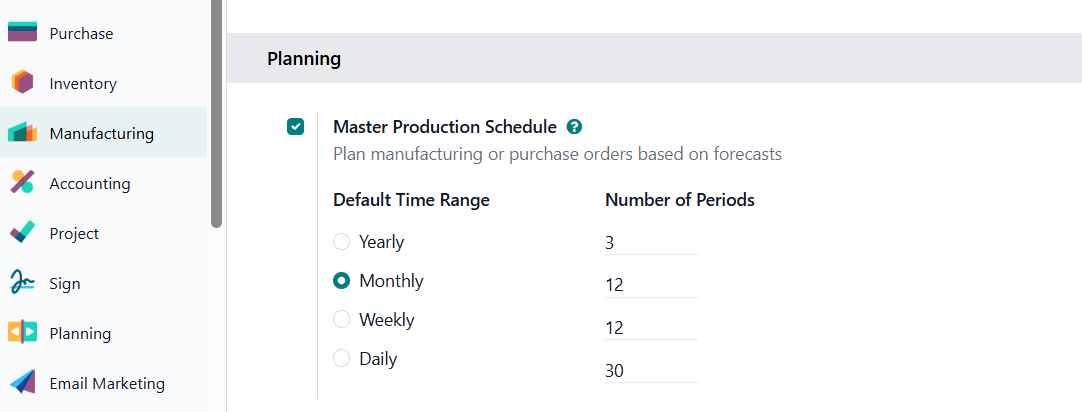
Before using Production Planning and Scheduling, the Master Production Schedule (MPS) feature must be enabled in Odoo Manufacturing.
Navigate to: Manufacturing → Configuration → Settings → Enable the Master Production Schedule (MPS) option and save the changes.
Once activated, Odoo provides a dedicated planning interface where manufacturers can forecast production requirements, monitor inventory levels, and determine the quantities that need to be produced based on expected demand.
How Production Planning and Scheduling in Works in Odoo 19
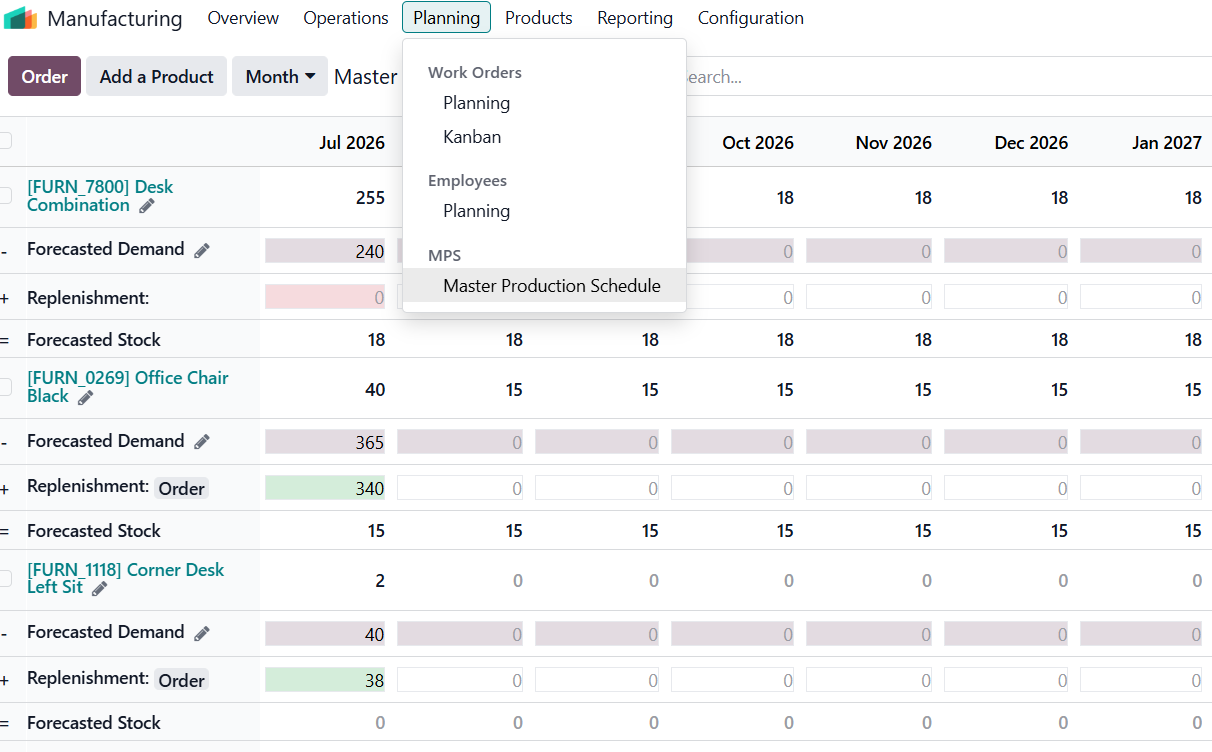
Once the Master Production Schedule (MPS) is enabled, manufacturers can begin planning production based on forecasted demand, available inventory, and replenishment requirements.
The Master Production Schedule dashboard provides a centralized view of products, allowing planners to monitor projected stock levels, forecast demand, and recommended replenishment quantities. This enables manufacturers to determine what products should be produced, how many units are required, and when production should begin.
Instead of relying on manual calculations or spreadsheets, production planners can review inventory forecasts directly within Odoo and make informed manufacturing decisions before creating Manufacturing Orders.
When additional stock is required, Odoo can generate the necessary Manufacturing Orders (MOs) based on the planned quantities, ensuring production aligns with customer demand while maintaining optimal inventory levels.
Visual Production Scheduling in Odoo 19
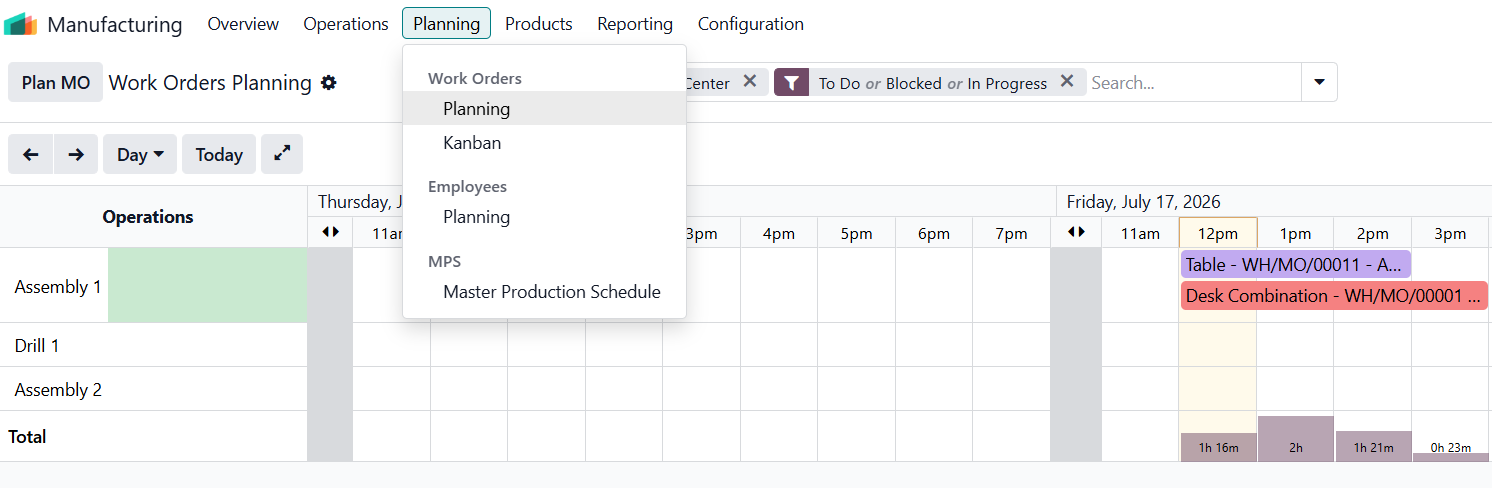
Once Manufacturing Orders have been generated, Odoo allows production managers to schedule them across available work centers using the Work Orders Planning board.
By clicking Plan MO, Odoo automatically schedules work orders based on the configured work centers, operation durations, and resource availability. The planning board then provides a visual timeline of manufacturing operations, making it easy to monitor and manage production schedules.
Production managers can:
- View operations by day or week
- Identify overloaded work centers
- Drag and drop operations to reschedule them
- Prioritize urgent orders
- Balance workload across available machines
Instead of manually adjusting spreadsheets, scheduling can be done directly from the visual planning interface, enabling manufacturers to respond quickly to changing production priorities.
Manufacturing → Planning → Work Orders/Planning
Capacity Planning and Work Centers
In Odoo, each machine or production area is configured as a Work Center.
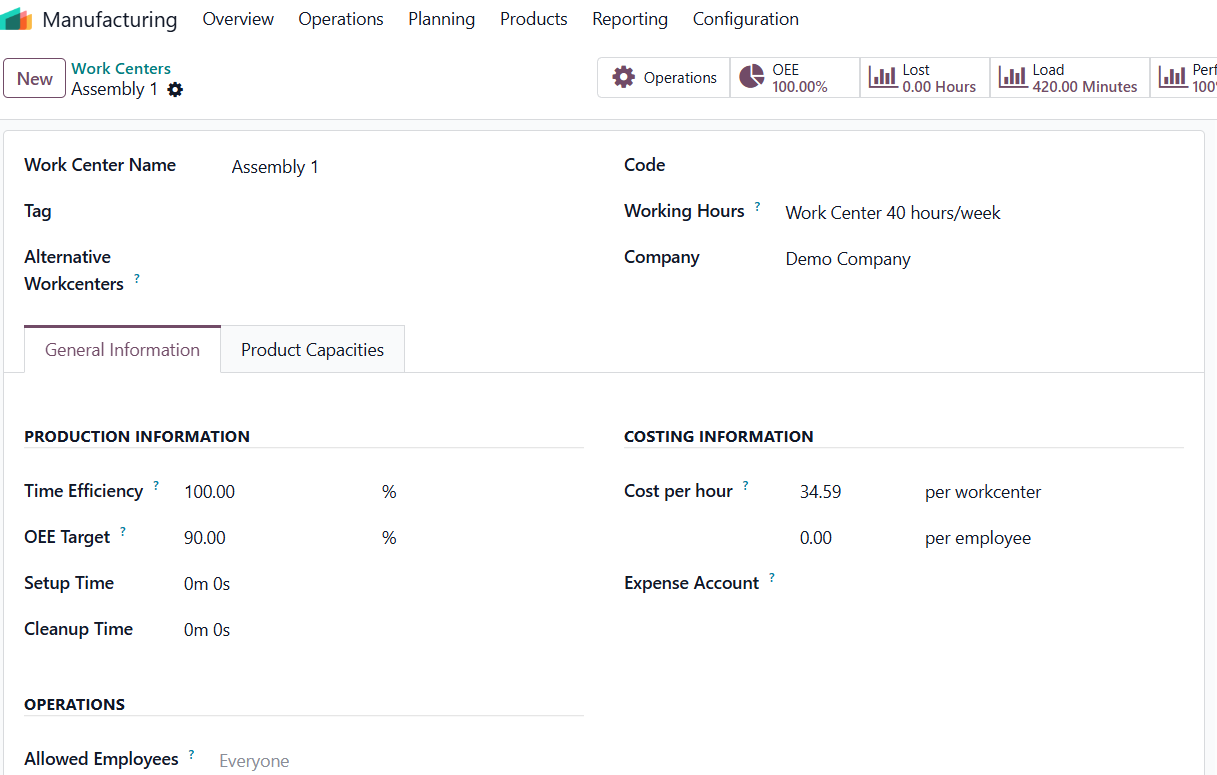
A work center can have:
- Working hours
- Capacity (number of operations it can handle simultaneously)
- Efficiency factor
- Setup and cleanup times
When scheduling operations, Odoo checks the available capacity of the selected work center and places operations in the next available time slot.
Odoo schedules each operation according to these calendars, helping avoid unrealistic production plans.
Rescheduling Production Orders
Manufacturing priorities often change due to urgent customer requests, machine breakdowns, or material delays.
Odoo 19 allows planners to quickly reschedule operations:
- Drag an operation to a new time slot
- Change the planned start date
- Recompute the schedule automatically
- Update dependent operations
This makes the production plan much more flexible than traditional spreadsheet-based scheduling.
Integration with Inventory and Procurement
Planning is most effective when connected to inventory, before production starts, Odoo checks whether required components are available.
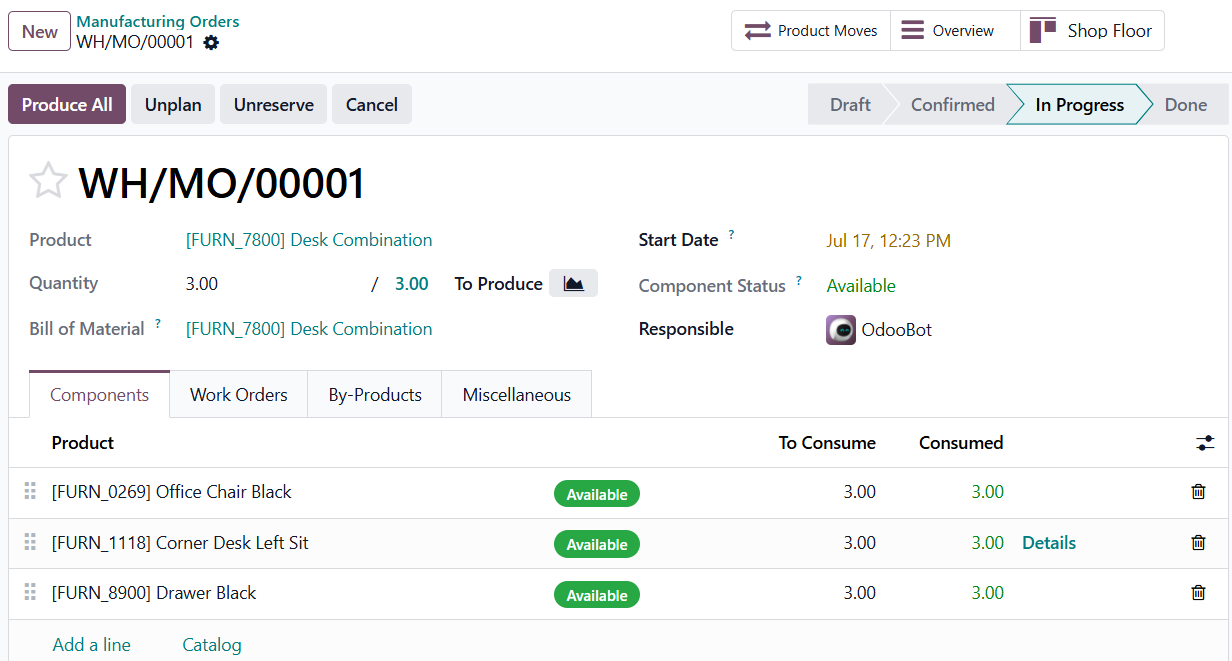
If materials are missing, the system can:
- Generate purchase orders
- Trigger replenishment rules
- Reserve available stock for the manufacturing order
This reduces the risk of production stopping midway due to component shortages.
Business Benefits of Odoo 19 Production Scheduling
Companies using structured production planning typically gain:
- Better delivery performance
- Improved machine utilization
- Reduced production downtime
- Fewer scheduling conflicts
- Greater visibility of production workload
- Faster response to changing priorities.
For small and medium-sized manufacturers, these improvements can significantly increase operational efficiency without requiring separate planning software.
Conclusion
Production planning and scheduling is no longer just an advanced feature for large factories. Odoo 19 brings visual, capacity-based production scheduling into the core Manufacturing application, allowing businesses to organize manufacturing orders, allocate work center capacity, detect bottlenecks, and adjust production plans in real time.
By combining manufacturing, inventory, procurement, and planning in a single system, Odoo helps manufacturers create realistic production schedules and improve on-time delivery performance while making better use of available resources.
Ready to optimize your production operations with Odoo 19?
Partner with Infintor Solutions to implement intelligent production planning and scheduling workflows that improve efficiency, reduce delays, and provide complete visibility into your manufacturing process.