
Many project teams perform the same activities repeatedly throughout the week, month, or year. These activities may include internal meetings, quality checks, employee training, customer follow-ups, maintenance activities, reporting, documentation, and routine project reviews. When team members create these tasks manually every time, they spend valuable time on administration instead of focusing on project delivery. Odoo 16 recurring tasks help project teams automate these repetitive activities and maintain a more consistent project workflow.
With Odoo Project, managers can configure recurring project tasks according to a defined schedule. Once the recurrence is configured, Odoo can create the next task automatically based on the selected frequency and recurrence rules. As a result, teams can reduce manual task creation, improve project organization, and ensure that important routine activities do not get overlooked. This Odoo 16 task automation feature can become particularly useful for businesses that manage multiple projects simultaneously and need a reliable way to maintain recurring workflows.
How Recurring Tasks Improve Odoo Project Management
Effective project management depends on more than assigning tasks and monitoring deadlines. Teams also need to maintain regular activities throughout the project lifecycle. For example, a project manager may need to review progress every week, conduct a recurring team meeting, check project documentation, verify deliverables, or follow up with customers at predefined intervals. Without automation, these activities can easily become dependent on individual team members remembering when to create the next task.
Odoo recurring tasks provide a structured solution for these situations. Instead of manually creating the same task repeatedly, project managers can define the recurrence once and allow Odoo to generate subsequent tasks according to the configured schedule. Therefore, the team can maintain a predictable workflow while reducing administrative work. Moreover, recurring project tasks can help managers create greater consistency across different projects because routine activities follow a predefined process rather than relying entirely on manual intervention.
Enable Recurring Tasks in Odoo 16 Project Settings
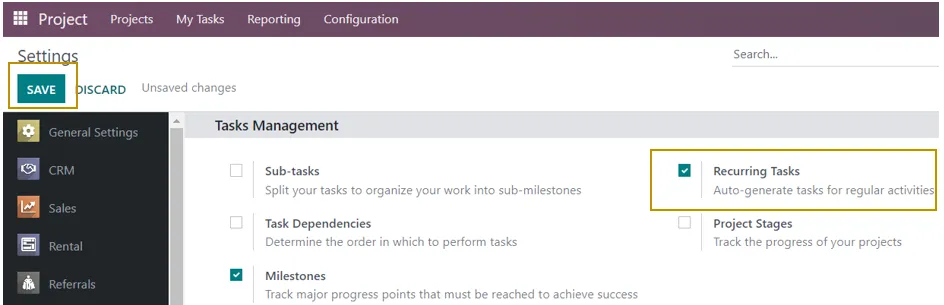
Let us now explore the feature of automating recurring tasks that can come across multiple projects or routine tasks that are executed in every project through the Odoo 16 Project Application. Firstly, we need to activate this feature in the settings page of the Project application.
Project Application => Configuration menu => Settings => Tasks Management section =>Recurring Tasks => Save
How to Configure a Recurring Task in Odoo 16
Now, the routine repetitive tasks will be automatically generated for all projects created in the Project application.
Select the Project Task for Recurrence
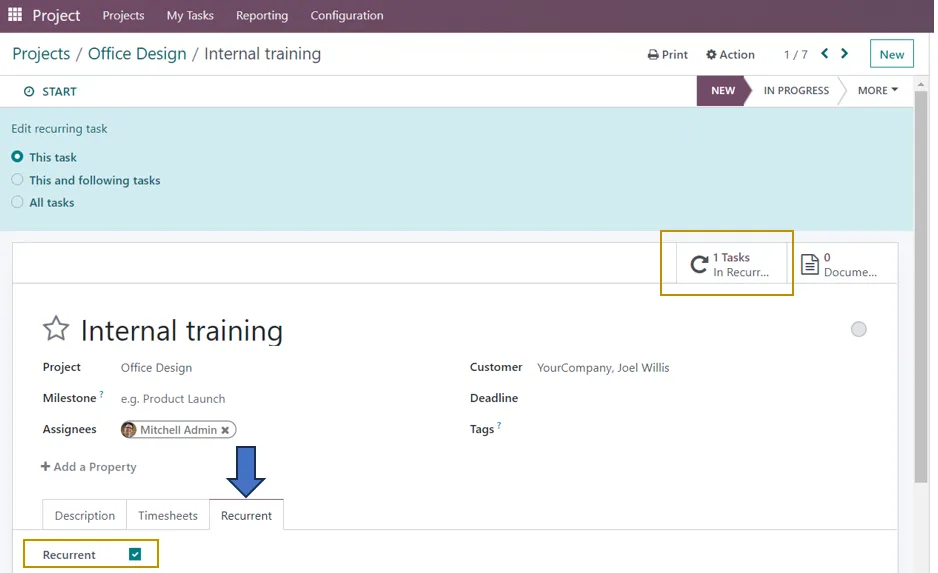
We need to specify the tasks that need to be automatically repeated. For that, Select the particular task of that project which is a recurrent task. For example, I need to give internal training for my team members every Thursday for the project Office Design.
Configure Sales Order and Project Details
After adding the task, project, and assignee names, you can attach them to a sales order item and enter Milestone in the provided box to have your services delivered automatically when a milestone is met. To charge the right customer for the project’s time, mention the customer and the sales order item. Give the project a deadline and give it the right label.
Set the Recurrence Schedule
In the ‘Recurrent’ tab of the selected task, enable the ‘Recurrent’ option. Then, some additional fields appear below this option where we can define the repetition day, the number of repetitions, and the end period.
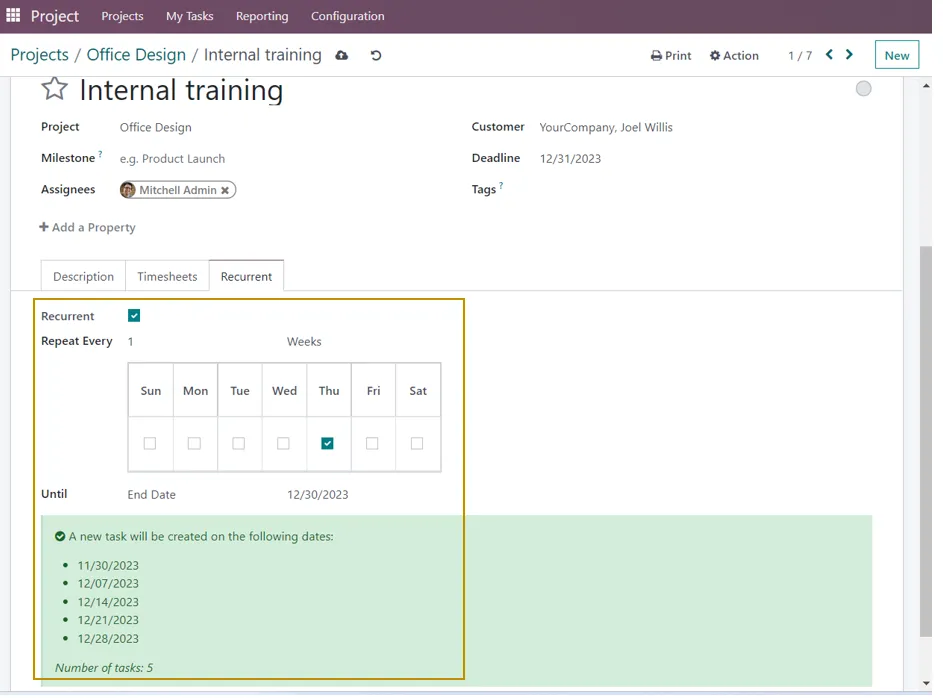
Days, Weeks, Months, Years, and the number of repeats are the variables you can use to choose the frequency. Additionally, the user can choose the end date of the recurrence from the “Until” column, which offers choices like “Forever,” “End date,” and “Number of Repetition.” We may notice the notification that a new task will be created on the dates indicated above because the job’s recurrence is configured based on days to repeat every week.
Additionally, we can observe that the Recurrence is scheduled as indicated below if we check the task’s smart button.

If you don’t want the recurring tasks to be generated automatically for a particular project or some of the projects, you have the option to select the project and disable the auto-generation of recurring tasks.
For that, we need to select the project in the Kanban view, click on the three vertical dots menu at the top-right corner of the project’s Kanban card, and select Settings.
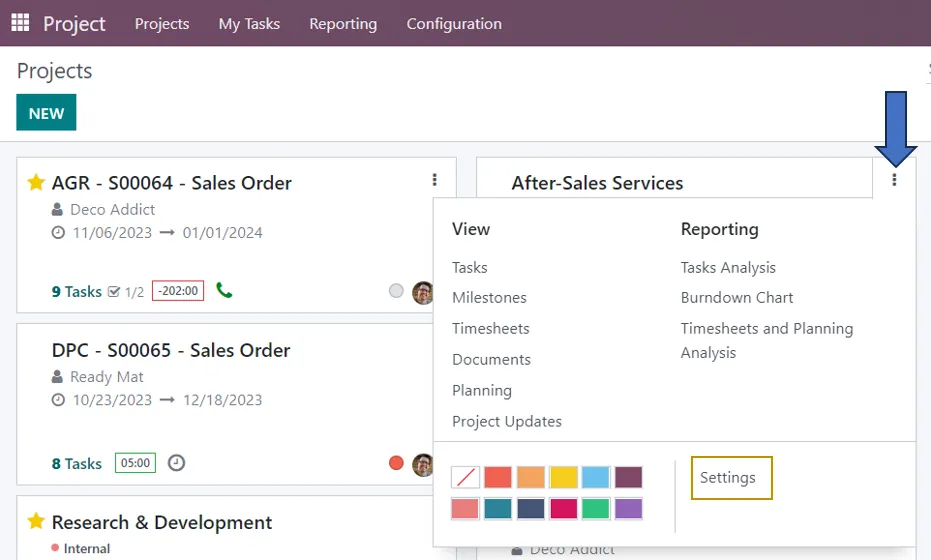
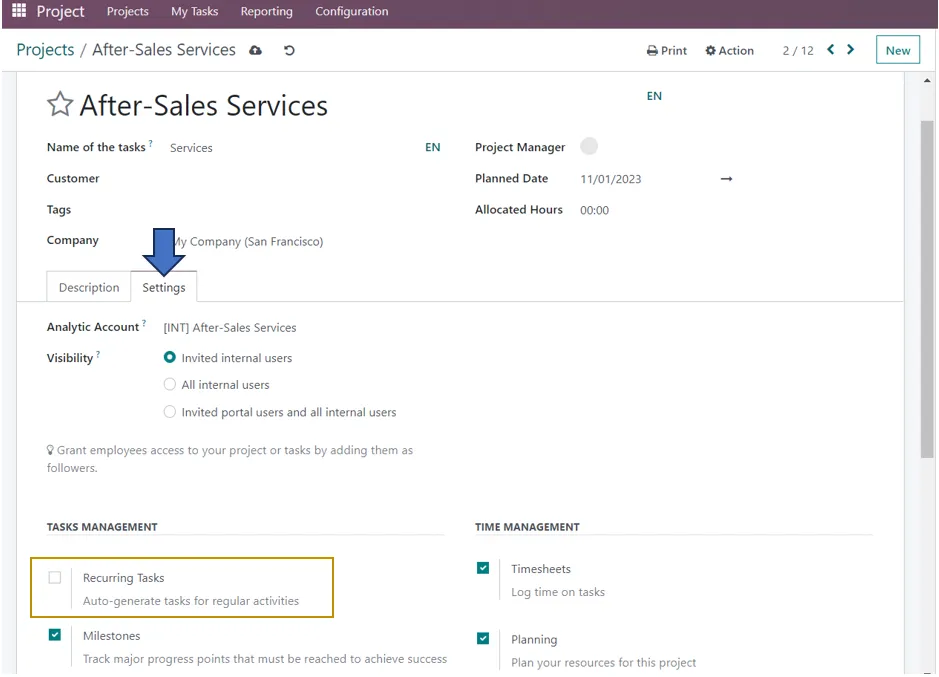
Go to the ‘Settings’ tab of the project to unselect the ‘Recurring Tasks’ option in the Tasks Management section.
Odoo thus enables project managers to keep track of repetitive tasks which can be automated thus saving much time and managing multiple projects in a less time-consuming way. Infintor Solutions provide innovative customizable solutions through automation and integration.
Common Use Cases for Odoo 16 Recurring Tasks
Businesses across different industries can use recurring tasks for activities that follow a predictable schedule. For example, an IT services company may create recurring tasks for system monitoring, backup verification, security checks, server maintenance, and internal technical reviews. Similarly, a consulting company can automate recurring activities such as weekly client reviews, project status updates, documentation checks, and team meetings.
Recurring tasks can also support internal business processes. Human resources teams may use them for recurring employee training, compliance reviews, onboarding follow-ups, and periodic policy checks. Manufacturing and engineering companies can use recurring project tasks for inspections, maintenance planning, quality reviews, and operational reporting. Marketing teams can create recurring activities for campaign reviews, content planning, performance analysis, and customer follow-ups. Consequently, Odoo 16 recurring tasks can support a wide range of business workflows without requiring teams to repeatedly create identical tasks.
Automate Routine Project Activities with Odoo
The main advantage of automating recurring tasks in Odoo is the reduction of repetitive administrative work. Project managers no longer need to remember every future activity or manually create identical tasks whenever a recurring activity becomes due. Instead, they can configure the recurrence based on the actual business requirement and allow Odoo to handle the task-generation process.
This approach also helps teams maintain continuity. When employees change roles, projects move between departments, or multiple projects run at the same time, manually managed recurring activities can become difficult to track. An automated recurrence provides a defined structure that remains connected to the project. Therefore, businesses can reduce the possibility of missed routine activities while improving accountability and project visibility.
Odoo 16 Recurring Tasks for Multiple Projects
Businesses that manage several projects can benefit significantly from recurring task automation. Consider a company that provides Odoo implementation services to several customers. Every implementation project may require recurring internal activities such as project review meetings, development reviews, testing checks, documentation updates, and customer communication. Creating these tasks manually for every project can consume considerable administrative time.
With Odoo Project, organizations can establish recurring activities according to their operational requirements. Project managers can then focus on project progress, resource allocation, customer requirements, and delivery schedules rather than repeatedly creating routine tasks. Furthermore, businesses can decide where recurring task automation is appropriate and where manual task management provides greater flexibility. This makes Odoo project task automation adaptable to different project management approaches.
Benefits of Odoo Project Task Automation
Automating repetitive project activities can improve both productivity and consistency. When Odoo automatically generates recurring tasks, project teams can spend less time on repetitive data entry and more time completing activities that require professional judgment. This becomes especially valuable when a company manages a large number of projects or has teams working across different departments.
Another important advantage is improved task visibility. Recurring activities remain part of the project workflow instead of existing as informal reminders or manually maintained schedules. Project managers can therefore use the Odoo Project application to monitor routine work alongside other project activities. In addition, predefined recurrence rules can help standardize processes, making it easier for teams to follow the same operational procedures across projects.
Recurring Tasks and Better Team Productivity
Productivity does not always mean completing more tasks manually. Instead, productive project management means using available resources effectively. When employees repeatedly perform administrative actions that software can automate, the organization loses time that could otherwise support customer service, project planning, development, testing, or other valuable activities.
Odoo 16 recurring tasks address this issue by moving repetitive task creation into an automated workflow. Once managers establish the required recurrence, employees can concentrate on completing the actual work. As a result, automation can support better utilization of employee time while also reducing the mental burden associated with remembering routine activities. Over time, these small improvements can contribute to a more efficient and organized project management process.
Best Practices for Managing Recurring Tasks in Odoo 16
Before creating a recurring task, project managers should determine whether the activity genuinely follows a predictable pattern. Recurring tasks work particularly well when an activity occurs at a consistent interval. Managers should also use clear task names and descriptions so that employees understand the purpose of each automatically generated task. A well-defined task makes the automated workflow easier for team members to follow and reduces confusion.
It is also important to review recurring tasks periodically. Business processes can change as projects evolve, teams grow, or customer requirements change. Therefore, project managers should verify that the recurrence frequency, responsible users, deadlines, and project settings still match the current workflow. By reviewing automated processes regularly, organizations can prevent outdated recurring activities from generating unnecessary work.
Odoo ERP Automation for Growing Businesses
As businesses grow, repetitive processes increase across departments. A small team may manage recurring activities manually without major difficulties, but the same approach can become inefficient when the organization handles dozens or hundreds of projects. Odoo ERP automation provides a way to standardize these processes while keeping them connected to the company’s broader operational system.
The Odoo Project application can work as part of a wider ERP environment where project activities connect with sales, timesheets, invoicing, customer management, and other business processes. Consequently, businesses can move beyond simple task management and develop more connected workflows. For organizations looking for a scalable ERP platform, automation can become an important part of improving operational efficiency and project visibility.
When Should You Use Recurring Tasks in Odoo?
Recurring tasks are most useful when the same activity needs to happen repeatedly according to a predictable schedule. Weekly project meetings, monthly reviews, regular maintenance activities, periodic quality checks, recurring employee training, and routine customer follow-ups are good examples. In these situations, creating the task manually every time adds little value and increases the possibility of human error.
However, not every project activity should become a recurring task. One-time activities, unpredictable assignments, and tasks that depend heavily on changing project conditions may require manual planning. Therefore, project managers should identify repetitive activities first and then determine which ones benefit from automation. This balanced approach helps businesses use Odoo task automation without unnecessarily complicating their project workflows.
Odoo 16 Project Management for More Efficient Workflows
Odoo 16 Project provides businesses with tools to organize tasks, assign responsibilities, manage deadlines, and structure project activities. Recurring task functionality adds another layer of efficiency by helping teams automate activities that occur repeatedly. Instead of treating every recurring activity as a new administrative task, organizations can create a repeatable workflow that supports consistent project execution.
For companies managing service projects, implementation projects, internal projects, maintenance activities, or long-term customer engagements, this approach can make day-to-day project management easier. In addition, combining recurring tasks with clear project stages, responsible users, deadlines, labels, and other project management practices can create a more structured operating environment. The result is a project workflow that is easier to monitor and more capable of supporting business growth.
How Odoo Recurring Tasks Support Process Standardization
Process standardization plays an important role in maintaining consistent service quality. When employees perform recurring activities differently each time, businesses may experience variations in execution, missed checks, or inconsistent documentation. Recurring tasks can help establish a standard operational rhythm by ensuring that predefined activities appear within the project workflow at the appropriate intervals.
For example, a company may require every project to undergo a weekly progress review. Instead of relying on individual project managers to remember this requirement, the business can establish a recurring task as part of its project management process. This creates a repeatable structure that employees can follow across different projects. As the organization grows, standardized automated workflows can also make it easier to train new employees and maintain consistent internal processes.
Automate Repetitive Workflows with Odoo ERP
Recurring task automation is only one example of how businesses can reduce repetitive work with Odoo ERP. Organizations can combine project management with other Odoo applications to create connected business workflows. Depending on the business requirements, project activities can work alongside CRM, Sales, Accounting, Timesheets, Helpdesk, Inventory, Manufacturing, and other Odoo applications.
This integrated approach allows businesses to manage information within a centralized ERP environment instead of depending on multiple disconnected systems. As a result, employees can access relevant information more easily, managers can gain better visibility into operations, and businesses can reduce unnecessary manual processes. Odoo ERP implementation can therefore provide a strong foundation for companies that want to gradually introduce automation into their daily operations.
Get More from Odoo Project Automation
Odoo 16 recurring tasks provide a practical way to automate repetitive project activities while keeping routine work organized within the Odoo Project application. By configuring recurring tasks correctly, businesses can reduce manual administration, improve task visibility, and create more consistent workflows. More importantly, automation allows project teams to spend their time on activities that require planning, communication, problem-solving, and professional expertise.
However, successful automation depends on more than simply activating a feature. Businesses should first understand their existing workflows, identify repetitive activities, define responsibilities, and determine where automation can deliver measurable value. An experienced Odoo implementation partner can help analyze these processes and configure Odoo according to the organization’s specific operational requirements.
Infintor Solutions helps businesses implement, customize, integrate, and optimize Odoo ERP solutions according to their business processes. From Odoo Project configuration and workflow automation to broader ERP implementation and integration, the right Odoo setup can help businesses improve productivity and create scalable processes. If your organization wants to automate recurring project tasks or build a more connected Odoo ERP workflow, a structured implementation approach can help you achieve better long-term results.