
Why Use Sub-Tasks in Odoo 16 Project Management?
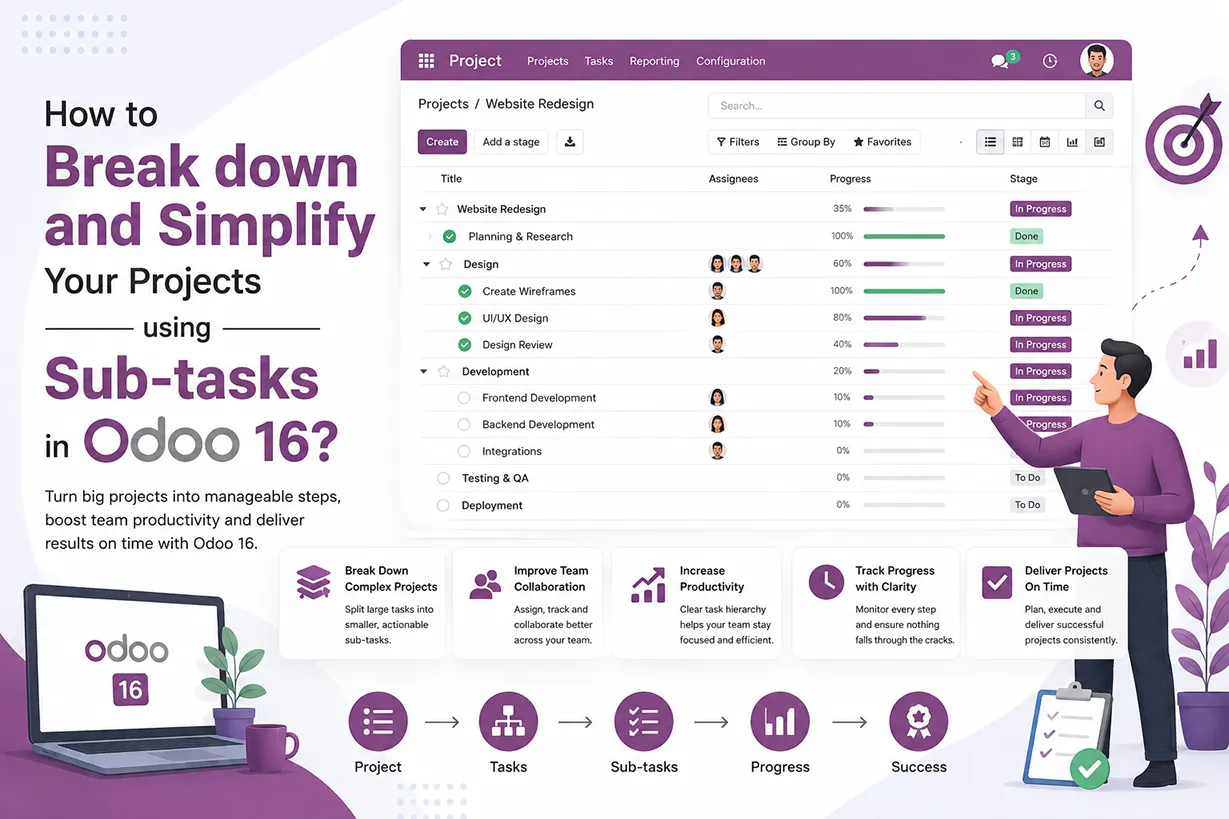
Managing a large project through one task can become difficult. This is especially true when several employees work on different activities. Odoo 16 sub-tasks provide a simple way to divide complex work into smaller activities. A parent task can represent the main project activity. Related sub-tasks can then represent the individual actions required to complete it. This structure makes project planning easier. It also helps employees understand their responsibilities.
For example, a website development project may include design, development, testing, and deployment. Instead of creating one large task, you can divide the work into several sub-tasks. Each employee can then focus on their assigned activity.
This approach improves Odoo project management and gives managers better visibility. They can monitor individual activities without losing sight of the main project goal.
How Odoo 16 Sub-Tasks Improve Project Planning
Good project planning requires clear goals and responsibilities. It also requires accurate deadlines and progress tracking. Odoo 16 project management brings these activities together in one application. A parent task can represent a major project objective. Sub-tasks can then represent the activities required to achieve that objective. This structure creates a clear project hierarchy.
For example, consider an Odoo ERP implementation project. The main task could be “Odoo ERP Implementation.” You can then create sub-tasks for requirement analysis, configuration, data migration, testing, and training.
Each sub-task can have its own responsible employee. It can also have a separate deadline and project stage. This makes the implementation process easier to monitor. Project managers can also use sub-tasks to identify delays. A delayed activity becomes easier to spot when the project contains smaller tasks. Managers can then take corrective action before the delay affects the complete project.
This method also supports better resource allocation. Different activities often require different skills. Assigning each sub-task to the right employee helps teams use their resources effectively.
Activating the Sub-Tasks Feature in Odoo 16
There is a setting in the ‘Project’ module of the Odoo dashboard to be enabled to divide a project into smaller tasks.
Enabling Sub-Tasks from Project Settings
Project application => Configuration menu => Settings => Tasks Management section => Sub-tasks => Save
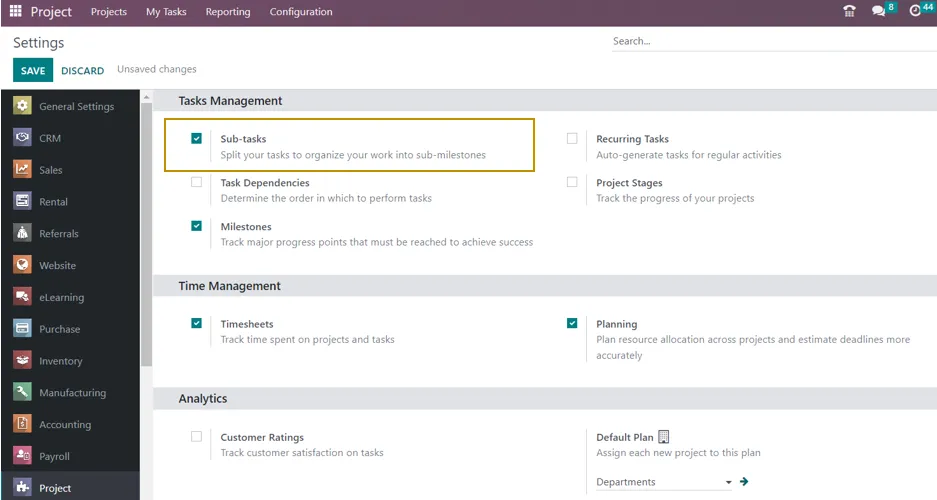
To see how to use the feature, let’s establish a project and assign tasks and subtasks to it.
Creating a New Project in Odoo 16
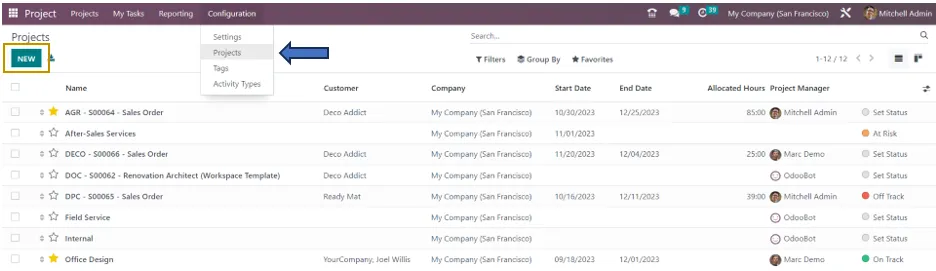
Go to the project configuration window and select the “New” button to begin a new project. You can start the Odoo 16 project creation process by choosing this option.
Entering Project Details
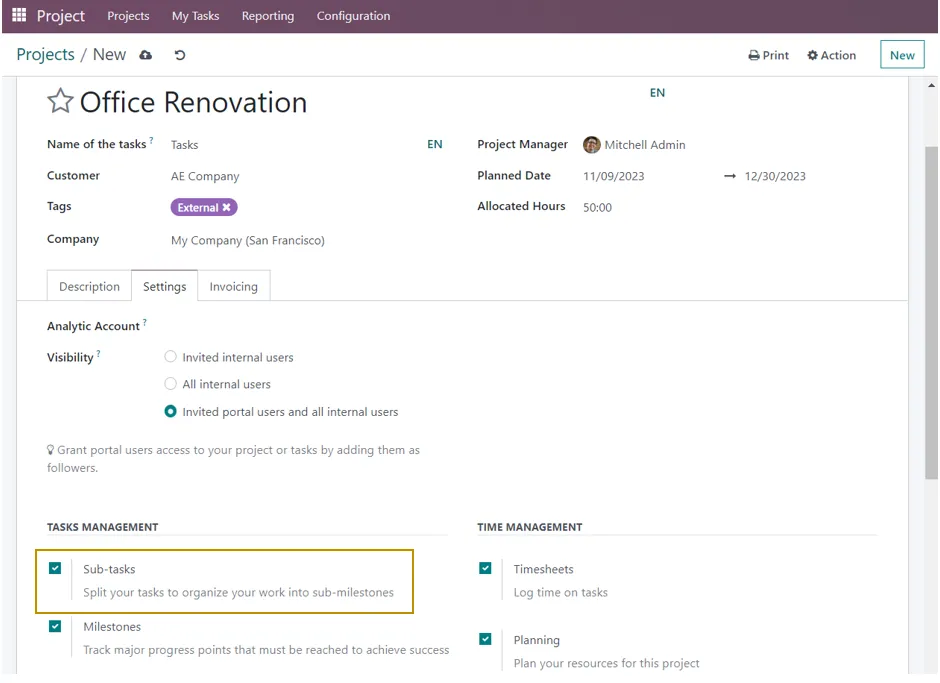
In the corresponding fields of the project creation window, you must enter the required project details. This gives details about the project, including its name, the names of the related tasks, customer information, categorization tags, the name of the firm, the project manager, the project start date, and the number of hours allotted for completion. You can add any further project comments or details using the Description tab.
Configuring Project Visibility and Settings
The ‘Settings’ tab of the project configuration window contains additional customization options. Who can view the project and its tasks is determined by the Visibility setting. Certain categories, like all invited users, invited portal users and invited internal users, can have their visibility restricted. This allows you to manage who may see and access the project and its associated tasks. By choosing the appropriate visibility option, you can ensure that project information is accessible to the intended audience while maintaining confidentiality and privacy as needed.
To add Subtasks to a particular project, the user can activate the Sub-Task feature from the Project’s settings tab, as illustrated above. After entering all the details, ensure to save the created project.
Creating and Assigning Sub-Tasks in Odoo
Returning to the project module, let’s examine the project from the Kanban perspective to add sub-tasks, as displayed below.
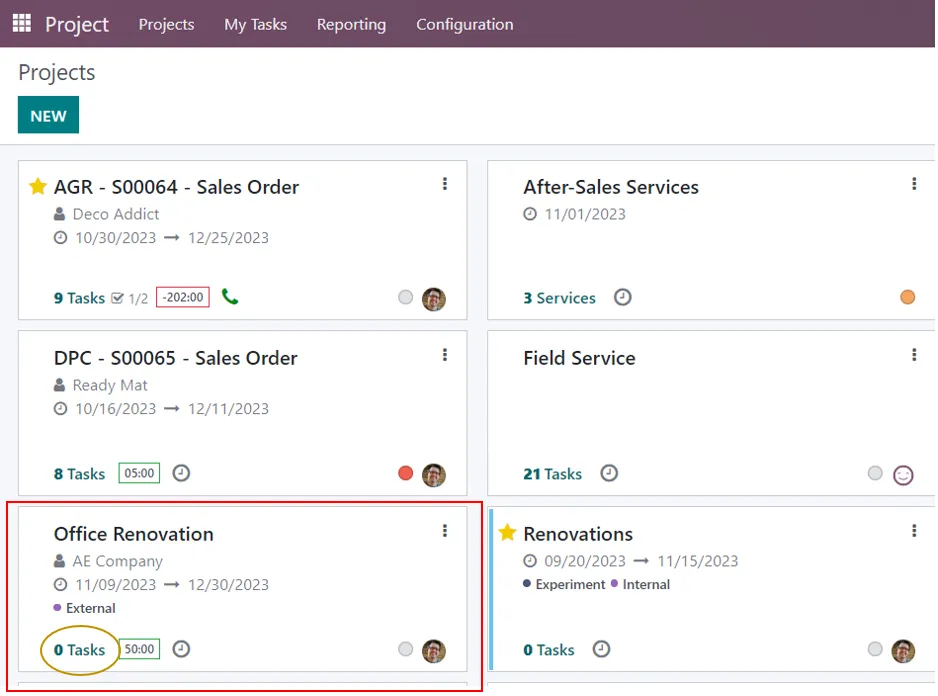
Adding Tasks from the Kanban View
On selecting the ‘Tasks’ option in the Kanban view of the created project, we can go to the ‘Tasks’ page where we can add various stages of the project by clicking ‘+’ along the ‘+ Stage’ option at the top and add sub-tasks by clicking on the ‘New’ button.
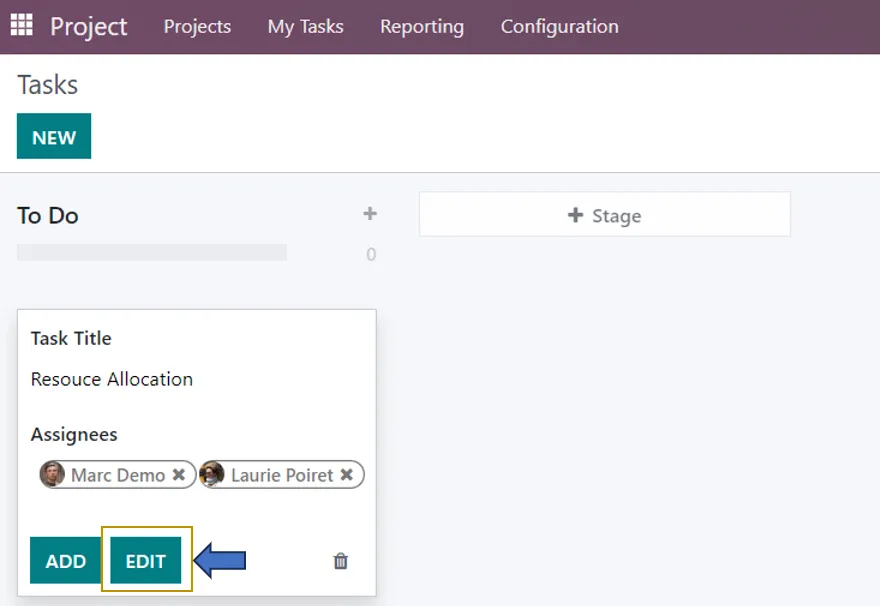
Adding Task Details and Assignees
We can enter the Task title and Assignees here. To give more details, click on the ‘Edit’ option.
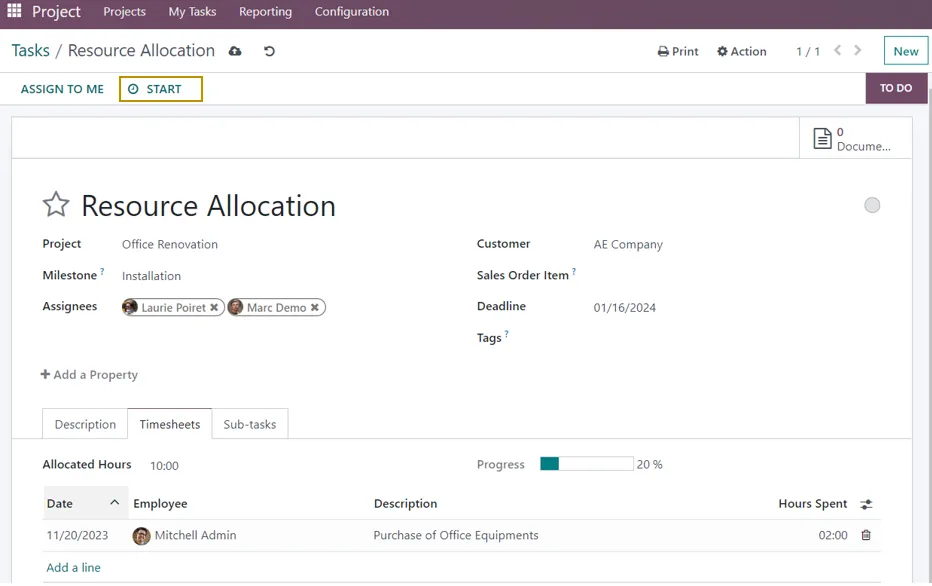
Add the task’s relevant details, including the customer, sales order item, and due date. The sales order item is automatically assigned after the customer has been chosen. You can include a description of your assignment in the Description box. You may see more tabs, such as sub-tasks, depending on your preferences.
Tracking Task Time with Odoo Timesheets
The ‘Timesheets’ tab allows you to enter the recorded amount of time spent on the task. You can alter the hours worked by each employee in the queue and add the given task’s hours as well as the workers assigned to it. You can verify the number of hours completed and the number of hours left on the task after entering the details.
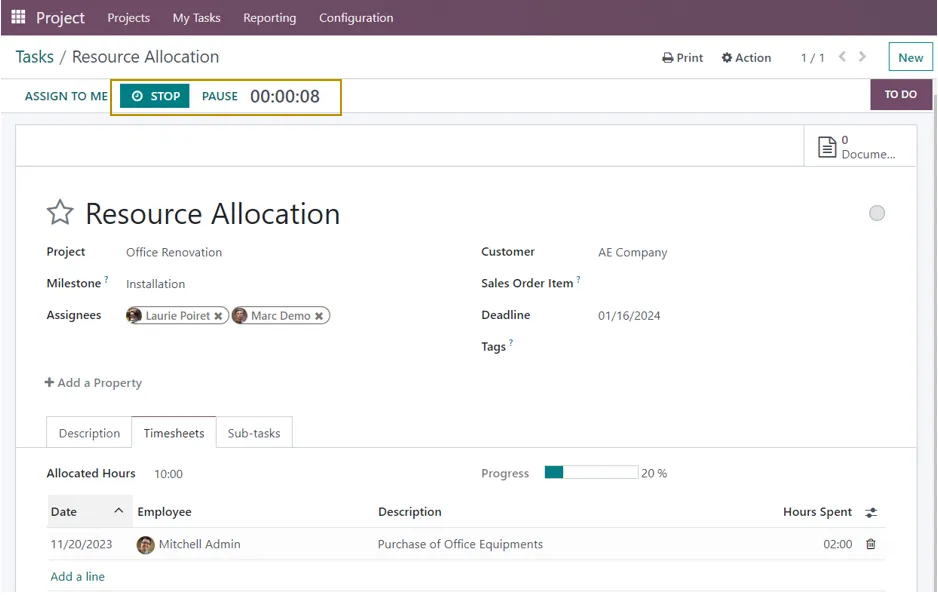
Once these parameters have been input, click the Start button at the top to begin the task. You have the option to pause and terminate the task when it is completed. You can enter the duration of your task and a description when you press the stop button. It will be added to the timesheet and displayed in the total number of hours left when you save it.
Adding Sub-Tasks to an Odoo Project Task
From the ‘Sub-tasks’ tab of the task, as indicated below, you can use subtasks to arrange your actions systematically.
Creating a New Sub-Task
A pop-up box that allows the user to create a new subtask from the ‘New’ button or select an existing task, if any, appears when we select the ‘Add a Line’ option from the Sub-tasks tab, as shown below.
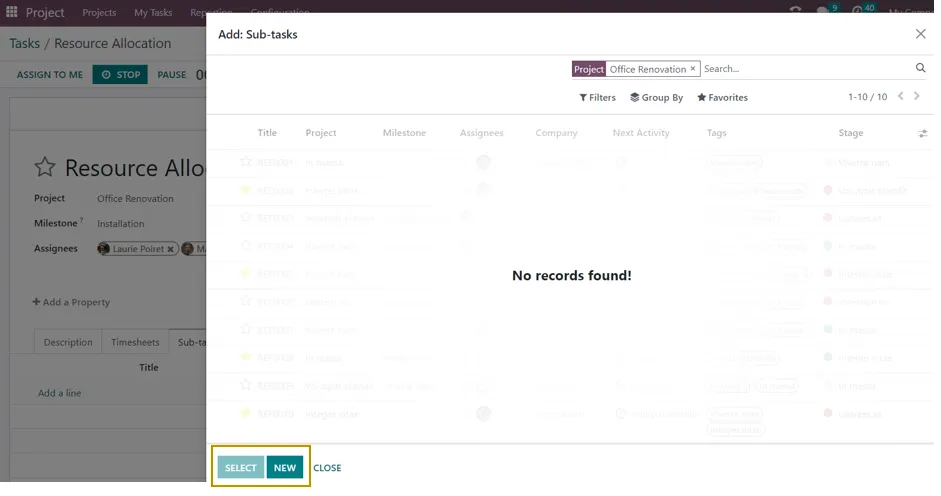
The user can create a new subtask by selecting the New button and entering details such as the subtask title, project, assignees, customer, sales order item, deadline, and tags.
Adding Descriptions, Timesheets, and Related Sub-Tasks
Additionally, the user can add a description, timesheet, and subtasks. As seen below, the user can also examine the Parent task smart button.
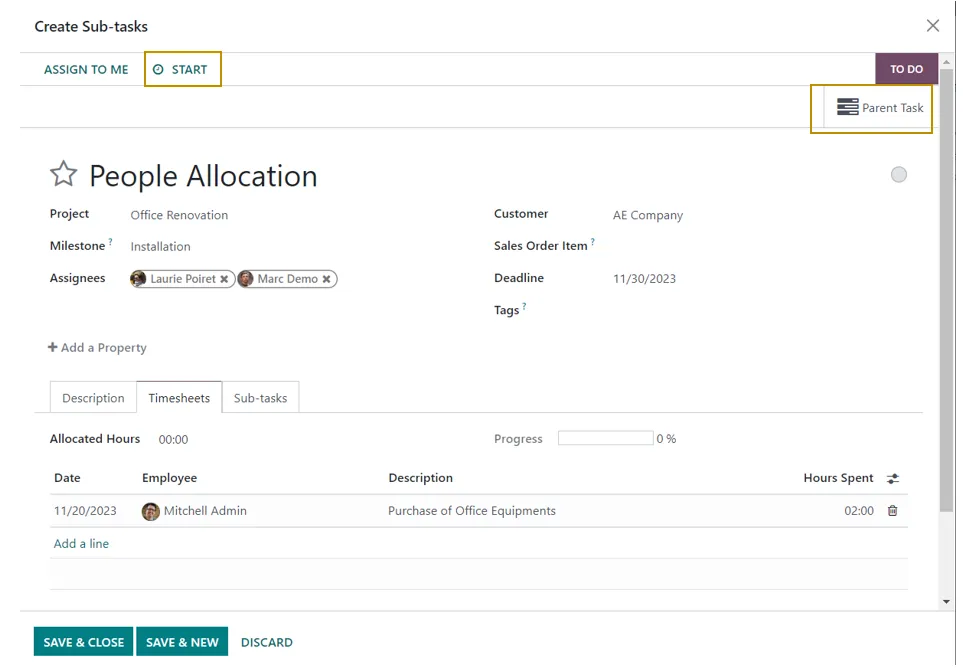
The Start button located at the top of the Sub Task window allows the user to initiate the Sub Task. You have the option to pause and terminate the task when it is completed. You can enter the duration of your task and a description when you press the stop button.
It will be added to the timesheet and displayed in the total number of hours left when you save it and after the subtask is finished, can mark it as done.
Creating Multiple Levels of Sub-Tasks
We also have the option to create another set of sub-tasks for the subtask created by going to the ‘Sub-tasks’ tab.
Viewing Sub-Task Progress and Timesheets
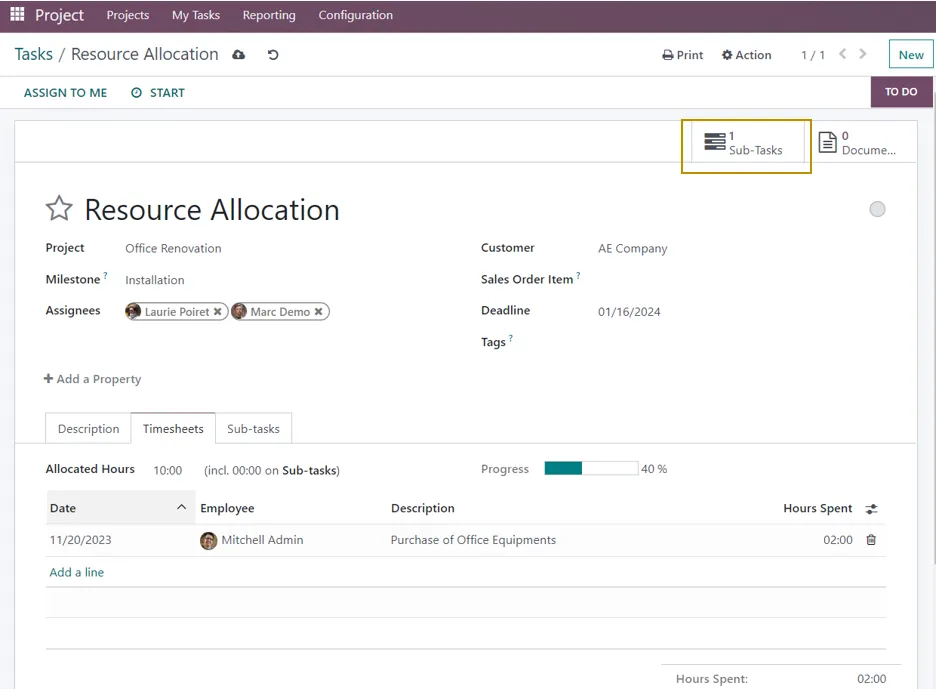
Since there is just one subtask added for the project, let’s return to the main task and examine the Subtask smart button with count one there.
Checking Sub-Task Hours
If we look at the main task’s timesheet, we can also see that the time spent on the subtask will be included above.
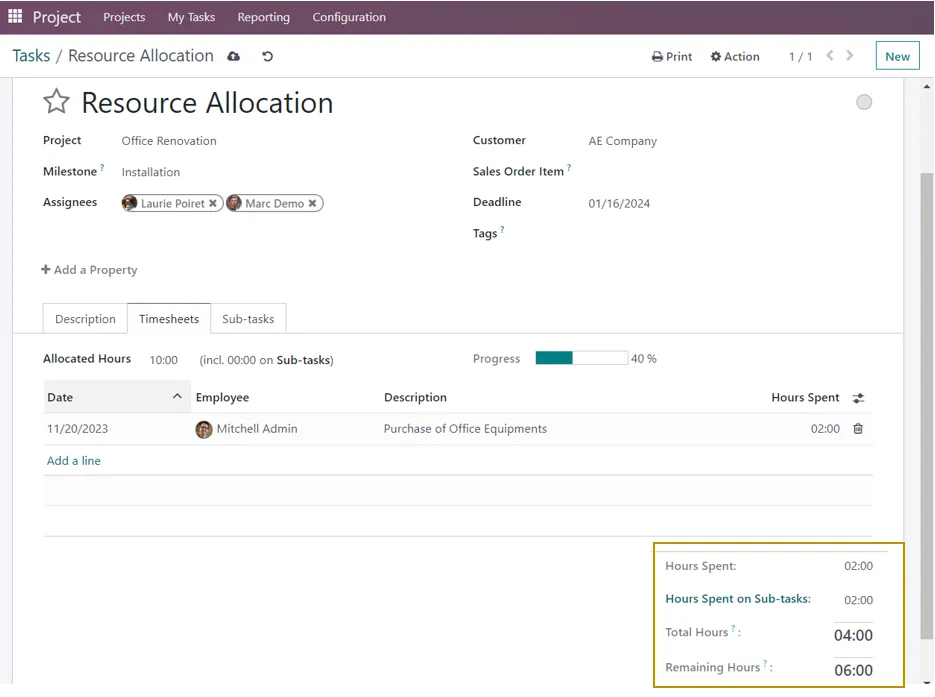
The other details such as the Hours spent on sub-tasks, total hours taken for completing the sub-task, and the remaining hours are computed and displayed in the ‘Timesheets’ tab of the Sub-task.
Simplifying Project Management with Odoo 16 Sub-Tasks
This is how we can add and manage different sets of tasks related to a project, thus simplifying project management operations with Infintor Solutions using Odoo 16.
Managing Project Tasks and Responsibilities with Odoo
One of the major advantages of using Odoo task management is the ability to maintain project information in one centralized system. Instead of managing project activities through separate spreadsheets, emails, messaging applications, and documents, teams can organize tasks directly within Odoo. This centralized approach improves visibility and makes communication between project members easier.
Odoo project tasks can contain important information such as task descriptions, assigned users, deadlines, customers, project details, sales order items, tags, timesheets, and related sub-tasks. Because this information remains connected to the task, employees can access the relevant details while working on the assignment. As a result, the team can spend less time searching for project information and more time completing productive work.
Furthermore, the Kanban view provides a visual representation of project tasks. Team members can move tasks between different stages as work progresses. This makes it easier to identify activities that are not started, currently in progress, waiting for review, or completed. When businesses combine the Kanban workflow with Odoo sub-tasks, they can achieve a more detailed view of project execution.
For project managers, this visibility can also simplify follow-up activities. Instead of asking every employee for a separate progress update, managers can review the task and sub-task status directly in the project. Therefore, Odoo can help create a more transparent workflow where employees understand their responsibilities and managers can identify delays earlier.
Odoo Sub-Tasks for Better Time Tracking and Productivity
Time management plays an important role in successful project delivery. A project may appear to be progressing according to schedule, but excessive time spent on individual activities can affect the final delivery date or project profitability. Odoo 16 sub-tasks work together with timesheets to give businesses greater visibility into the time spent on project activities.
Employees can record the time they spend working on tasks and sub-tasks. Project managers can then review this information to understand how much effort the team has invested in a particular activity. Over time, this data can also help businesses create more accurate estimates for similar projects. For example, if a company regularly performs data migration as part of Odoo ERP implementation projects, historical timesheet information can help the project manager estimate the effort required for future implementations.
In addition, breaking a large task into smaller activities makes productivity easier to measure. A team member may complete several sub-tasks during a working day, allowing the project manager to see tangible progress instead of relying only on the status of one large task. This improves visibility and can help identify bottlenecks before they affect the entire project.
Benefits of Using Odoo 16 Sub-Tasks for Businesses
Businesses can use Odoo sub-tasks across a wide range of projects and departments. Software development teams can divide development work into design, coding, testing, debugging, and deployment activities. Marketing teams can use sub-tasks for campaign planning, content creation, graphic design, advertising setup, and campaign analysis. Similarly, construction, consulting, manufacturing, engineering, and service companies can structure complex activities according to their individual workflows.
Another important advantage is improved collaboration. When employees can clearly see their assigned activities, deadlines, and related project information, they can coordinate their work more effectively. In addition, the parent task provides the broader context behind each individual assignment. Therefore, employees can understand not only what they need to complete but also how their work contributes to the overall project.
Odoo also helps businesses maintain consistency in project execution. By using predefined project stages, task structures, tags, assignments, and sub-task workflows, organizations can establish repeatable processes. This becomes particularly useful for companies that handle similar projects for multiple customers. A standardized project structure can reduce manual planning effort while ensuring that important activities do not get overlooked.
Odoo Project Management for Growing Businesses
As a business grows, project management becomes increasingly complex. More customers, employees, projects, deadlines, and activities can make manual project tracking difficult. A centralized ERP platform such as Odoo can help businesses connect project management with other business operations.
For example, project activities can be connected with customers, sales orders, timesheets, invoicing, and other Odoo applications depending on the configured workflow. This connection can reduce duplicate data entry and provide better visibility across departments. Consequently, businesses can manage project execution while keeping important commercial and operational information connected.
For companies planning an Odoo ERP implementation, project management can also become an important part of the implementation process itself. The implementation team can create tasks for requirement analysis, configuration, customization, integration, data migration, testing, training, and deployment. Each major activity can then contain smaller sub-tasks. This creates a structured implementation roadmap and makes it easier to monitor the project’s progress.
Best Practices for Managing Sub-Tasks in Odoo 16
To get the best results from Odoo 16 sub-tasks, businesses should create a clear structure before adding a large number of tasks. Start by identifying the main objective of the project and then determine the major activities required to achieve that objective. Next, divide complex activities into smaller tasks that have a clear outcome. Each sub-task should have an appropriate assignee and realistic deadline.
It is also important to avoid creating unnecessary sub-tasks. Breaking every small action into a separate task can make the project unnecessarily complicated. Instead, create a sub-task when the activity requires a separate responsibility, deadline, status, or time-tracking requirement. This balance keeps the project organized without creating excessive administrative work.
Finally, project managers should regularly review task progress and update deadlines or assignments when project requirements change. Agile teams can particularly benefit from this approach because they can adjust individual activities while continuing to work toward the broader project objective. With consistent task management and regular progress reviews, Odoo can support a more organized and adaptable project workflow.
How Odoo 16 Supports More Efficient Project Execution
The combination of projects, tasks, sub-tasks, stages, assignments, and timesheets makes Odoo 16 a useful platform for organizing complex project workflows. Instead of managing every activity independently, businesses can create a clear hierarchy that connects individual assignments to larger project goals.
As a result, project managers gain better visibility into ongoing work, while employees receive clearer instructions about their responsibilities. Moreover, businesses can use recorded project information to improve future planning, resource allocation, time estimation, and project delivery. This makes Odoo project management useful not only for tracking current projects but also for improving project processes over time.
Whether you manage software development, ERP implementation, consulting, marketing, engineering, or service projects, breaking large activities into smaller sub-tasks can make the workflow easier to manage. With Odoo 16 sub-tasks, teams can organize complex assignments, track progress, record working hours, assign responsibilities, and maintain a clearer connection between individual activities and the overall project objective.
Odoo 16 Sub-Tasks: A Practical Approach to Project Management
Breaking a complex project into smaller, clearly defined activities is one of the simplest ways to improve project visibility and team coordination. Odoo 16 makes this process easier by allowing businesses to create parent tasks and related sub-tasks within the Project application. Each activity can then be assigned, monitored, updated, and completed as part of the larger project workflow.
For businesses looking to improve their project management processes, this functionality can provide a more organized alternative to manually tracking project activities. By combining Odoo project management, task assignments, sub-tasks, timesheets, deadlines, and project stages, teams can create a structured workflow that supports better productivity and project control.
At Infintor Solutions, we help businesses plan, implement, customize, and optimize Odoo solutions according to their operational requirements. A properly configured Odoo Project application can help organizations manage their projects more efficiently while connecting project activities with other essential business processes. If your business needs a structured Odoo ERP project management solution, Odoo can be configured to support your specific workflow, team structure, and project requirements.