
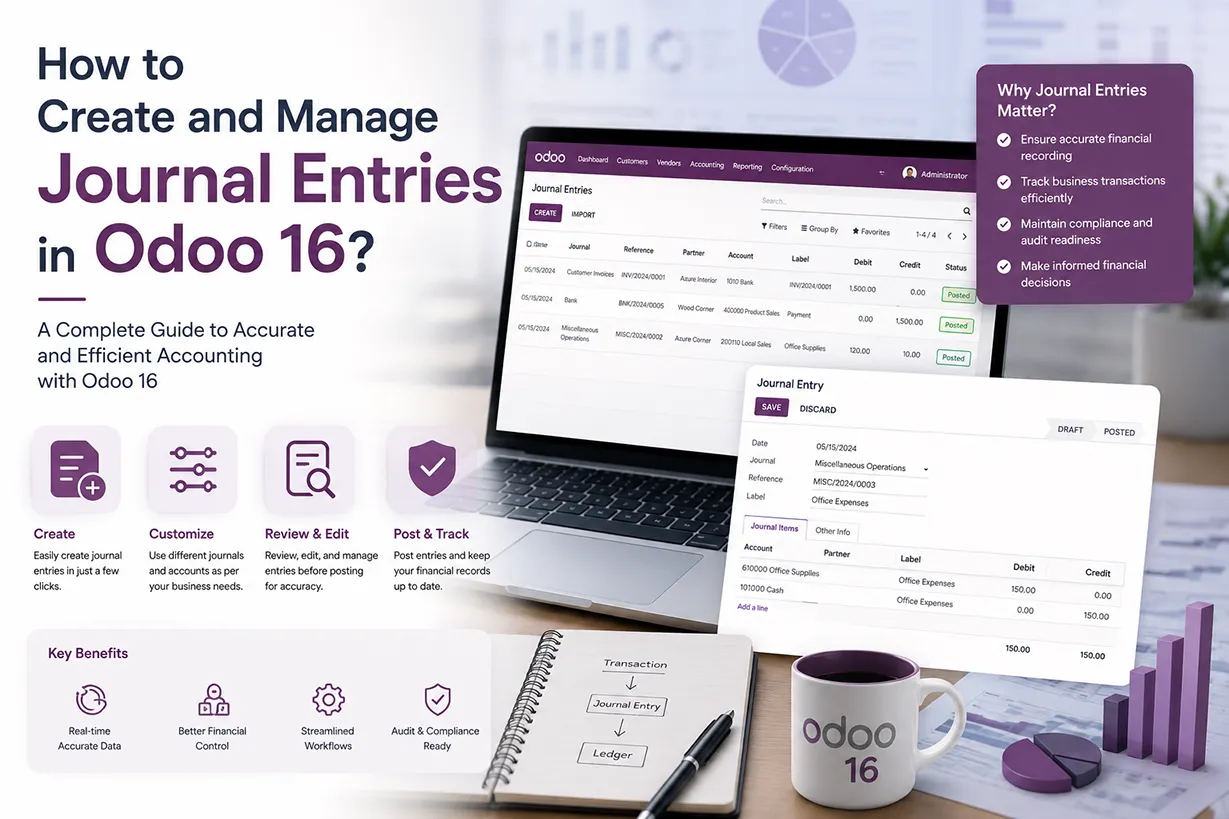
Odoo 16 journal entries provide a structured way to record and manage financial transactions within the Odoo Accounting application. Every business generates numerous transactions throughout the day, including customer payments, supplier invoices, operating expenses, bank transactions, tax adjustments, and internal accounting movements. Therefore, businesses must maintain accurate journal entries to keep financial records organized and reliable. With Odoo accounting software, businesses can record these transactions in dedicated journals while maintaining a complete connection between accounting, sales, purchases, inventory, and other Odoo ERP applications.
Unlike a basic bookkeeping system, Odoo 16 connects journal entries with the wider business process. For example, when a customer invoice is created and posted, Odoo automatically generates the corresponding accounting entries. Similarly, supplier bills, inventory valuation, payments, and other financial activities can generate journal items without requiring accountants to manually enter every transaction. As a result, businesses can reduce repetitive accounting work while improving financial accuracy and visibility. This integrated approach makes Odoo 16 accounting particularly useful for companies that want to manage their financial operations from a single ERP platform.
How Odoo 16 Journal Entries Support Business Accounting
Journal entries play an important role in maintaining the accounting structure of an organization.In Odoo 16, the accounting system records each financial transaction through debit and credit accounts according to double-entry bookkeeping principles. Because every debit must have a corresponding credit, the system helps accountants maintain balanced financial records. Consequently, businesses can reduce common data-entry mistakes and identify accounting discrepancies more quickly.
Odoo also provides different accounting journals for different types of transactions. Depending on the company’s requirements, accountants can work with sales journals, purchase journals, cash journals, bank journals, and miscellaneous journals. This separation makes financial data easier to organize and review. Moreover, companies can configure journals according to their accounting workflow, reporting requirements, and business structure. When accountants consistently record journal entries in the correct journals, financial reporting becomes clearer and month-end accounting becomes easier to manage.
Creating a Journal Entry
A journal entry for a transaction can be made in a journal. A proper journal entry contains the accounting date, the amount to be debited and credited, the reference details, and a description of the transactions. Odoo’s Double Entry Bookkeeping System requires a minimum of one debit and one credit line. There must be an equal amount of credit and debit in a journal entry. The individual lines that comprise a journal entry are called journal items. You can access the Journal Entries platform from the module’s Accounting menu.
Accounting Application => Accounting menu => Journal Entries

The list view displays the Date, Number, Partner, Reference, Journal, Company, Total, and Status information for each journal entry. To begin adding a new journal entry to a specific journal, click the ‘New’ button.
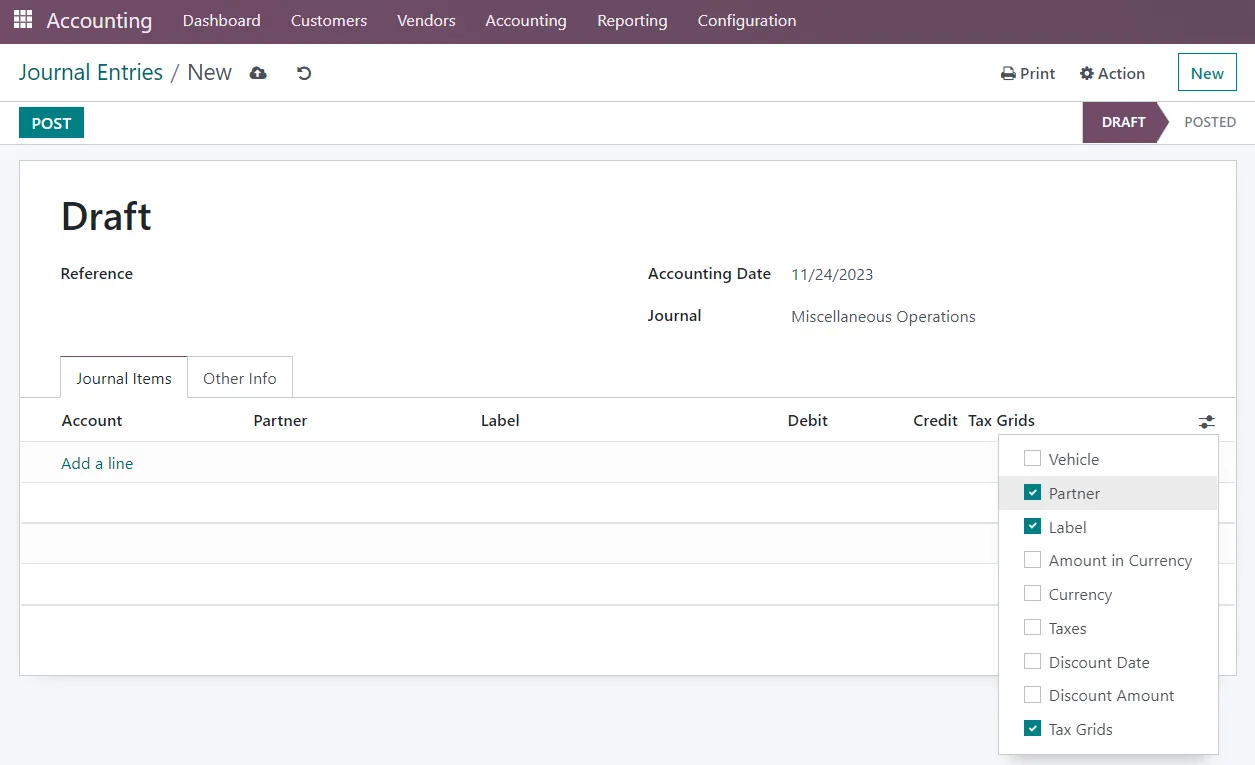
You can cite any sources that are pertinent to this journal post by using the Reference section. The Accounting Date of the entry will be shown in the corresponding field. To add this entry to your journal, select a suitable journal from the list of available journals. Using the ‘Add a Line’ button located in the ‘Journal Items’ tab, you can add journal entries by providing details like Account, Partner, Label, Analytic, Debit, Credit, and TaxCloud on this page. Other details such as Vehicle, Amount in Currency, Currency, Taxes, Discount Date, and Discount Amount can also be entered by selecting the required fields in the additional options as shown in the screenshot above.
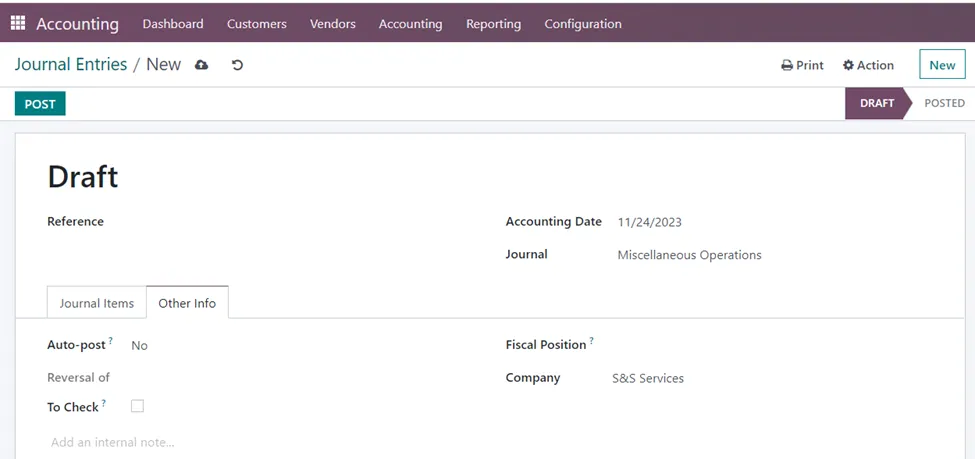
Under the ‘Other Info’ tab, you have the option to ‘Auto-post’ which will cause the item to be posted automatically on the applicable accounting date. If you feel that the entry has to be verified twice, you can activate the ‘To Check’ field. After indicating the Fiscal Position and Company, click the ‘Post’ button to post the entry in the relevant journal.
Reversing a Journal Entry
In some cases, transactions may be recorded in one accounting period for practical reasons, but the economic impact occurs in a subsequent period. Reversing entries helps align the financial records with the economic reality, preventing distortions in financial reporting. In accrual accounting, certain transactions are recorded before the cash is received or paid. For example, an accrual might be made for expenses that are incurred but not yet paid. Reversing entries helps avoid double-counting these items in the following accounting period when the actual payment or receipt occurs.
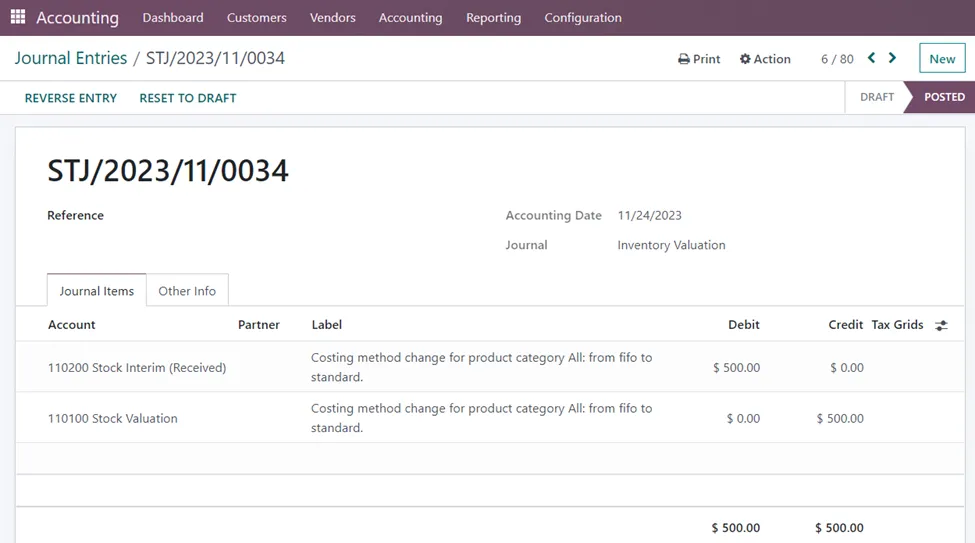
The ‘Reverse Entry’ button allows you to instantly undo a published journal article. There is a pop-up window where you may enter the Reversal Date and Specific Journal. After that, select the ‘Reverse’ option.

Journal Items in Odoo 16 Accounting
All the journal items entered in the system can be viewed by selecting the ‘Journal Items’ option in the Accounting Application.
Accounting Application => Accounting menu => Journal Items

The list view of the Journal Items shows details such as Date, Journal Entry, Account, Partner, Label, Amount in Currency, Debit, Credit, Matching or not, and Analytic Account. If you wish to view more details, you can select the additional columns that need to be viewed such as Company, Journal, Reference, Product, Vehicle, Taxes, Currency, Tax Grids, Discount Date, Discount Amount, Originator Tax, Due Date, Balance, Residual and Residual in Currency.
Journal Groups in Accounting Application
With the ‘Journal Groups’ option under Configuration, you may create distinct groups for the journals.
Accounting Application => Configuration menu => Accounting section => Journal Groups => New

Enter a name for your specific journal group. In the ‘Excluded Journals’ section, you can enter the journal IDs that you wish to have removed from this group. The name of the Company will be automatically entered into the relevant box.
To effectively create and manage journal entries, it’s important to follow accounting principles and guidelines. The Odoo 16 accounting software solution can automate many aspects of the journal entry process, making it more efficient and reducing the likelihood of errors. It is nothing complex to manage your financial transactions with the solutions provided by Infintor Solutions. As a partner in your success, we prioritize understanding your unique challenges and goals. Our comprehensive approach involves crafting solutions that are not only technically proficient but also strategically aligned with your business vision.
Creating Accurate Journal Entries in Odoo 16
When you create journal entries in Odoo 16, accuracy is important because the information recorded in an entry can affect several financial reports. Accountants should therefore review the accounting date, journal, account, partner, debit, credit, taxes, analytic information, and reference before posting the transaction. A well-structured journal entry helps accountants understand why they recorded a transaction and how it affects the company’s financial position.
In addition, Odoo 16 allows businesses to use analytic accounting information when required. Analytic accounts and analytic distributions can help organizations track expenses and revenues by department, project, product line, cost center, or other business dimensions. Therefore, journal entries can provide more than basic debit and credit information. They can also support detailed management reporting and help business owners understand where money is being spent or generated.
Managing Journal Items and Financial Transactions
Journal items are an important part of Odoo accounting because they provide the detailed accounting lines behind journal entries. Each transaction can contain multiple journal items, with each line representing a specific account movement. By reviewing journal items in Odoo, accountants can investigate individual transactions, verify account balances, and understand how financial activities affect the company’s accounts.
Furthermore, Odoo makes it easier to search and filter journal items based on different criteria. Accountants can review transactions by date, journal, partner, account, reference, company, analytic account, or other available fields. This is especially useful when a business has a large volume of financial transactions. Instead of checking individual records manually, users can filter the information they need and quickly investigate specific accounting activities. As a result, Odoo journal items can support daily bookkeeping as well as financial analysis and audit preparation.
Automating Accounting Entries with Odoo 16
One of the major advantages of Odoo 16 accounting is its ability to automate many routine financial processes. Instead of manually creating every journal entry, businesses can configure their accounting workflow so that Odoo automatically records transactions from invoices, bills, payments, inventory operations, and other applications.. This reduces repetitive work and allows accounting teams to spend more time reviewing financial information and making business decisions.
Odoo 16 also supports automated posting for suitable transactions. Depending on the configuration, businesses can schedule recurring accounting activities so that Odoo posts journal entries on the appropriate accounting date. This can be particularly useful for recurring expenses, accruals, depreciation-related processes, and other regular accounting operations. Therefore, automation can improve consistency while reducing the risk of forgetting important accounting activities.
Reviewing and Validating Odoo Journal Entries
Before posting an important journal entry, accountants should verify the transaction details and ensure that the debit and credit amounts are correct. Odoo 16 provides several fields that help users understand the origin and purpose of a transaction. Reviewing these details before posting can prevent incorrect account allocation and reduce the need for later corrections.
The validation process is also important for maintaining reliable financial reports. Once accountants post transactions, Odoo adds them to the company’s accounting records, where they influence reports such as the general ledger, profit and loss statement, balance sheet, tax reports, and other financial analyses. Therefore, businesses should establish appropriate internal accounting procedures for reviewing journal entries. Odoo’s accounting workflow can support these procedures by providing structured transaction records and clear audit information.
Journal Entries, Financial Reporting, and Business Decisions
Accurate Odoo journal entries directly contribute to reliable financial reporting. Financial reports are only as dependable as the transactions that accountants record in the accounting system. When accountants record sales, purchases, expenses, payments, taxes, and adjustments correctly, management can gain a clearer picture of the company’s financial performance and financial position.
Moreover, Odoo ERP accounting connects transactional data with business reporting. Management can use accounting information to monitor revenue, expenses, outstanding receivables, supplier liabilities, cash flow, taxes, and profitability. Consequently, accurate journal entry management is not only an accounting requirement but also an important part of business decision-making. When financial information is available in a centralized ERP system, decision-makers can respond more quickly to changing business conditions.
Best Practices for Managing Journal Entries in Odoo 16
Businesses should establish a consistent process for creating, reviewing, and posting journal entries in Odoo 16. Accounting teams should use the appropriate journal for each transaction and provide meaningful references or descriptions whenever necessary. In addition, users should verify account selection, transaction dates, debit and credit amounts, taxes, partners, and analytic information before posting an entry. Consistent procedures make the accounting database easier to maintain and simplify future financial reviews.
Regular reconciliation is also an important part of effective Odoo accounting management. Accounting teams should review bank transactions, customer payments, supplier payments, and other financial movements regularly so they can identify discrepancies early. Furthermore, businesses should periodically review unusual or manually created journal entries. This approach can help maintain accurate financial records while providing better control over accounting operations.
Odoo 16 Journal Entries for Growing Businesses
As a business grows, the number and complexity of financial transactions usually increase. Managing these transactions through spreadsheets or disconnected accounting applications can make it difficult to maintain accurate records. Odoo 16 provides an integrated accounting environment where journal entries can work together with sales, purchase, inventory, invoicing, expenses, and other business processes.
For growing companies, this integration can provide a significant operational advantage. Instead of maintaining separate systems for different departments, businesses can centralize their financial data within Odoo ERP. As a result, accountants can access transaction information more efficiently, while management can obtain a more complete view of business performance. With the right configuration and accounting workflow, Odoo 16 can support both everyday bookkeeping requirements and more advanced financial management needs.
Odoo Accounting Implementation and Journal Entry Configuration
Although Odoo 16 provides powerful accounting functionality, the system should be configured according to the company’s business processes and accounting requirements. During implementation, the accounting team should review the chart of accounts, journals, taxes, fiscal positions, payment methods, access rights, and reporting requirements. Proper configuration ensures that Odoo correctly transfers transactions from different ERP applications into the accounting system.
An experienced Odoo implementation partner can help businesses configure accounting workflows, migrate existing financial data, integrate external systems, and train accounting teams. This is particularly important for organizations moving from traditional accounting software to an integrated Odoo ERP environment. With appropriate implementation and user training, companies can take better advantage of automated journal entries, journal items, financial reporting, reconciliation, and other Odoo accounting features.
Why Proper Journal Entry Management Matters in Odoo
Effective journal entry management creates a strong foundation for accurate accounting and reliable business reporting. When transactions are recorded consistently, reviewed carefully, and connected with the appropriate business processes, companies can maintain better financial control. In addition, centralized accounting data makes it easier to analyze business performance and prepare financial reports.
Odoo 16 combines journal entries, journal items, invoices, payments, bank transactions, inventory valuation, taxes, and financial reporting within one integrated platform. Therefore, businesses can manage accounting activities more efficiently while reducing unnecessary manual work. For companies looking to improve their financial processes, implementing Odoo accounting with a properly designed accounting workflow can provide a scalable foundation for long-term growth.
Explore Odoo Accounting with Infintor Solutions
Choosing the right ERP configuration is important when implementing accounting automation. Infintor Solutions can help businesses evaluate their accounting requirements, configure Odoo accounting workflows, integrate financial processes, and provide Odoo ERP implementation and support. From journal entry configuration and accounting automation to financial reporting and system integration, a properly planned Odoo implementation can help organizations create a more efficient and connected financial management environment.