
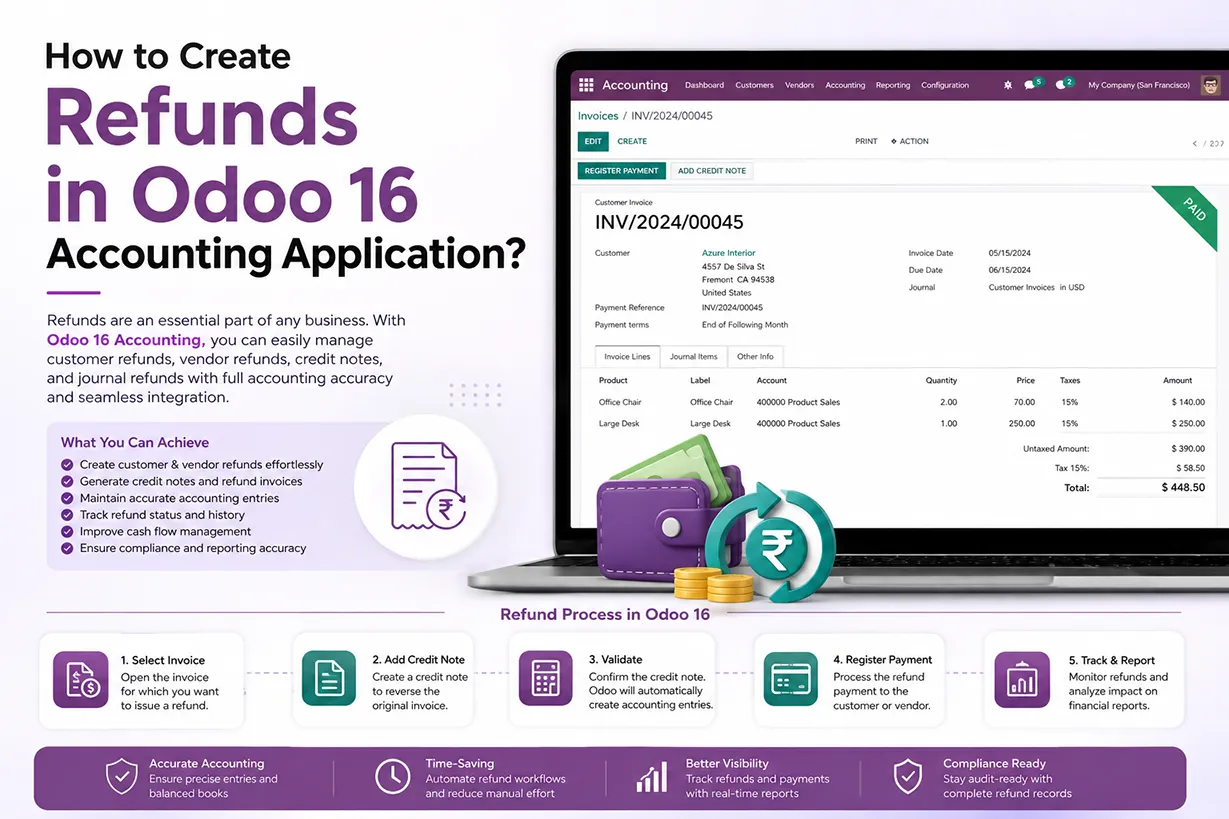
Refund management plays an important role in maintaining accurate financial records and building long-term customer relationships. With Odoo 16 Accounting, businesses can organize the refund process directly within their accounting workflow instead of managing refund requests through separate spreadsheets or manual records. The Odoo Accounting application connects invoices, bills, payments, credit notes, taxes, journals, and financial reports, which makes it easier for accounting teams to maintain consistency throughout the refund cycle.
When a business needs to return money to a customer or record an amount that it owes back to a vendor, the accounting team can use the appropriate refund or credit note process in Odoo 16. As a result, the company can maintain accurate accounts while also keeping a clear history of every financial transaction. Moreover, Odoo 16 refunds help businesses reduce manual accounting work because users can link refund transactions with the original invoice or bill whenever applicable. This connection makes the refund process easier to review, verify, and reconcile.
Why Businesses Use Odoo 16 for Refund Processing
Managing refunds manually can create unnecessary work for finance teams, particularly when a business processes a large number of invoices and payments. An accounting employee may need to check the original invoice, calculate the refund amount, verify taxes, update the accounting records, and then reconcile the related payment. Odoo 16 brings these activities into a centralized accounting environment, allowing users to manage refund-related transactions more efficiently.
Furthermore, Odoo 16 Accounting provides greater visibility into the financial impact of refunds. Accounting teams can review refund amounts, tax information, journal entries, payment status, and related documents from the same system. Therefore, businesses can improve financial accuracy while reducing the possibility of duplicate entries or incorrect calculations. For organizations that handle frequent customer returns, cancellations, price adjustments, or vendor claims, a structured Odoo refund management process can save valuable time.
Why Refunds Are Important for Customer Satisfaction and Business Growth
Refunds contribute to customer satisfaction by addressing issues such as product defects, service failures, or unmet expectations. Satisfied customers are more likely to become repeat customers and advocates for your brand. Refund requests often come with valuable feedback that can be used to identify areas for improvement. Organizations can use this feedback to enhance products, services, or internal processes. Refunding can also be a tool for conflict resolution, helping to appease dissatisfied customers and resolve disputes. It can turn a negative customer experience into a positive one, demonstrating the organization’s commitment to customer service.
How to Create Refunds in Odoo 16 Accounting
In the Accounting Module of Odoo 16, a business can manage their refund operation seamlessly. Many alternatives are available for refunds in Odoo 16, including manual refund, invoice-based refund, credit-based refund, and payment-based refund.
To create a refund, follow the path below:
Accounting application => Vendors menu => Refunds => New
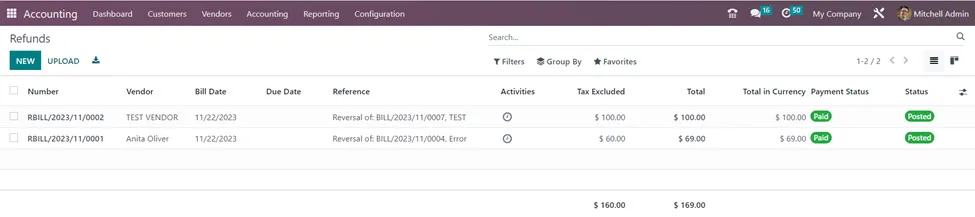
The page shows essential details such as the Refund number, Vendor, Bill date, Due date, Reference of bill, Activities, Tax excluded, Total, Total in currency, Payment status and Status.
We can select the ‘New’ button to create a new refund.
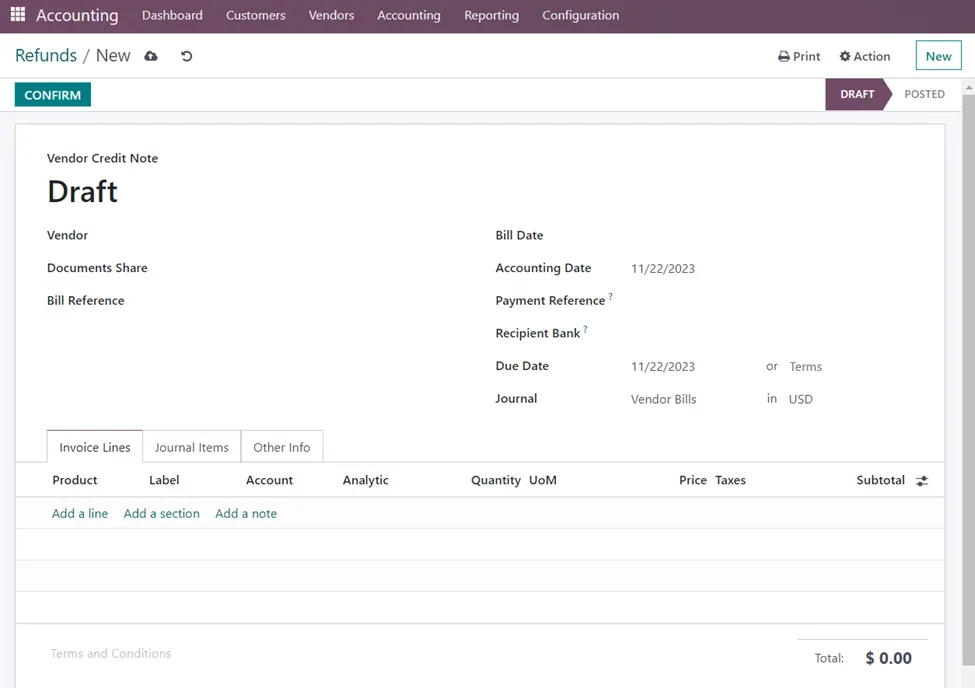
You can fill in the designated spaces on this creation page with the vendor credit note, vendor name, and bill reference. The vendor date, accounting date, recipient bank, payment reference, due date, and journal can now be added, in that order. As seen in the above figure, the tabs containing invoice lines, journal entries, and other information are located beneath that. You can put the product name, label, account, analytic, quantity, UoM, price, taxes, and subtotal in the spaces provided beneath the ‘Invoice Lines’. You can also use the Add a Line, Add a Section, and Add a Note choices that are located under that.
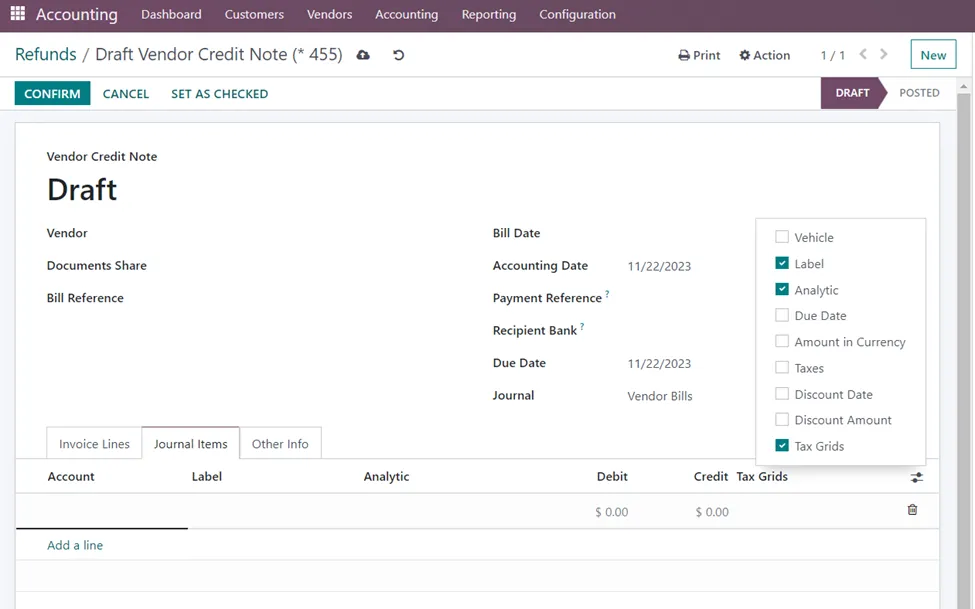
In the ‘Journal Items’ tab, we can enter the Account, Label, Analytic account, Debit, Credit and Tax Grids. We can also select additional columns such as Vehicle, Due date, Amount in currency, Taxes, Discount date and Discount amount by selecting the required fields in the additional fields option as shown above.
You can enter details such the company name, incoterm, fiscal position, and auto post option in the ‘Other info’ tab. You can also tick the option to activate, as shown in the image below.
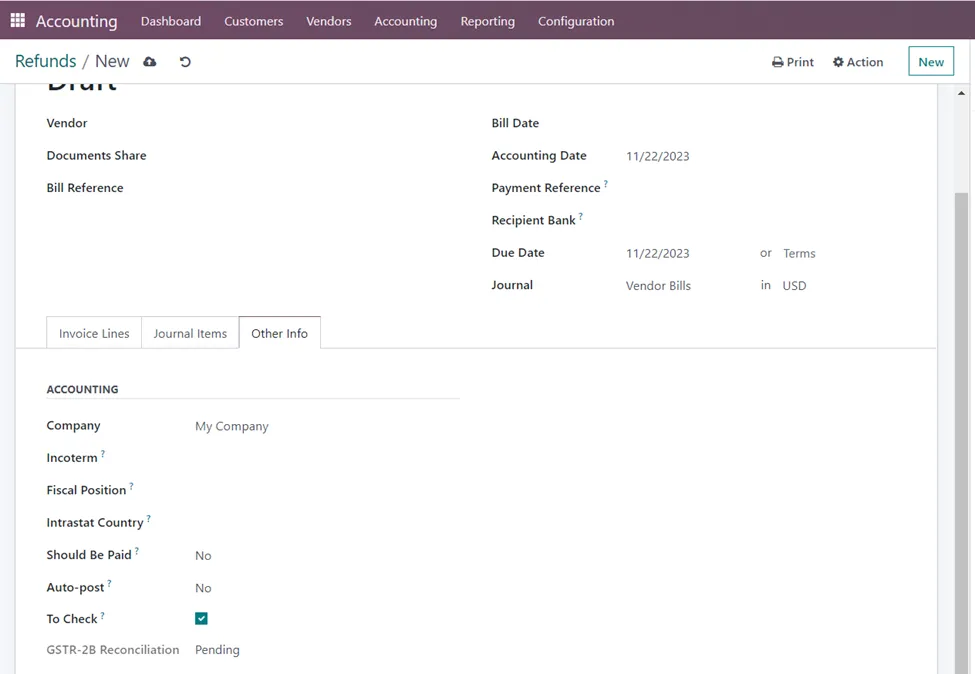
After giving all the details, let’s ‘Save’ the created refund. On ‘Confirming’ the refund, the status changes from ‘Draft’ to ‘Posted’.
Issuing refunds is not just a reactive measure to address customer complaints; it’s a proactive strategy to ensure customer satisfaction, uphold ethical standards, and foster a positive relationship between the organization and its customers. Thus, Infintor Solutions your trusted Odoo ERP Partners helps in maintaining a customer-centric and successful business.
Customer Refunds and Credit Notes in Odoo 16
A customer refund generally occurs when a business needs to return all or part of an amount previously invoiced to a customer. For example, a customer may return a damaged product, cancel an order, receive a price adjustment, or qualify for a partial refund. In these situations, businesses can use a credit note to record the reduction in the amount owed by the customer. Odoo 16 Accounting helps users create and manage these accounting documents while maintaining the connection between the original transaction and the corresponding adjustment.
Credit notes also provide a more transparent accounting trail. Instead of deleting or changing the original invoice, the business can create a separate document that records the adjustment. Consequently, the original invoice remains available for reference, while the credit note clearly explains why the company reduced the receivable. This approach supports better financial control and makes it easier for accounting teams to review customer refunds during internal checks or audits.
Vendor Refunds and Credit Notes in Odoo 16
Businesses also need to process refunds received from suppliers and vendors. For instance, a supplier may issue a refund because of returned goods, incorrect pricing, damaged products, excess payment, or an adjustment to a previous vendor bill. In Odoo 16, accounting users can record these transactions through the appropriate vendor refund or vendor credit note workflow.
Keeping vendor refunds inside Odoo 16 Accounting helps businesses maintain accurate accounts payable records. In addition, accounting teams can track the original vendor bill, refund amount, taxes, journal entries, and payment information within the accounting system. This creates a clear financial history and helps the business understand how supplier adjustments affect its overall expenses and liabilities.
How Odoo 16 Refunds Improve Accounting Accuracy
Accurate refund accounting requires more than simply returning money to a customer or receiving money from a supplier. Every refund can affect revenue, expenses, taxes, receivables, payables, and cash flow. Therefore, businesses need to record refund transactions correctly so that their financial reports reflect the actual financial position of the organization.
Odoo 16 Accounting supports this process by automatically generating the relevant accounting entries when users confirm the appropriate refund document. Depending on the transaction, Odoo can also consider taxes, accounts, journals, and currency information. As a result, finance teams can reduce repetitive calculations and improve the consistency of their accounting records. Businesses can then use accurate data for financial reporting, reconciliation, budgeting, and decision-making.
Managing Refunds, Taxes, and Financial Transactions
Refund transactions can also affect the tax amounts associated with the original sale or purchase. When a business creates a refund or credit note, the accounting team should ensure that the applicable products, accounts, taxes, quantities, and amounts are correct. Odoo 16 provides the necessary accounting fields to help users maintain this information within the refund document.
In addition, businesses that operate across multiple currencies or companies can benefit from maintaining refund information directly in Odoo. Currency values, accounting dates, journals, payment references, and other financial information can contribute to the final accounting result. Therefore, users should review the refund details carefully before posting the transaction. A properly configured Odoo Accounting system can make this review process much easier and more reliable.
Best Practices for Creating Refunds in Odoo 16
Before confirming an Odoo 16 refund, accounting users should verify the original invoice or vendor bill, refund amount, customer or vendor information, products or services, taxes, accounting date, and journal. Checking these details helps prevent incorrect financial entries and reduces the need for later corrections. It is also useful to include a clear reference or reason for the refund so that another employee can understand the transaction without searching through multiple records.
Businesses should also establish a consistent refund approval process. For example, the sales, customer service, purchasing, and accounting teams can follow defined responsibilities for reviewing and approving refund requests. Consequently, Odoo 16 can become part of a broader refund management workflow rather than simply serving as a place to record the final accounting transaction.
Simplify Refund Management with Odoo ERP
A well-organized refund process can improve both financial control and customer service. However, configuring Odoo 16 Accounting correctly is important because every business has different invoicing, taxation, payment, approval, and reporting requirements. Companies may also need additional Odoo customization or integrations to connect refunds with sales, inventory, payment gateways, customer portals, or other business applications.
Infintor Solutions helps businesses implement and optimize Odoo ERP according to their operational and accounting requirements. With the right Odoo ERP implementation strategy, businesses can streamline invoicing, credit notes, vendor refunds, customer refunds, payment reconciliation, and financial reporting through one integrated platform. As a result, organizations can reduce manual accounting work, improve financial visibility, and build a more efficient refund management process.