
Managing inventory efficiently is one of the biggest challenges for businesses dealing with multiple products, warehouses, and stock movements. Every product entering a warehouse should reach the correct storage location quickly to reduce handling time, improve stock accuracy, and accelerate order fulfillment. This is where Product Transfer in Odoo 17 Inventory becomes an essential feature for businesses of every size.
Odoo 17 offers a powerful inventory management system that enables organizations to automate internal transfers, vendor receipts, warehouse movements, and storage allocation through intelligent Putaway Rules. Instead of manually deciding where every product should be stored, businesses can configure automated rules that guide products to predefined warehouse locations based on product type, category, package, or destination.

What You Will Learn in This Guide
Whether you operate a manufacturing company, retail business, wholesale distribution center, or eCommerce warehouse, learning how to manage Product Transfer in Odoo 17 Inventory can significantly improve warehouse productivity while minimizing inventory errors.
In this comprehensive guide, you will learn how product transfers work in Odoo 17, how to configure Putaway Rules, how warehouse locations function, and how inventory automatically updates after every stock movement. By the end of this article, you will have a clear understanding of how to optimize inventory transfers, automate warehouse workflows, and improve stock accuracy using Odoo 17 Inventory.
Why Product Transfer Matters in Odoo 17 Inventory
Warehouse operations involve much more than receiving products from suppliers. Every incoming item must be inspected, stored correctly, tracked continuously, and transferred whenever required. Without a structured inventory process, warehouses often face misplaced products, delayed deliveries, inaccurate stock counts, and unnecessary operational costs.
Reduce Manual Inventory Errors
Product Transfer in Odoo 17 Inventory simplifies this entire workflow by allowing businesses to move products between vendors, warehouses, internal locations, manufacturing areas, quality control zones, and customers while maintaining complete inventory traceability.
Instead of relying on manual warehouse decisions, Odoo 17 automates inventory movement using configurable warehouse rules. As a result, businesses improve operational efficiency while maintaining accurate stock records.
Key Benefits of Product Transfer in Odoo 17
- Improve warehouse organization
- Reduce product searching time
- Increase inventory accuracy
- Speed up receiving operations
- Optimize warehouse space utilization
- Improve employee productivity
- Reduce picking and storage errors
- Maintain complete stock visibility
These improvements directly contribute to faster order fulfillment and better customer satisfaction.
Understanding Product Transfer in Odoo 17 Inventory
A Product Transfer refers to the movement of inventory from one location to another while keeping accurate stock records. Depending on the business workflow, transfers can occur between vendors, warehouses, storage locations, production areas, or customers.
Odoo 17 supports multiple inventory transfer types, including:
- Vendor Receipts
- Internal Transfers
- Delivery Orders
- Manufacturing Transfers
- Returns
- Scrap Transfers
- Inter-Warehouse Transfers
Every transfer automatically updates inventory quantities, stock valuation, warehouse history, and product traceability. Unlike traditional inventory systems that require manual stock adjustments, Odoo automatically records every inventory movement, making stock management highly reliable.
What Are Putaway Rules in Odoo 17?
Putaway Rules are intelligent warehouse instructions that automatically determine where incoming products should be stored after they are received.
Instead of asking warehouse staff to manually decide storage locations, Odoo assigns products to predefined locations based on configurable rules.
Examples of Putaway Rules
For example, businesses can configure Odoo to automatically store:
- Heavy products on ground-floor racks
- Fragile items on protected shelves
- Fast-moving products near dispatch zones
- Temperature-sensitive goods inside cold storage
- Hazardous materials in dedicated storage areas
Because these rules operate automatically, warehouse employees spend less time searching for storage locations and more time processing inventory efficiently. Moreover, this automation reduces human errors, improves warehouse organization, and ensures consistent inventory management.
Benefits of Using Product Transfer and Putaway Rules in Odoo 17
Businesses implementing Product Transfer in Odoo 17 Inventory experience significant operational improvements across their warehouse.
Some major advantages include:
Better Warehouse Organization
Every product reaches its designated storage location immediately after receipt. Consequently, warehouse layouts remain organized even as inventory grows.
Faster Inventory Processing
Warehouse employees no longer need to decide where products belong. Instead, Odoo automatically recommends the correct storage location.
Therefore, receiving operations become much faster.
Improved Inventory Accuracy
Since every transfer updates stock quantities automatically, businesses maintain accurate inventory records without manual intervention.
This reduces stock discrepancies and improves inventory planning.
Efficient Space Utilization
Putaway Rules help distribute products efficiently throughout the warehouse. As a result, businesses maximize available storage capacity without overcrowding popular locations.
Faster Picking Operations
When products remain consistently stored in predefined locations, warehouse staff can locate inventory much faster.
Consequently, customer orders ship more quickly.
Better Traceability
Every inventory movement is recorded in Odoo.
Managers can easily identify:
- Where products originated
- Where products moved
- Who validated the transfer
- When the transfer occurred
This improves inventory transparency throughout the supply chain.
Putaway Rules
Putaway rules are used in inventory management to optimize the storage and retrieval of goods within a warehouse or distribution center. Depending on the nature of the products and changing business requirements, putaway rules can be adjusted or automated in Odoo 17 to adapt to evolving inventory management strategies. This flexibility is crucial for maintaining efficiency in a dynamic business environment. Some goods have specific storage requirements or safety considerations. Putaway rules can take these factors into account, ensuring that items are stored in a manner that complies with safety regulations and prevents damage.
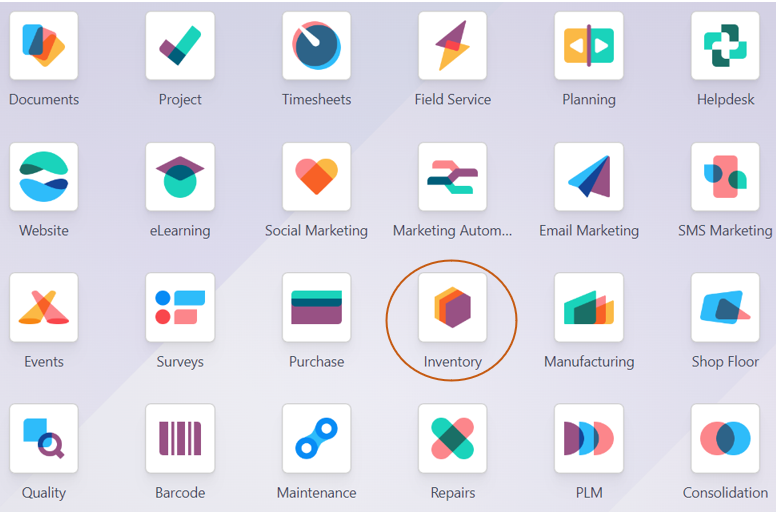
Enable Multi-Step Routes in Odoo 17 Inventory
Putaway is the process of moving things from receiving shipments and placing them in the appropriate area. To create the putaway rule, go to the Inventory module Settings and activate the Multi-Step Routes option.
Inventory Module => Configuration Menu => Settings => Warehouse Section => Multi-Step Routes => Save
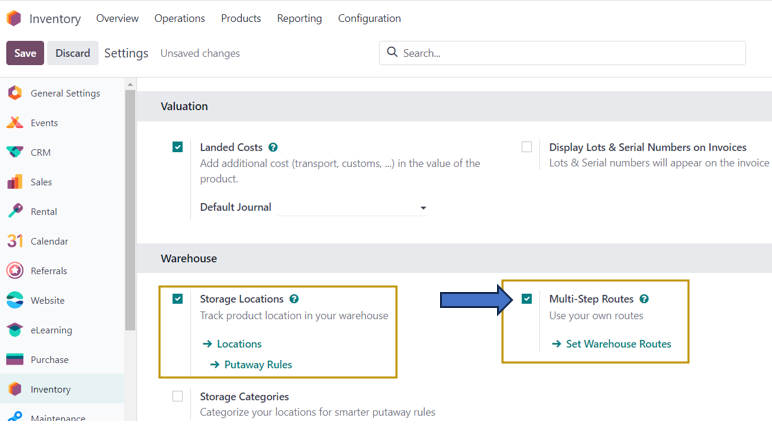
You may observe that on turning on the ‘Multi-Step Routes’ setting, another setting ‘Storage Locations’ is also automatically activated.
Properly implemented putaway rules can reduce the time it takes to locate and retrieve items when they are needed. By storing similar items together or placing frequently accessed items in easily reachable locations, warehouse staff can work more efficiently. Let us see how we can handle products in inventory efficiently with the use of putaway rules.
Configure Storage Locations
As the products are received and moved over to different warehouse locations, we can navigate to the ‘Locations’ page to view all the warehouse locations available. We have the option to directly go to the Locations page from the ‘Settings’ page under ‘Storage Locations’ as seen in the screenshot above or we need to select ‘Locations’ from the ‘Configuration’ menu.
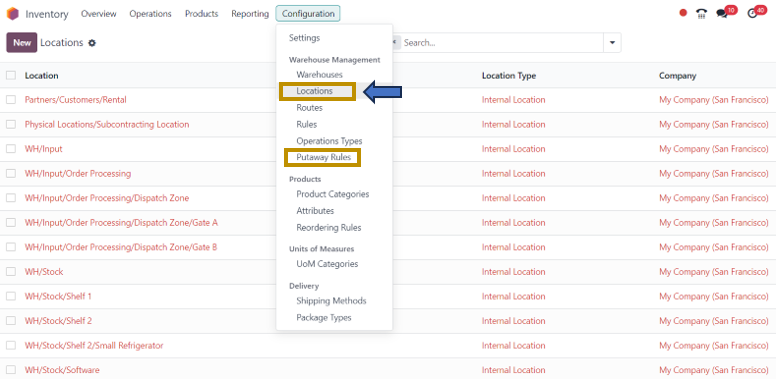
From here, we can select the location to define new putaway rules and view all other existing putaway rules.
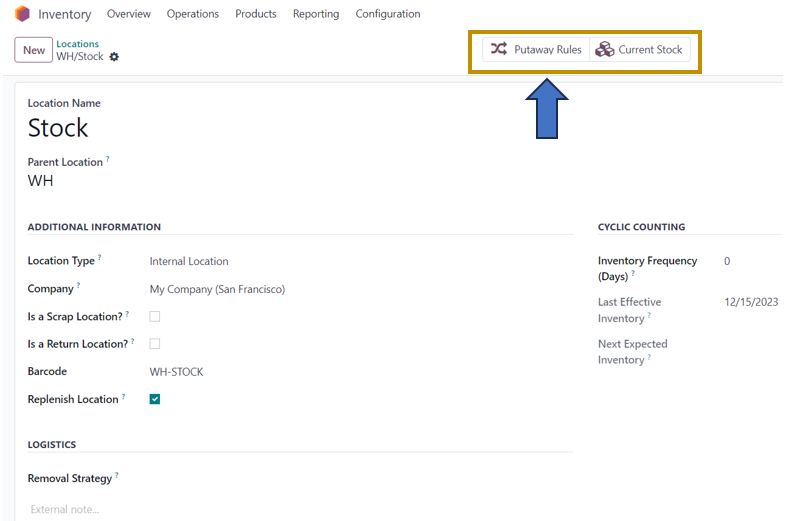
We have selected the Warehouse Stock location from the window. On the Location page, details such as Location name, Parent location, Location type, Company, Barcode, Removal Strategy, Inventory Frequency Days, and other options to specify whether the location is a Scrap Location, Return Location, and Replenish Location are displayed.
From the ‘Location’ form, we can directly go to the putaway rules related to that particular location by selecting the ‘Putaway Rules’ smart button. We can also find the ‘Putaway Rules’ option from the ‘Configuration’ menu in which we can access all the putaway rules configured in the system.

Create Putaway Rules in Odoo 17
To create a new Putaway Rule for that location, we need to select the ‘New’ option in the window.
On the Putaway Rules page, we can view the information such as Product arrival location, Product, Product Category, Package type, Sublocation to store the product, and Company.
On returning to the Location form, we can select the ‘Current Stock’ smart button to understand the products and their quantities in that location.

I insist that you note the ‘On Hand Quantity’ of Customizable Desk (Custom, White) in the screenshot above which is 75 units now. For Instance, we can do a product transfer operation, that is from purchasing the product ‘Customizable Desk (Custom, White) from our vendor to moving the product to the warehouse stock. For that, let us go to the Operations menu to create a new product transfer.
Inventory Module => Operations menu => Receipts => New
As we are dealing with the receiving of products from the vendor, we are selecting ‘Receipts’ as the Transfer Operation.
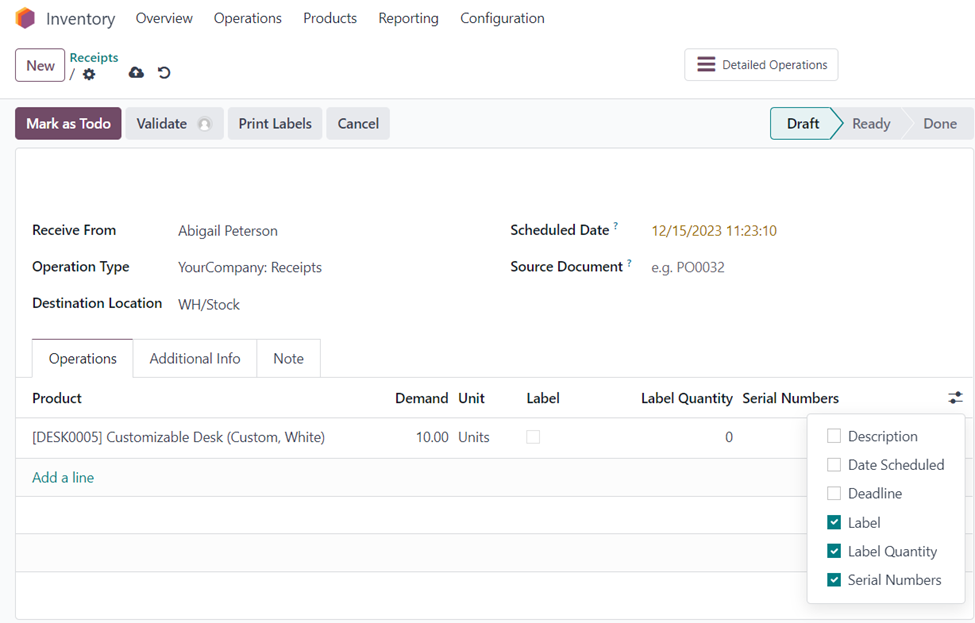
In the ‘Receipts’ form, enter the necessary details such as ‘Receive From’, ‘Operation Type’, ‘Destination Location’, ‘Scheduled Date’, and ‘Source Document’ and the operations to be performed related to that product transfer. Here, in the ‘Operations’ tab, we can specify the product to be transferred along with its demand, unit, label, label quantity, serial number, and so on.
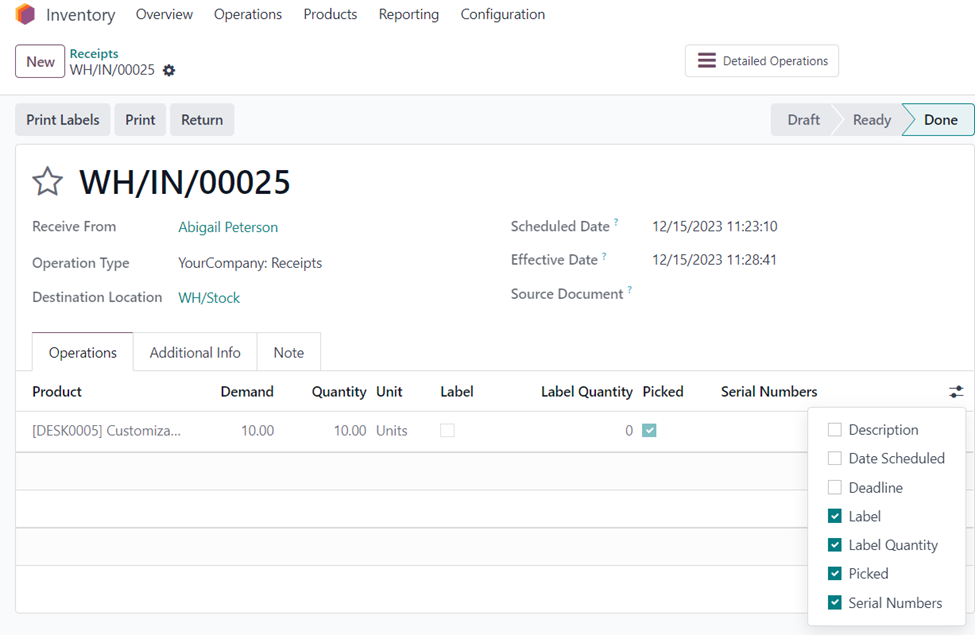
The Receipt above is now in the ‘Draft’ change which can be validated to mark the receipt as ‘Done’. Select the ‘Validate’ button to verify the receipt of products and you may observe that the stage of the receipt is changed to ‘Done’.
View Current Warehouse Stock
Now, 10 Customizable Desks are received from the vendor, Abigail Peterson, and are transferred to the Warehouse Stock location. There were 75 units of Customizable Desk (Custom, White). Now, an additional quantity of 10 units is added to the stock.
To view the current stock, go back to the ‘Locations’ page from the ‘Configuration’ menu and select the ‘WH/Stock’. In the ‘WH/Stock Location’ form, go to the ‘Current Stock’ smart button to view the current stock.
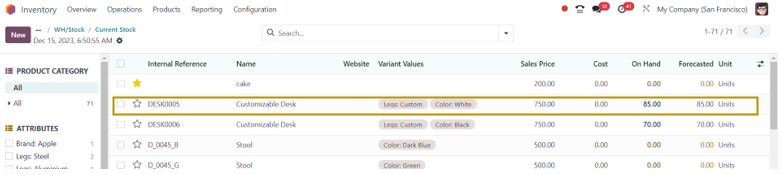
We can see that the ‘On Hand’ quantity of Customizable Desk has changed from 75 to 85 in the stock location because of the receiving of 10 quantity of units from Abigail Peterson.
In summary, putaway rules play a critical role in optimizing the storage and retrieval of inventory in a warehouse, contributing to efficiency, accuracy, and overall operational effectiveness. In this blog, we have discussed Putaway rules, Locations, Product Transfer, and Current Stock functionalities of the Odoo 17 Inventory module. Check out other blogs from the Infintor team to discover other functionalities in Inventory management, Project management, Manufacturing, Accounting, and other operations.
Best Practices for Managing Product Transfer in Odoo 17 Inventory
Although Odoo automates warehouse operations, following a few best practices helps businesses maximize inventory efficiency.
Regularly review warehouse locations to ensure products remain organized according to business requirements. As inventory grows, storage strategies should evolve accordingly.
Configure Putaway Rules for product categories instead of individual products whenever possible. This approach simplifies warehouse management and reduces maintenance.
Validate receipts immediately after physical verification. Doing so keeps inventory records synchronized with actual warehouse stock.
Use barcode scanning to accelerate warehouse transfers while reducing manual entry errors.
Monitor Current Stock frequently to identify inventory discrepancies before they affect customer orders.
Finally, analyze warehouse movement reports regularly to identify bottlenecks and improve storage efficiency.
Why Businesses Choose Odoo 17 for Inventory Transfers
Odoo 17 combines warehouse automation, inventory tracking, product traceability, and intelligent routing within a single ERP platform.
Unlike traditional inventory software, Odoo integrates inventory management with purchasing, manufacturing, sales, accounting, quality control, and logistics.
As a result, businesses gain complete visibility across the entire supply chain.
Whether you manage one warehouse or multiple distribution centers, Product Transfer in Odoo 17 Inventory helps maintain inventory accuracy while reducing warehouse operating costs.
Conclusion
Efficient warehouse management depends on accurate inventory movement, organized storage locations, and automated stock transfers. Product Transfer in Odoo 17 Inventory provides businesses with a powerful framework to handle every stage of warehouse operations, from receiving products from vendors to storing them in the correct warehouse locations using intelligent Putaway Rules.
By enabling Multi-Step Routes, configuring Storage Locations, creating Putaway Rules, and validating inventory receipts, organizations can improve warehouse efficiency, reduce manual work, and maintain accurate stock records. Moreover, real-time inventory updates ensure that warehouse managers always have complete visibility into available stock, helping them make faster and more informed decisions.
Whether you operate a retail store, manufacturing facility, wholesale warehouse, or eCommerce fulfillment center, Odoo 17 delivers the flexibility and automation needed to optimize inventory operations. Implementing these features not only streamlines product transfers but also enhances productivity, minimizes inventory errors, and supports sustainable business growth. By adopting the best practices outlined in this guide, businesses can unlock the full potential of Odoo 17 Inventory Management and build a faster, smarter, and more reliable warehouse management process.