
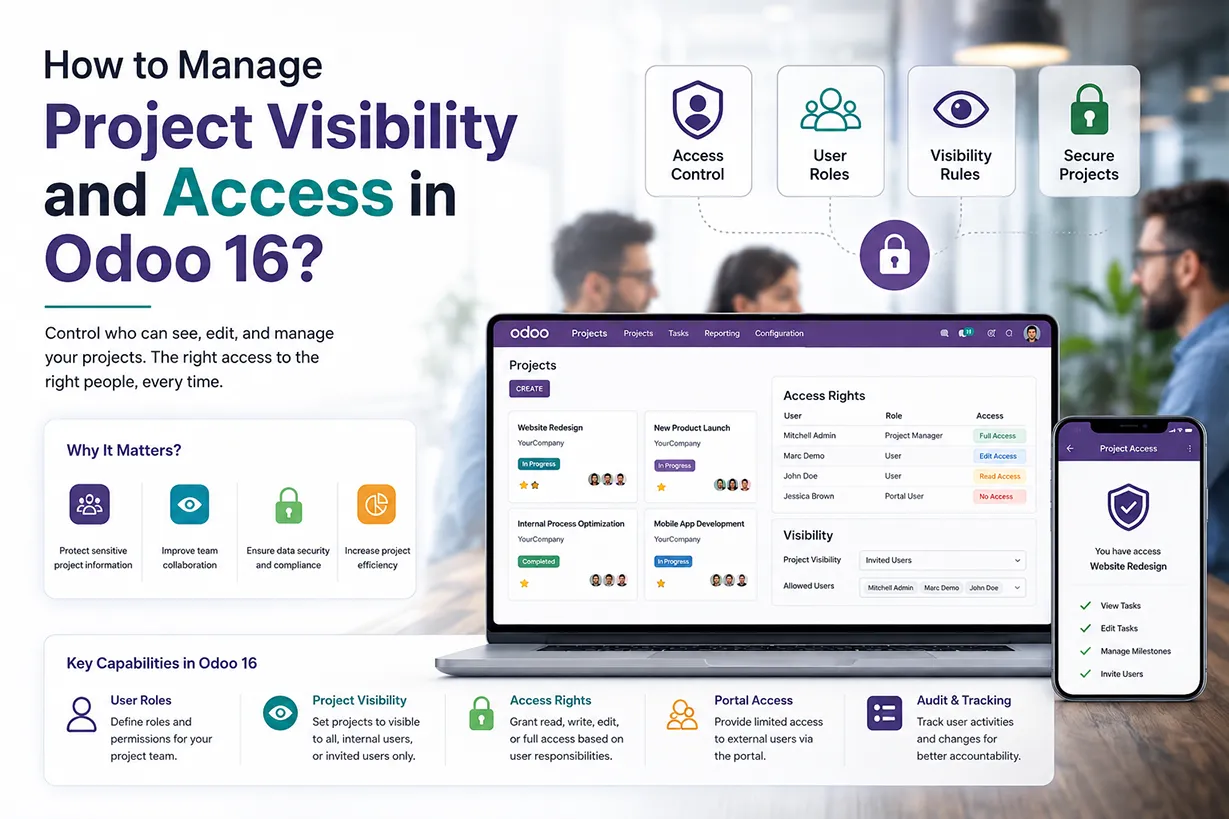
Why Odoo Project Visibility and Access Rights Matter
Odoo project visibility helps businesses control who can access project information. Every project can contain important customer data, internal discussions, deadlines, documents, and business strategies. Therefore, companies need a clear system for managing project access.Odoo project access rights allow administrators to control user permissions according to job responsibilities. Employees can access the projects they need without viewing unrelated information. As a result, teams can collaborate efficiently while businesses maintain better control over sensitive data.
Odoo Project Management also brings projects, tasks, deadlines, timesheets, and team activities into one platform. This centralized approach makes it easier to manage project information. It also gives administrators greater control over user access and project visibility.
How Odoo Project Access Control Improves Security
Project access control plays an important role in protecting business information. Different employees may work on different projects. However, they may not need access to every project within the company.
For example, a software development team may work on technical implementation projects. The finance team may need access to financial tasks instead. Odoo user access rights allow administrators to create permissions that match these responsibilities.This approach reduces unnecessary access to confidential information. It also helps project managers maintain accountability. Users can focus on their assigned work without navigating through unrelated projects and tasks.
Odoo Project Visibility for Internal Users
Odoo provides different project visibility options for internal users. Businesses can choose the appropriate option according to their collaboration requirements. Some projects may require access only for selected employees. Other projects may need to remain open to all internal users. This flexibility helps organizations create different access structures for different types of projects.
For example, a company can restrict a confidential client implementation project to its project team. At the same time, it can allow all employees to access a general internal improvement project. Therefore, Odoo project visibility gives businesses greater control over project information. It also helps employees find relevant projects more easily.
Odoo Project Access for Portal Users
Many businesses need to share project information with customers. However, customers should not automatically receive access to internal company information. Odoo portal access provides a practical solution. Businesses can allow customers to view relevant project information while keeping internal discussions and confidential data private.
For example, a customer can follow tasks related to their project. The internal team can continue managing the project from the Odoo backend. This creates a connected workflow between employees and customers. Portal access can also reduce unnecessary email communication. Customers can follow relevant project activities and receive updates through the Odoo portal. Consequently, project teams can spend more time completing tasks and less time sending manual status updates.
Project Visibility and Access Setup
Projects often involve sensitive information, proprietary data, or confidential strategies. By defining access rights, you can ensure that only authorized individuals have access to such information, reducing the risk of data breaches and unauthorized disclosures. In collaborative projects, multiple team members may be working on different aspects simultaneously. Access controls help maintain version control by preventing conflicting changes and ensuring that individuals only modify the sections of the project for which they are responsible. For projects involving external clients or stakeholders, setting up access controls is essential for managing the flow of information. It allows organizations to share relevant project updates and information with external parties while maintaining control over sensitive details.
Let’s see how access to different projects by different stakeholders of your organization can be controlled in Odoo. For that, we can go to the ‘Project’ Module in the Odoo dashboard.
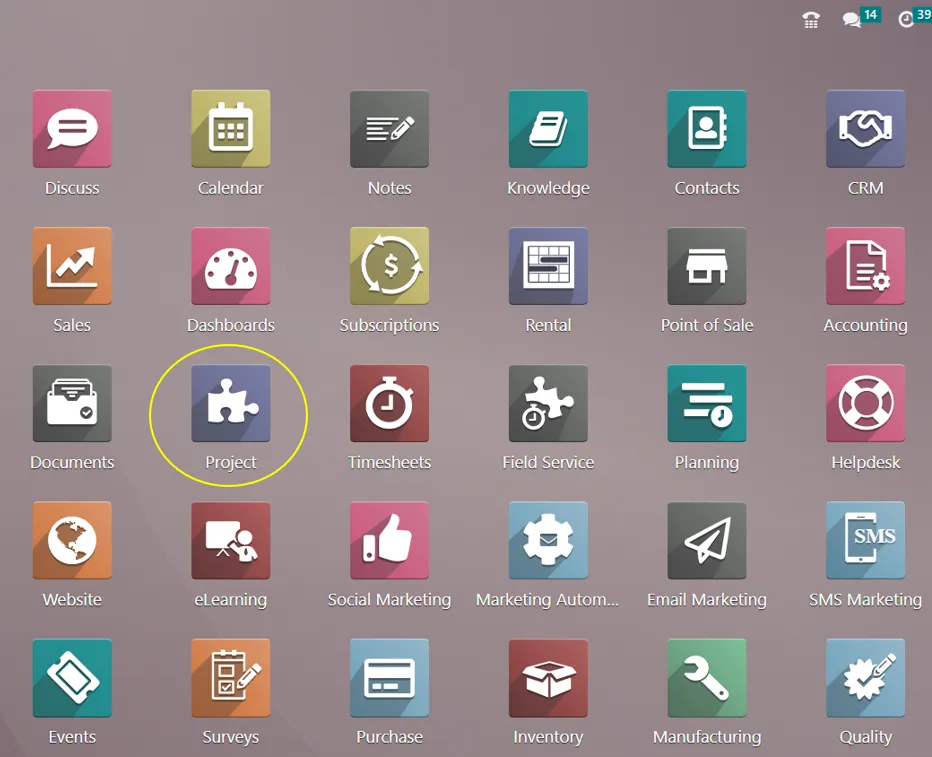
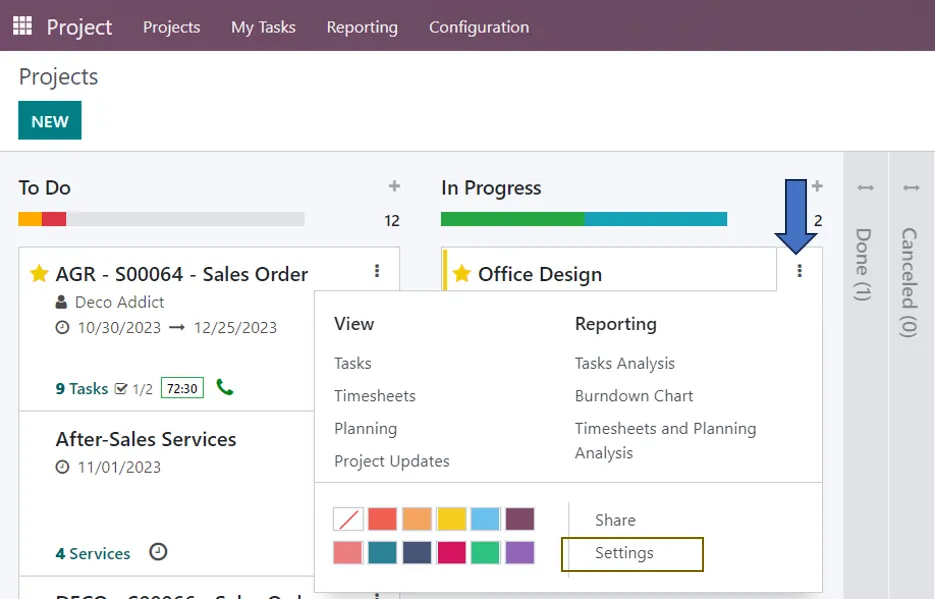
For setting up privacy in the Project management module, we have to go to the settings of the respective projects added in the module.
Project Application => Projects => Select the Project => Project Configuration tab => Settings
In the ‘Settings’ tab of the Project page, we have three options for defining the visibility of that project to its users.
=> Invited Internal Users:
Internal users who follow a project will have unrestricted access to all of its tasks. If not, they will only be able to access the particular tasks they are completing. Even if they are not specifically among the followers, a user with the project > administrator access right level can nevertheless access this project and associated tasks. This allows you to add employees as followers of your project or tasks, and it also removes Portal users from the project and task followers list.
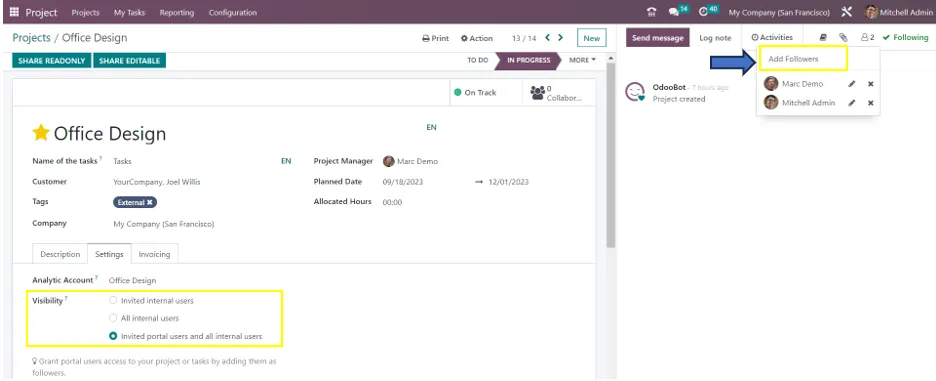
=> All internal users:
There are no restrictions on the internal users to access the project or its tasks. Users of the portal will no longer be able to follow the project or its tasks.
=> Invited Portal Users and All internal users:
Those who have been invited to the portal and all the internal users have equal access to the project and all of its tasks. Portal users will have undifferentiated access to all of a project’s tasks when they follow it. If not, they will only be able to access the particular tasks they are completing. The portal user is sent to their portal when a project is shared as read-only. They are unable to alter the tasks, only view them. Upon sharing a project in edit mode, the user of the site is directed to the task Kanban and list mode. They can modify a specific group of task fields. If the relevant URL is given to an internal user (or, if the project is private, if they are a follower), they can access a task even in the absence of project access credentials.
The ‘User’ menu in the ‘General settings’ allows you to modify the user’s role and access permissions for various modules.

From here, we can select a particular user to define their role in different modules such as Sales, POS, Inventory, Purchase, Accounting, Sign, etc.. in the Odoo dashboard according to their roles and responsibilities in your organization. Now, we are going to set the user type for the Project Management module in Odoo. We can select administrator, user, or none.
1. When the User Type is set as Administrator
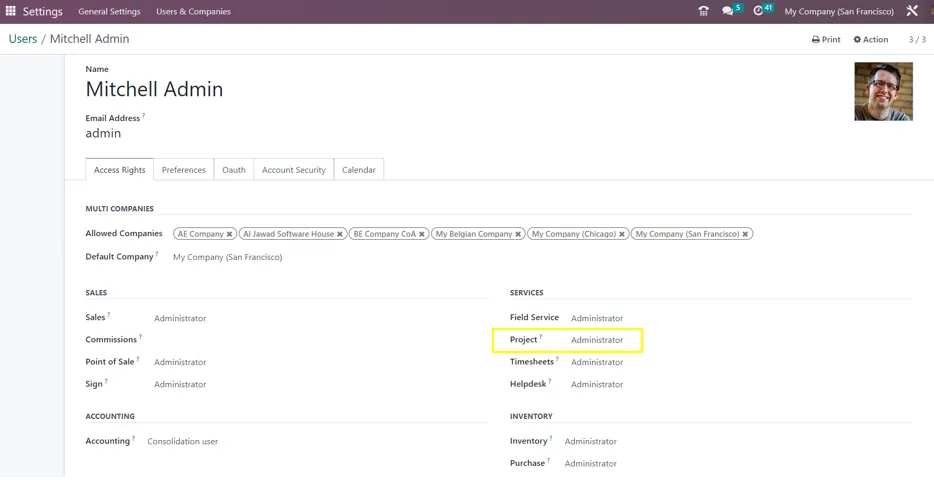
With the Administrator position, a user can work on one or more projects at once and manage them with ease. Conduct searches and analyses for many projects. In addition, it gives the administrator the ability to oversee each project-by-project management of the subtask function. To manage the link between tasks, create subtasks at different levels, re-plan jobs, and keep track of the anticipated and actual hours. You can also utilize automated actions to send emails on various statuses, such as ticket confirmation and customer satisfaction surveys.
The administrator has access to the Setting page of the Project Module to set and define different settings for managing numerous projects effectively.
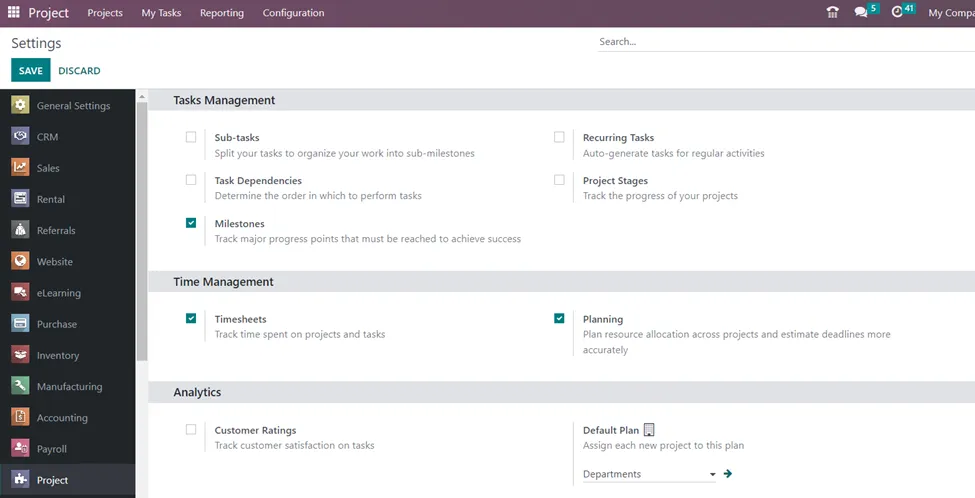
2. When the User Type is set as User
Through Odoo user security roles, users can access the modules they need, and administrators can govern the functioning of the modules according to their roles and preferences. Access to the created projects, tasks, and reports area is granted to users with the project module User role. The project module’s setup and settings section will be off-limits to the user, as indicated below.
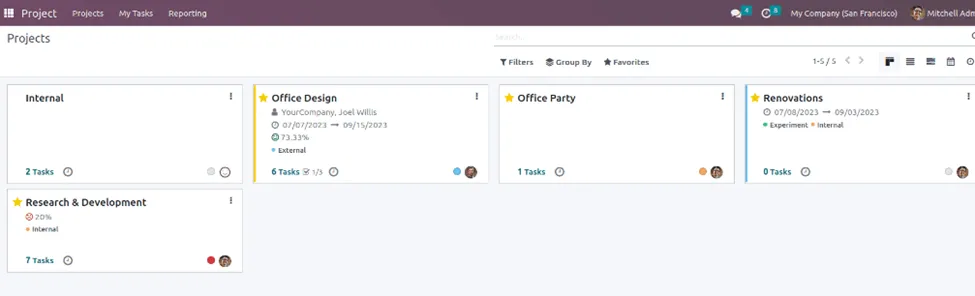
3. When the User Type is set as None
The relevant user will not be able to access the Project module or any of its features if the role is set to None.
In summary, project visibility and access rights are essential components of effective project management. They safeguard sensitive information, support compliance efforts, enable efficient collaboration, and contribute to the overall success of the project and the organization. Infintor Solutions helps businesses to manage projects in real-time by tracking down tasks, monitoring progress, allocating resources, and timely completion of projects.
Odoo Project Management and User Roles
User roles form an important part of Odoo project security. Each employee should receive permissions that match their responsibilities.
Project administrators may need access to configuration options, reports, project settings, and advanced management features. Regular project users may only need access to projects, tasks, timesheets, and other daily activities.
This role-based approach keeps project management organized. It also prevents users from accessing settings that they do not need.
Odoo user permissions can support different departments within the same organization. Sales, development, support, finance, and management teams can work with the information relevant to their responsibilities.
Managing Odoo Project Permissions
Administrators should review project permissions before assigning access. First, identify the users who need access to the Project application. Next, determine what each user needs to view or manage.
This process helps businesses create a simple permission structure. It also reduces the risk of giving excessive access to employees.
For example, a project manager may need to create and manage tasks. A regular employee may only need to update assigned tasks. A customer may only need to view selected project information.
By matching permissions with responsibilities, businesses can maintain better Odoo project access control.
Best Practices for Odoo Project Access Rights
Businesses should follow a few simple practices when configuring Odoo project permissions. First, define user roles clearly. Then, assign access according to each person’s responsibilities.
Administrators should also review permissions regularly. Employees may change departments, take on new responsibilities, or leave the organization. Therefore, outdated permissions should not remain active.
Businesses should also avoid giving administrator access to users who do not need it. Administrator permissions provide broader control over the Project application. Limiting this access can reduce the possibility of accidental changes.
A clear internal access policy can make this process easier. Employees should understand which projects they can access and why they have those permissions.
Odoo Project Access Rights for Growing Businesses
Growing companies often manage more employees, customers, departments, and projects. As the number of projects increases, manual access management becomes difficult.
Odoo project access rights provide a centralized solution. Administrators can manage user roles and project visibility from the Odoo environment.
For example, a company can create separate project teams for different customers. Each team can access its relevant projects and tasks. Customers can then receive controlled portal access for their own projects.
This structure improves organization as the business grows. It also helps managers maintain better oversight of ongoing work.
Project Visibility and Customer Collaboration
Customer collaboration requires a balance between transparency and security. Customers need enough information to understand project progress. At the same time, businesses must protect internal information.
Odoo helps businesses manage this balance through project visibility and portal access. Companies can share relevant project information without exposing unrelated internal activities.
As a result, customers can remain informed while project teams retain control over internal work. This approach can improve communication and create a more professional customer experience.
Odoo Project Security and Business Data
Project security involves more than controlling who can open a project. Businesses also need to consider who can modify tasks, update information, view reports, and manage project settings.
Odoo provides different user roles to help administrators manage these requirements. When businesses configure these roles correctly, they can create a structured project environment.
This approach becomes especially useful when Odoo connects project management with other applications. Sales, CRM, Accounting, Inventory, Purchase, Timesheets, and Helpdesk can all contribute information to business workflows.
Therefore, companies should consider project permissions as part of their wider Odoo ERP security strategy.
Why Choose Odoo for Project Management?
Odoo combines project planning, task management, timesheets, collaboration, reporting, and customer communication in one ERP platform. This unified approach reduces the need to manage project information across multiple systems.
Businesses can create projects, assign tasks, track deadlines, monitor working hours, and communicate with customers from the same environment. At the same time, administrators can configure user permissions according to business requirements.
Odoo project management can support many types of organizations. Software companies, consulting firms, manufacturers, construction businesses, service providers, and other organizations can use Odoo to organize their project workflows.
Odoo Project Access Rights for Better Project Management
Correctly configured project access rights can improve both security and productivity. Employees receive access to the information they need. Managers gain better control over projects. Customers can receive appropriate project visibility through the portal.
For businesses implementing Odoo, permission planning should form part of the initial configuration process. An experienced Odoo implementation partner can review business requirements, define user roles, configure project visibility, and establish suitable access rights.
With the right configuration, Odoo can provide a secure and scalable project management environment. Businesses can therefore manage projects more efficiently while maintaining better control over important information.