

Introduction to Pro-Forma Invoice in Odoo 17
Businesses often need to provide customers with a detailed quotation before confirming an order or requesting payment. In such situations, a Pro-Forma Invoice in Odoo 17 becomes an essential document that communicates pricing, taxes, product details, delivery information, and payment expectations without creating an official accounting invoice.
Why Use a Pro-Forma Invoice in Odoo 17?
Odoo 17 simplifies this process by allowing businesses to generate and send professional Pro-Forma Invoices directly from the Sales module. Instead of preparing documents manually, sales teams can create quotations, convert them into pro-forma invoices, email them to customers, and later confirm the order when the customer approves.
What You Will Learn in This Guide
Whether you operate a manufacturing company, wholesale business, retail store, trading organization, or service-based enterprise, understanding how to send a Pro-Forma Invoice in Odoo 17 helps improve customer communication, accelerate approvals, and streamline your sales workflow.
In this guide, we will explain everything you need to know about Pro-Forma Invoices in Odoo 17, including their benefits, activation process, step-by-step configuration, creation, delivery validation, and best practices.
What is a Pro-Forma Invoice?
A Pro-Forma Invoice is a preliminary commercial document that a seller sends to a buyer before issuing the final invoice. Although it resembles a standard invoice, it is not an accounting document and does not record financial transactions. Instead, it provides an estimate of the products or services that will be supplied along with their expected costs.
Businesses use Pro-Forma Invoices for several important purposes. They help customers understand pricing before placing an order, simplify international trade documentation, support customs clearance procedures, and establish transparency between buyers and sellers.
Unlike a quotation, a Pro-Forma Invoice appears more formal because it resembles the final invoice that customers will receive after delivery. However, unlike an actual invoice, it does not create journal entries or affect accounting records.
For organizations using Odoo ERP, the Pro-Forma Invoice feature seamlessly integrates with quotations, sales orders, inventory management, delivery operations, and invoicing, making the entire sales cycle much more efficient.
Why Use Pro-Forma Invoices in Odoo 17?
Modern businesses require faster communication and accurate documentation throughout the sales process. Fortunately, Odoo 17 allows companies to generate Pro-Forma Invoices with just a few clicks.
Using Pro-Forma Invoice in Odoo 17 offers several advantages.
First, it provides customers with complete pricing transparency before the order is confirmed. Customers can review product details, taxes, discounts, delivery charges, and payment terms without receiving an official invoice.
Second, businesses involved in international trade often require Pro-Forma Invoices for customs documentation. Since customs authorities frequently request product values before shipment, businesses can generate these documents directly from Odoo.
Furthermore, sales representatives can negotiate pricing more effectively because customers receive professional-looking documents instead of informal quotations.
Additionally, customers gain confidence when they receive a structured document that clearly outlines the transaction. This improves trust and often speeds up purchasing decisions.
Most importantly, Pro-Forma Invoices help reduce misunderstandings because both parties agree on pricing and terms before delivery begins.
Key Benefits of Sending a Pro-Forma Invoice in Odoo 17
Odoo 17 offers numerous advantages when businesses use Pro-Forma Invoices as part of their sales process.
Professional Customer Communication
A professionally formatted Pro-Forma Invoice creates a positive impression while presenting detailed pricing information in an organized manner.
Improved Sales Transparency
Customers can clearly review every product, quantity, tax, discount, and additional charge before confirming the purchase.
Faster Sales Approval
Since customers already understand the financial details, they often approve quotations much faster.
Better International Trade Support
Export businesses frequently require Pro-Forma Invoices for customs declarations, import approvals, banking procedures, and shipping documentation.
Seamless Integration
Unlike manually prepared documents, Pro-Forma Invoices in Odoo connect directly with Sales Orders, Inventory, Delivery Orders, and Accounting modules.
Reduced Manual Errors
Because Odoo automatically retrieves customer information, product pricing, taxes, and quantities, businesses minimize manual data entry and avoid common mistakes.
Difference Between a Quotation, Pro-Forma Invoice, and Invoice
Many users confuse these three sales documents. However, each serves a different purpose within the Odoo sales process.
A quotation introduces pricing to potential customers before they make a purchasing decision.
A Pro-Forma Invoice presents the agreed pricing in a formal invoice-style document without creating accounting entries.
The final customer invoice becomes the legal accounting document generated after confirming the order and delivering products or services.
This structured workflow allows businesses to communicate clearly while maintaining accurate accounting records.
Pro-Forma Invoice Setting in Odoo 17 Activation
Before creating a Pro-Forma invoice, we need to make sure the functionality is enabled on the Settings page of the Odoo 17 Sales module.
Sales Application => Configuration Menu => Settings => Quotations and Orders Section => Pro-Forma Invoice => Save
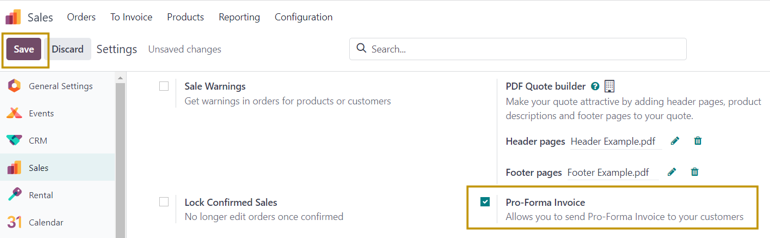
Let us now dive into the creation of Pro-Forma Invoice. Firstly, we need to create a sales order for sending Pro-Forma invoice for that order.
Sales Application => Orders Menu => Orders => New
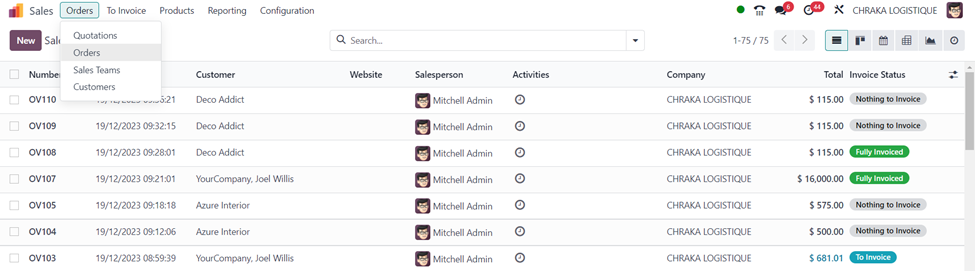
The ‘Sales Order’ window shows all the sales orders created in the Odoo system along with details such as Sales Order number, Order date, Customer, Website, Salesperson, Activities, Company, Total amount, Invoice status, and many more in the list view.
Select the ‘New’ button to create a new sales order.
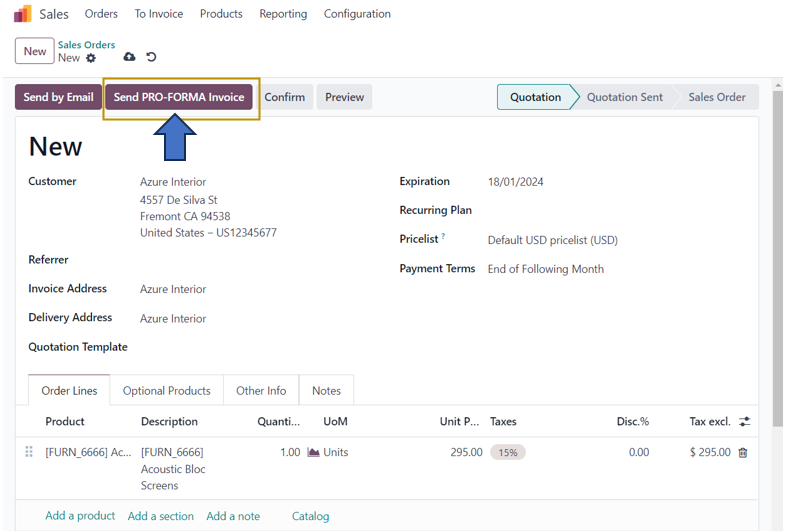
In the sales order form, select the customer from the drop-down and enter other essential details in the form. Add the product to the invoice in the ‘Order Lines’ tab of the form by selecting the product using either ‘Add a product’ or ‘Catalog’ options.
To send a Pro-Forma Invoice for this sales order, we can select the ‘Send PRO-FORMA Invoice’ option at the top of the quotation.
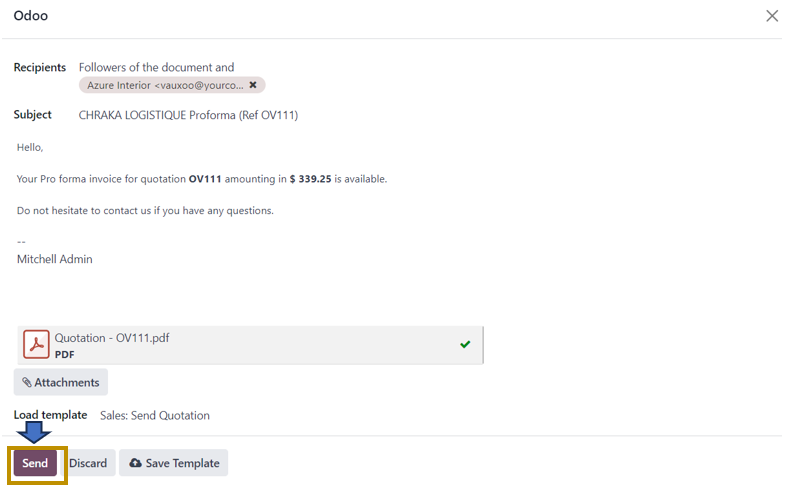
A window appears as above in which details entered in the quotation are reflected. The customer in the order is the recipient of the Pro-Forma Invoice. Other details such as the Subject, E-mail content, and Quotation are attached as a PDF file. We can also edit and make changes in the e-mail. Once everything is done, click on the ‘Send’ option.
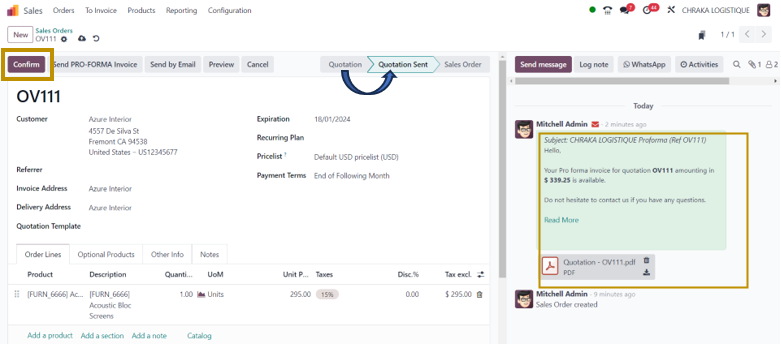
The Pro-Forma Invoice is now sent to the customer. On returning to the sales order, we can access the details of Pro-Forma Invoice in the ‘Log Note’ section. You may observe now that the status of the order has been changed from ‘Quotation’ to ‘Quotation Sent’. On clicking the ‘Confirm’ button, the status again changes from ‘Quotation Sent’ to ‘Sales Order’.
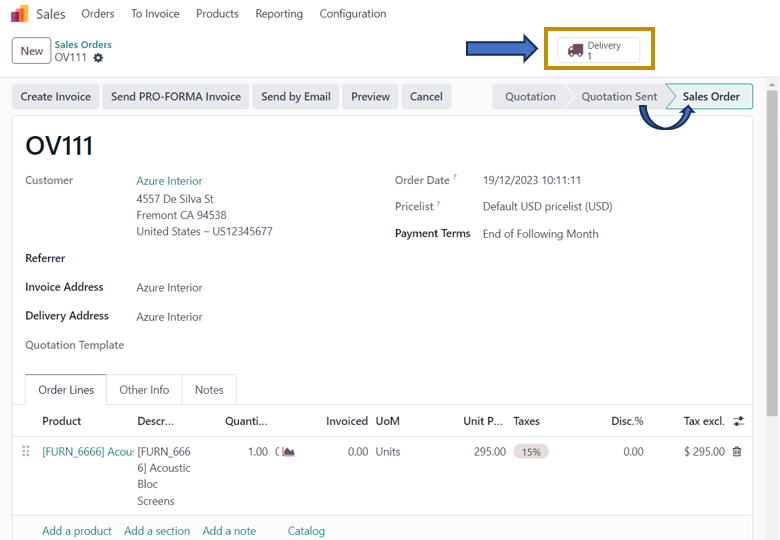
A ‘Delivery’ smart button appears at the top which we need to validate the delivery order. For that, Click on the ‘Delivery’ smart button.

In the Delivery Order, Select the ‘Validate’ option to validate the delivered quantity of the product.

On validation, the status of the delivery order is changed to ‘Done’ and the delivery of 1 unit of Acoustic Bloc Screens to the customer, Azure Interior is completed.
Sending a pro forma invoice is part of the overall invoicing process, providing transparency, clarity, and a basis for a smooth business transaction. It helps build trust between the buyer and seller and ensures that both parties are on the same page regarding the terms of the transaction. Refer to other blogs from Infintor Solutions to stay ahead of Odoo 17 ERP Software functionalities.
What Information Does a Pro-Forma Invoice Include?
A typical Pro-Forma Invoice in Odoo 17 contains comprehensive information required for customer review and international trade documentation.
The document generally includes customer details, company information, quotation reference, product descriptions, quantities, unit prices, discounts, taxes, subtotal, total amount, payment terms, validity period, shipping information, and applicable notes.
This complete presentation allows customers to review every aspect of the transaction before making payment or approving the order.
Best Practices for Sending Pro-Forma Invoices in Odoo 17
Although generating Pro-Forma Invoices in Odoo is straightforward, following a few best practices ensures a smoother sales process.
Always verify customer information before sending the document. Incorrect email addresses or billing details can delay approvals.
Next, review product pricing and tax calculations carefully. Even small mistakes may create confusion later in the sales cycle.
Moreover, customize your email templates with professional branding. Personalized communication increases customer confidence and improves response rates.
It is also advisable to include payment terms, delivery timelines, warranty information, and any special conditions directly within the quotation or email.
Finally, monitor customer responses through Odoo’s chatter feature so your sales team can follow up promptly whenever necessary.
How Pro-Forma Invoices Improve Business Operations
Businesses that regularly use Pro-Forma Invoices experience smoother communication throughout the sales process.
Customers receive clear pricing before making commitments, reducing disputes and unnecessary revisions.
Sales teams spend less time preparing documents manually because Odoo generates them automatically from quotations.
Accounting teams benefit because Pro-Forma Invoices do not create journal entries until the actual invoice is issued.
Warehouse teams also gain better visibility since confirmed Sales Orders trigger inventory operations only after customer approval.
Consequently, organizations improve operational efficiency while maintaining complete transparency between departments.
Why Choose Odoo 17 for Sales and Invoice Management?
Odoo 17 provides a fully integrated sales ecosystem that connects CRM, Sales, Inventory, Purchase, Accounting, Manufacturing, Delivery, and Customer Relationship Management into one centralized platform.
Instead of using multiple disconnected applications, businesses can manage the complete customer journey from quotation creation to payment collection within a single ERP solution.
The Pro-Forma Invoice feature is just one example of how Odoo automates repetitive sales activities while maintaining professional communication with customers.
Whether you are a startup, SME, distributor, manufacturer, exporter, wholesaler, or enterprise organization, Odoo 17 helps simplify sales operations, reduce manual work, and improve customer satisfaction.
Conclusion
Knowing how to send a Pro-Forma Invoice in Odoo 17 is essential for businesses that want to create transparent, professional, and efficient sales processes. A Pro-Forma Invoice allows customers to review pricing, taxes, payment terms, and product details before an official invoice is generated. As a result, both buyers and sellers gain greater clarity and confidence throughout the transaction.
With Odoo 17, enabling the feature takes only a few minutes. Once activated, sales teams can create quotations, send professionally designed Pro-Forma Invoices, monitor customer communication, confirm sales orders, validate deliveries, and complete invoicing—all within a unified ERP platform.
If your organization aims to optimize sales operations, improve customer communication, and automate invoice management, Odoo 17 provides a reliable and scalable solution. Partnering with an experienced Odoo implementation company can further help you customize the platform to match your unique business requirements, ensuring you get the maximum value from your ERP investment.