
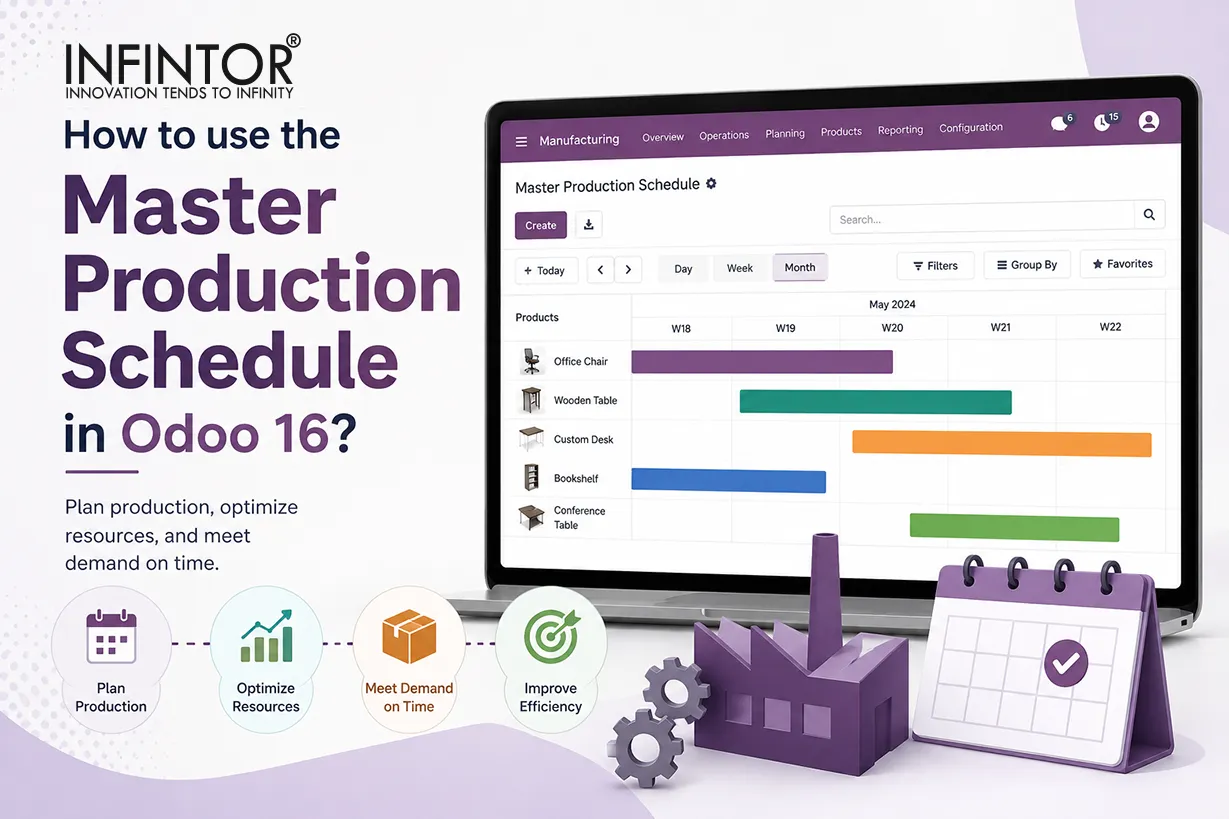
The Master Production Schedule (MPS) in Odoo 16 helps manufacturers plan future production and replenishment according to expected demand. Instead of waiting for customer orders or inventory shortages, production planners can estimate future requirements and prepare the necessary quantities in advance. This approach gives manufacturing businesses greater visibility into upcoming demand while helping them coordinate inventory, production, and procurement activities.
Odoo MPS connects demand forecasting with replenishment planning. A production planner can review forecasted demand, current inventory, planned replenishment, forecasted stock, and other relevant information from a single planning interface. Based on these figures, the planner can decide whether the business needs to manufacture additional products or purchase them from suppliers.
This capability becomes particularly valuable when customer demand changes frequently. Seasonal products, fast-moving goods, products with long manufacturing lead times, and businesses that maintain make-to-stock inventory can all benefit from forward-looking production planning. Rather than reacting to shortages after they occur, teams can identify potential requirements earlier and take corrective action.
Production planning also becomes easier when the company connects its manufacturing process with inventory and purchasing. Odoo provides this integrated environment through its Manufacturing, Inventory, Purchase, Sales, Quality, and Maintenance applications. Consequently, production planners can make decisions using information from several connected business processes instead of relying entirely on separate spreadsheets.
Why Use Odoo 16 MPS for Production Planning?
Manufacturers need accurate information to determine what they should produce, when they should produce it, and how much inventory they should maintain. Traditional spreadsheets can provide basic planning functionality, but they often require employees to update multiple files manually. As the number of products, warehouses, suppliers, and production orders increases, this process becomes increasingly difficult to manage.
The Odoo 16 Master Production Schedule provides a centralized planning environment. Production planners can enter expected demand, review projected inventory, and determine replenishment requirements without maintaining a separate production planning system. Moreover, the MPS works within the wider Odoo ERP environment, which allows users to connect production planning with inventory and procurement processes.
A manufacturing company can also use MPS to prepare for future demand instead of focusing only on current orders. For example, historical sales may show that demand for a particular product increases significantly during a specific season. The production team can enter that expected demand into the MPS and review the resulting replenishment requirement before the season begins.
This proactive approach can reduce the risk of emergency production and last-minute purchasing. At the same time, planners can reduce unnecessary production when forecasts indicate lower future demand.
How Does the Odoo 16 Master Production Schedule Work?
The Odoo MPS process starts with the products that require forecast-based planning. The production planner selects the relevant products and reviews their demand and inventory information across future planning periods. Odoo then displays information that helps the planner understand the expected stock position and replenishment requirement.
Businesses can configure the MPS according to their planning cycle. Odoo 16 supports daily, weekly, and monthly planning periods. Therefore, a manufacturer can select a planning frequency that matches its operational requirements. A company with stable demand may prefer monthly planning, while a manufacturer with rapidly changing requirements may benefit from weekly or daily planning.
The planning dashboard can display several important values, including starting inventory, actual demand, forecasted demand, indirect demand, replenishment, forecasted stock, and available-to-promise information. These values help planners understand how demand and replenishment affect future inventory.
When a planner changes forecasted demand, Odoo recalculates the relevant planning information. Higher expected demand can increase the required replenishment, while lower demand can reduce it. This flexibility allows production teams to update their plans as market conditions change.
Configuring Master Production Planning
Manufacturing management systems offer several benefits, including decreased redundancy, automated processes, improved supply chain, warehouse, transportation, inventory management, risk reduction, improved customer service, departmental integration, real-time reporting, centralization of operational and financial data, and flexibility to accommodate changes in the business. The ERP system that streamlines scheduling and planning at every level, Odoo 16 Manufacturing Module, is a useful tool for managing manufacturing orders, bills of materials, and work centers. It integrates Product Lifecycle Management (PLM), Quality, and Maintenance modules to offer efficient request monitoring, quality alerts, and component approval processes. This connection ensures continued network expansion and communication for industrial businesses.
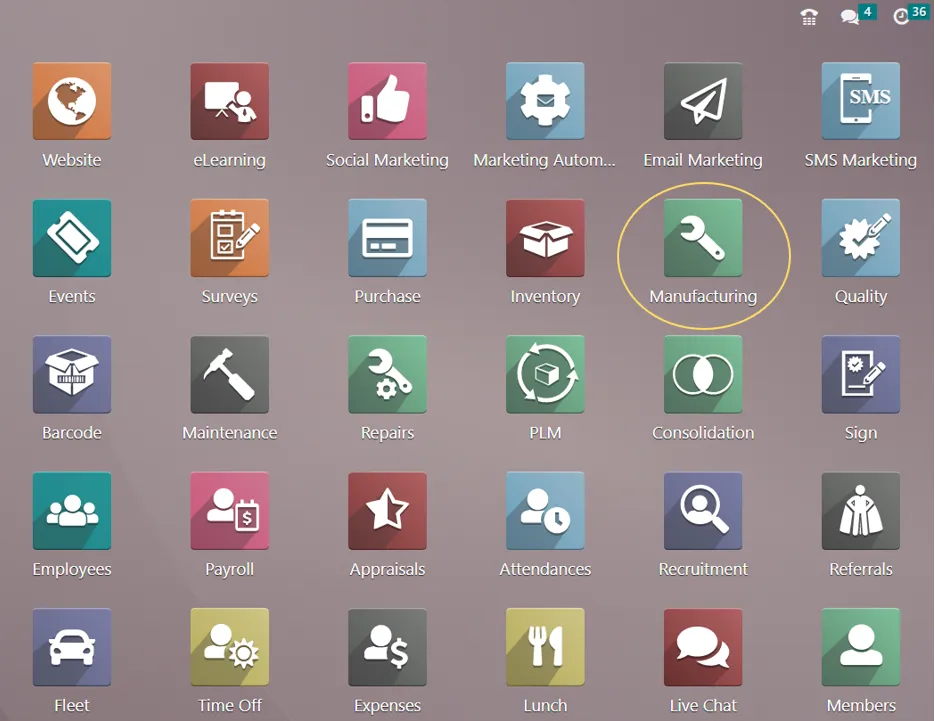
Master Production Planning is a production forecasting tool available in the Odoo 16 enterprise version Manufacturing module. Forecasts are used to calculate product demand, and users can change values as needed. This function helps manufacturers estimate the necessary product quantities to meet demand, which helps plan production per market demand. It is necessary to guarantee effective production and satisfy consumer requests.
You can enable the “Master Production Schedule” option from the “Settings” page of the Odoo 16 Manufacturing Module to configure the Master Production Scheduler capability.
Manufacturing Application => Configuration menu => Settings => Planning section => Master Production Schedule => Save
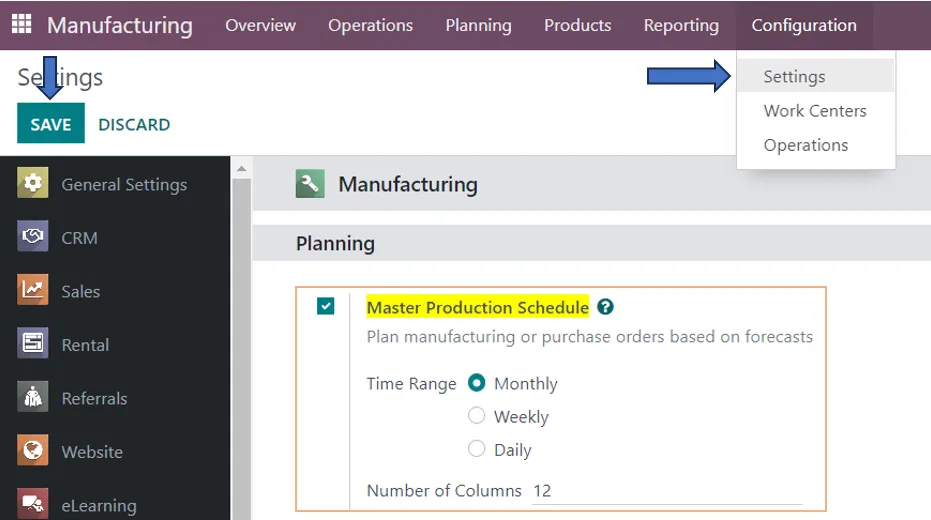
The Master Production Scheduler (MPS) settings allow you to choose the number of periods you want to show continuously as well as the time range (Month, Week, or Day) for your schedule. Here, we have specified the number of columns as 12 and the production planning monthly.
Developing an Upcoming Master Production Schedule
Go to the “Master Production Schedule” option in the “Planning” menu, as shown in the screenshot below, to plan a new MPS for your manufacturing unit.
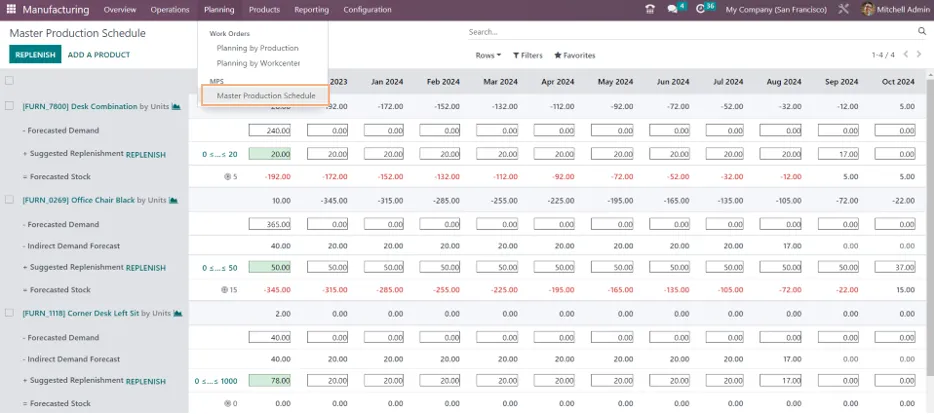
You can select which information is shown by clicking on the “Rows” option in the MPS view. Starting Inventory, Actual Demand, Indirect Demand Forecast, To Replenish, Actual Replenishment, Forecasted Stock, and Available to Promise are among the factors included in this.
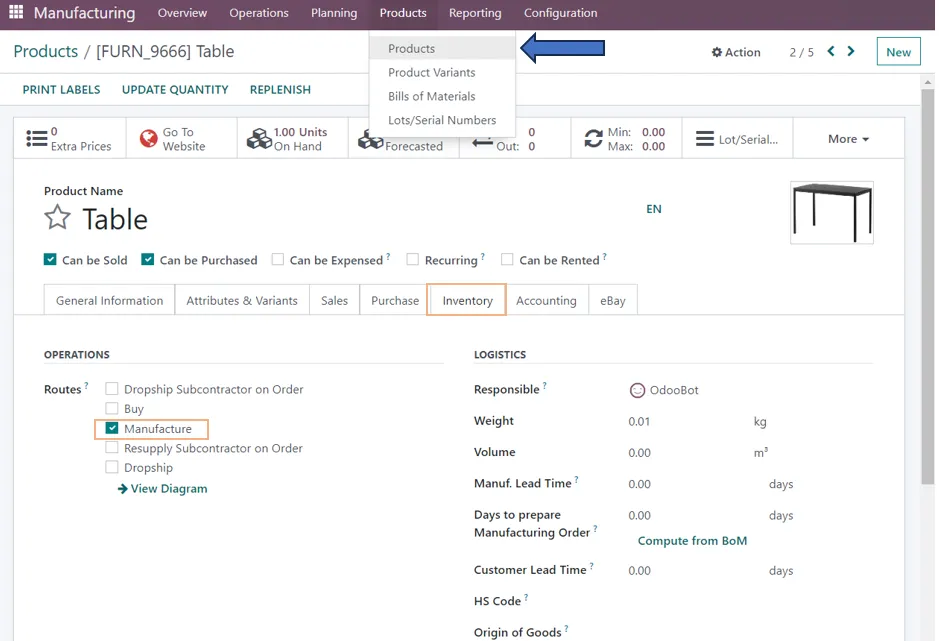
If the relevant product’s route of operation is set to “Manufacturing” when it is added to the MPS, Odoo will only be able to generate a manufacturing order upon replenishment. As seen in the example below, you may modify the product path by launching the specific form view from the “Products” menu.
Manufacturing Module => Products Menu => Products => Select the Product => Inventory Tab => Operations section => Routes => Manufacture => Save
Including a New Item
The “ADD A PRODUCT” button allows you to add a new product to the Master Product Schedule. Clicking this button will open the Pop-up form window you see below.
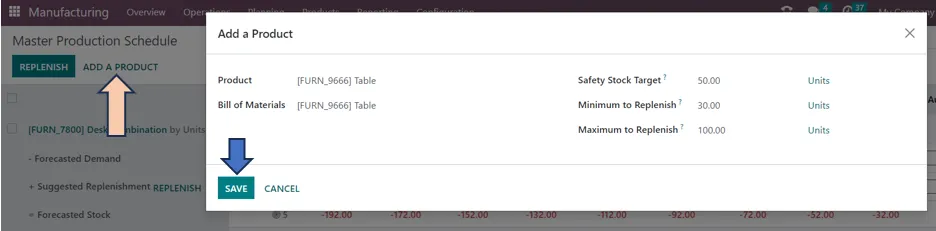
The product data, such as the “Product Name,” “Bill of Materials,” and “Production Warehouse,” can be entered within the form view.
Indicate how much free stock of the product specified in the “Safety Stock Target” column you would like to have on hand at all times. Odoo will always renew at least the “Minimum to Replenish” amount if you supply it, up until the point at which there is no more demand. The maximum quantity of replenishment you would like to use for each MPS product is indicated by the amount indicated in the “Maximum to Replenish” field. If the demand is greater than this sum, the balance will be automatically carried over to the following period. Once finished, click the “SAVE” button.
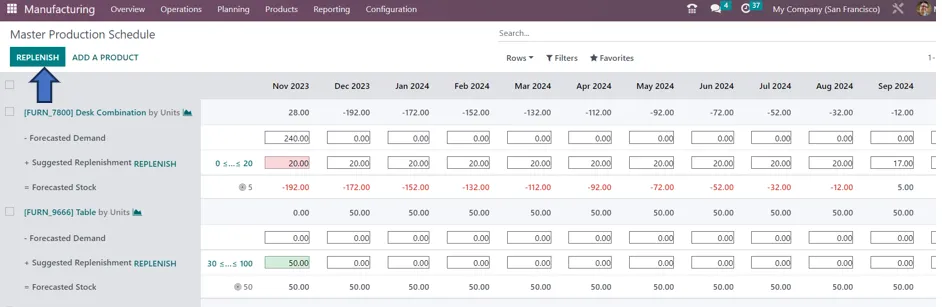
The product created by selecting the ‘Add a product’ option, the product will be displayed in the MPS dashboard in which you can view the presently available number of pieces for purchase. Information on the stock over the next year is available and will be released every month. The “Forecasted Demand” column can be manually updated with the anticipated demand. The suggested refill amount is displayed in the “Suggested Replenishment” column. The “Forecasted Stock” field will include an indication of the amount of stock that will be available after the period.
When the “REPLENISH” button is clicked, Odoo will generate a manufacture or buy order based on the product’s operating path. The Manufacturing Orders portal will display the orders that were produced using MPS as the source.
Forecasting product demand and replenishing stock is made easier with the Master Production Scheduler available in Odoo. This helps to manage inventory and manufacturing processes easily. Infintor Solutions provides you with the best ERP solutions by analyzing your business requirements.
Understanding Forecasted Demand in Odoo MPS
Forecasted demand represents the quantity a business expects to sell or consume during a future planning period. This value plays an important role in production forecasting because manufacturers often need to prepare products before customers place confirmed orders.
For example, imagine that a manufacturer expects to sell 2,000 units next month. Confirmed customer orders currently account for only 1,200 units. The remaining 800 units represent expected demand based on historical sales, seasonal trends, marketing activities, or the sales team’s forecast. The planner can include this expected requirement in the MPS and evaluate the resulting inventory position.
Actual demand and forecasted demand should work together. Confirmed orders provide information about known requirements, while the forecast provides visibility into potential future demand. Reviewing both values allows planners to create a more realistic production plan.
Forecasts should also change when new information becomes available. If actual sales exceed expectations, the planner can increase future demand estimates. Conversely, if market demand declines, the business can reduce the forecast and avoid unnecessary replenishment.
Odoo MPS and Demand Forecasting
Demand forecasting helps manufacturers decide how much inventory they may need in future periods. Accurate forecasts can improve production planning, while poor forecasts can create either shortages or excess inventory.
The Master Production Schedule allows planners to include expected demand that does not yet appear as confirmed sales orders. This capability makes the feature useful for businesses that rely on historical sales patterns, seasonal demand, recurring customer requirements, or management forecasts.
Consider a manufacturer that sells 1,000 units of a product during an average month. Historical information indicates that demand will probably increase to 1,500 units during the next festive season. Confirmed orders may still show only 800 units. If the production team plans only around confirmed orders, inventory could fall short when demand increases.
By entering the expected demand into the MPS, planners can evaluate the additional replenishment required. Consequently, the business can prepare production capacity and materials before customer demand reaches its peak.
Odoo MPS for Seasonal Manufacturing
Seasonal demand creates unique challenges for production teams. Businesses that manufacture clothing, consumer products, food items, promotional goods, school supplies, or festival-related products often experience significant changes in demand throughout the year.
The Odoo Master Production Schedule helps production planners prepare for these changes. A planner can enter higher forecasted demand for the months when sales normally increase and review the required replenishment in advance.
For instance, a manufacturer may experience its highest demand in December. During September or October, confirmed orders may not fully represent the expected December requirement. However, historical sales data can provide enough information to create a reasonable forecast.
Planning ahead gives the production team more time to secure raw materials, schedule manufacturing capacity, and coordinate purchasing. As a result, the company can reduce the pressure associated with last-minute production.
Seasonal planning also requires careful inventory control. Producing too much too early can increase storage costs and create obsolete stock. Therefore, planners should regularly compare actual sales with forecasts and adjust future production quantities.
Odoo MPS and Inventory Management
Production planning and inventory management directly influence each other. A company cannot manufacture products efficiently when required components are unavailable. At the same time, excessive inventory can tie up working capital and increase storage costs.
The MPS provides a forward-looking view of inventory requirements. Current stock tells the business what it has today, while forecasted stock helps planners understand what inventory may remain after future demand and replenishment.
Suppose a manufacturer currently holds 5,000 units of a product. That quantity may appear sufficient at first. However, if forecasted demand reaches 7,000 units during the next planning period, the company could face a shortage unless it replenishes inventory.
By reviewing forecasted demand and forecasted stock together, planners can identify this situation before it becomes an operational problem. They can then increase production or purchase the required quantity.
Safety Stock Planning in Odoo MPS
Safety stock provides a buffer against unexpected changes in demand and supply. Manufacturers often maintain additional inventory because customer demand can increase suddenly or suppliers can experience delays.
The Safety Stock Target in the MPS represents the inventory level the business wants to maintain at the end of a planning period. Planners can use this target to protect important products from unexpected shortages.
However, companies should avoid setting unnecessarily high safety stock levels. Excess inventory consumes warehouse space and working capital. In addition, products with short life cycles can become obsolete before the business sells them.
A better strategy involves reviewing historical demand, supplier reliability, manufacturing lead times, product importance, and customer service requirements. These factors can help the business establish a more appropriate safety stock target.
Understanding Suggested Replenishment in Odoo 16
Suggested Replenishment shows the quantity that Odoo recommends replenishing according to the available planning information. The recommendation can support either manufacturing or purchasing, depending on the product’s configuration and replenishment route.
Production planners should treat the suggested quantity as a planning recommendation rather than an automatic instruction. Business conditions can change quickly, and managers may have information that the system does not contain.
For example, a company may expect a large customer order that has not yet entered the system. The production manager may decide to increase the planned replenishment. Similarly, a supplier delay may force the procurement team to purchase additional materials earlier than originally planned.
The MPS therefore combines system-based calculations with human decision-making. Odoo provides the information, while the responsible planner evaluates the business situation and decides how to proceed.
Forecasted Stock and Future Inventory Planning
Forecasted stock helps manufacturers understand how inventory may change during future planning periods. This information gives planners a better view of potential shortages and excess inventory.
A negative or unusually low forecasted stock level can indicate that future demand may exceed available inventory. The planner can investigate the situation and determine whether additional replenishment is necessary.
On the other hand, a consistently high forecasted stock level may indicate that planned production exceeds expected demand. In that situation, the business can review the forecast and reduce unnecessary replenishment.
This forward-looking approach improves inventory planning because teams can address potential problems before they affect customers or production operations.
Understanding Indirect Demand in Odoo MPS
Indirect demand occurs when demand for one product creates additional demand for another product. This situation commonly appears in manufacturing because finished products require components listed in their Bills of Materials.
For example, a manufacturer may plan to produce 1,000 finished units. Each unit requires two components. The planned production therefore creates a requirement for 2,000 component units.
Production planners need to consider this relationship when preparing future manufacturing requirements. Otherwise, the company could have enough finished-product inventory while still lacking the components required to manufacture additional units.
Accurate Bills of Materials help Odoo understand these relationships. Consequently, manufacturers can connect finished-product planning with component requirements and improve material planning.
Odoo MPS and Bills of Materials
The Bill of Materials defines the components and manufacturing structure required to produce a product. Accurate BoMs form an important foundation for reliable production planning.
If a Bill of Materials contains incorrect quantities, missing components, or outdated information, the production plan may not accurately represent the real manufacturing requirement. Therefore, manufacturing teams should regularly review and update their BoMs.
Product variants also require attention. Different variants may require different components or quantities. Correct configuration helps the ERP system calculate the appropriate material requirements.
When businesses combine accurate Bills of Materials with Odoo MPS, they can create a more connected production planning process. The planner can consider finished-product demand while also understanding its potential impact on component requirements.
Odoo MPS and Manufacturing Orders
Production planning ultimately needs to support manufacturing execution. After reviewing the suggested replenishment in the MPS, an authorized user can launch the required replenishment.
For products configured with a manufacturing route, Odoo can create manufacturing orders based on the replenishment requirement. The manufacturing team can then process those orders through the standard Odoo Manufacturing workflow.
However, planners should review production capacity before launching large manufacturing quantities. Machine availability, workforce capacity, material availability, maintenance schedules, and customer priorities can all affect production decisions.
Therefore, the MPS works best as a planning layer that supports manufacturing decisions rather than replacing production management.
Odoo MPS and Purchase Planning
Manufacturers often purchase some products and produce others internally. Components, packaging materials, consumables, and certain finished goods may come from external suppliers.
The Master Production Schedule can support purchasing decisions when products follow purchasing routes. Procurement teams can review future requirements and prepare purchases before inventory reaches a critical level.
Long supplier lead times make this planning especially important. Suppose a supplier requires six weeks to deliver a specialized component. If production demand will increase significantly in eight weeks, the procurement team should act early instead of waiting for inventory to fall below a minimum level.
Early purchasing can also give the business more time to compare suppliers, negotiate prices, confirm delivery schedules, and manage minimum order quantities.
Odoo MPS and Manufacturing Lead Times
Manufacturing lead time determines how long a business needs to produce a product. Procurement lead time determines how long a supplier needs to deliver a purchased item. Both factors influence production planning.
A future requirement may appear several weeks away, but the business may need to take action immediately if production or procurement requires a long lead time.
For example, if a product takes four weeks to manufacture and demand will increase significantly in six weeks, the production team cannot wait until the demand arrives. The team needs to plan the manufacturing activity early enough to meet the expected requirement.
Accurate lead-time configuration therefore plays an important role in ERP-based production planning. Incorrect lead times can result in late replenishment or unnecessary early production.
Odoo MPS for Make-to-Stock Manufacturing
Make-to-stock manufacturing relies heavily on demand forecasting. Businesses produce standardized products in advance and keep them available for customers.
This production model can benefit significantly from Odoo MPS because planners can estimate future demand before customers place individual orders. Historical sales, seasonal trends, marketing campaigns, and management forecasts can all contribute to the planning process.
However, make-to-stock production also creates the possibility of overproduction. If actual demand falls below expectations, finished products may remain in inventory for an extended period.
Regular forecast reviews can reduce this risk. Production teams should compare actual sales with previous forecasts and adjust future replenishment accordingly.
Odoo MPS for Make-to-Order Manufacturing
Make-to-order manufacturing generally starts production after receiving customer demand. This model works well for customized products or products that would be expensive to keep in finished-goods inventory.
Although MTO businesses may rely less on finished-product forecasting, they can still benefit from production planning. Forecast information can help them anticipate material requirements, capacity requirements, and supplier demand.
The appropriate Odoo replenishment method depends on the product and business process. Companies should evaluate whether MPS, make-to-order, reordering rules, or another workflow best matches their operational requirements.
Odoo MPS vs Reordering Rules
Odoo provides several replenishment methods, and each one serves a different purpose. Reordering rules can help businesses maintain inventory between predefined minimum and maximum levels. MPS provides a manual planning environment where users enter expected demand and review suggested replenishment.
These approaches should not compete for control of the same product. Odoo documentation recommends avoiding the simultaneous use of MPS and reordering rules for the same product because the automated replenishment process can conflict with the manual planning approach.
Businesses should therefore establish a clear replenishment strategy during Odoo implementation. Some products may work well with automated reordering rules, while others may require manual MPS planning because demand changes frequently or depends heavily on forecasts.
Odoo MPS vs Make-to-Order
MPS and Make-to-Order address different production planning situations. MTO generally responds to confirmed customer requirements, whereas MPS helps businesses plan future replenishment according to expected demand.
A manufacturer of customized industrial equipment may prefer MTO because producing finished products before receiving customer specifications may not make financial sense. In contrast, a manufacturer of standard consumer products may use MPS to prepare inventory before seasonal demand increases.
The right strategy depends on product characteristics, customer expectations, inventory costs, production lead times, and demand predictability.
Common Odoo MPS Mistakes to Avoid
Poor demand forecasting represents one of the most common production planning mistakes. When teams consistently overestimate demand, the business may produce unnecessary inventory. Conversely, underestimating demand can result in stockouts and delayed deliveries.
Master data can also create problems. Incorrect product routes, outdated Bills of Materials, inaccurate lead times, or unreliable inventory quantities can reduce the quality of the production plan.
Another issue occurs when teams treat suggested replenishment as an automatic production decision. The planner should review the recommendation and consider current business conditions before launching replenishment.
Businesses should also avoid mixing different replenishment strategies without a clear process. Products that use MPS should have a defined planning approach, while products that use reordering rules or MTO should follow their respective workflows.
Finally, teams should review MPS data regularly. A forecast that looked accurate three months ago may no longer reflect current market conditions.
Best Practices for Odoo 16 Master Production Schedule
Successful MPS planning starts with accurate master data. Manufacturing teams should review products, routes, Bills of Materials, lead times, inventory quantities, warehouses, and procurement configurations before relying on the planning dashboard.
The business should also determine which products actually require MPS planning. Not every product needs manual forecasting. Products with predictable demand, long lead times, seasonal requirements, or strategic inventory importance may benefit more than products with simple automated replenishment needs.
Forecasts should undergo regular reviews. Production teams can compare actual demand against previous forecasts and identify recurring differences. Over time, this process can improve forecasting quality and help management make better production decisions.
Clear ownership also matters. A designated production planner or supply chain manager should understand who creates forecasts, who reviews replenishment recommendations, and who approves production or purchasing actions.
Improving Production Forecasting with Odoo
Effective production forecasting combines historical information with current business knowledge. Past sales can reveal useful patterns, but planners should also consider new customers, marketing campaigns, product launches, market changes, seasonal events, and supply chain constraints.
Odoo provides several connected applications that can support this process. Sales information can help planners understand confirmed demand, Inventory provides stock visibility, Purchase provides supplier information, and Manufacturing manages production activities.
The MPS brings these considerations into a forward-looking planning environment. Planners can review future requirements and adjust forecasts when new information becomes available.
This creates a continuous planning cycle. The company forecasts demand, plans replenishment, executes production or purchasing, reviews actual results, and updates future forecasts. Over time, this process can improve production planning and inventory control.
How Odoo MPS Helps Reduce Stockouts
Stockouts can interrupt production and negatively affect customer satisfaction. A missing component can delay an entire manufacturing order, while insufficient finished-goods inventory can postpone customer deliveries.
The Master Production Schedule helps planners identify potential shortages before they occur. By reviewing future demand and forecasted stock, teams can determine whether replenishment should increase.
Early identification gives the business more options. The company can increase production, place purchase orders earlier, find alternative suppliers, adjust production priorities, or communicate revised delivery expectations to customers.
Consequently, MPS can support a proactive inventory strategy instead of a reactive stockout-response process.
How Odoo MPS Helps Reduce Excess Inventory
Inventory optimization requires a balance between product availability and inventory cost. Excess stock can consume warehouse space, increase handling expenses, tie up working capital, and create obsolete inventory.
MPS helps planners compare expected demand with future stock levels. If demand decreases, the planner can reduce future replenishment rather than continuing with an outdated production plan.
This approach becomes especially valuable for products with short life cycles or rapidly changing market demand. A manufacturer can reduce unnecessary production by continuously reviewing the relationship between forecasts, actual demand, and inventory.
Odoo MPS and Supply Chain Planning
Manufacturing depends on an effective supply chain. Changes in production demand can influence purchasing, warehouse operations, supplier schedules, logistics, and customer deliveries.
When the production forecast increases, component requirements may also increase. Procurement teams need enough time to secure materials, while warehouse teams need to prepare space for incoming goods. Production teams then require those materials at the right time.
An integrated Odoo environment can connect these activities. Instead of moving planning information between disconnected spreadsheets and systems, teams can work with data from connected ERP applications.
This integration can improve communication between production, procurement, inventory, sales, and management teams.
Odoo MPS for Multi-Product Manufacturing
Manufacturers with hundreds or thousands of products face complex planning requirements. Demand varies across product categories, and multiple products may share the same raw materials, machines, or production resources.
The MPS can help planners focus on products that require active forecast-based planning. Teams can review future demand and replenishment across multiple periods and identify products that need attention.
Production capacity becomes especially important when several products compete for the same machines. Management may need to prioritize production according to customer commitments, profitability, inventory risk, or strategic importance.
MPS does not replace detailed capacity planning. Instead, it provides a higher-level view of future replenishment requirements before teams schedule individual manufacturing operations.
Odoo MPS and Production Capacity Planning
Inventory alone cannot guarantee that a business can meet future demand. Manufacturing capacity also determines whether the company can produce the required quantity within the available timeframe.
A production planner may identify a requirement for 10,000 units through the MPS. However, the business may discover that its machines and workforce can produce only 7,000 units during the required period.
Management can then evaluate possible solutions. The company may add production shifts, outsource selected operations, invest in equipment, move production to another work center, or adjust customer delivery schedules.
Therefore, businesses should use demand planning alongside capacity planning. The MPS identifies expected requirements, while capacity planning determines whether the organization can realistically fulfill them.
Odoo MPS and Production Scheduling
Production scheduling determines when specific manufacturing activities should occur. MPS operates at a broader planning level by identifying future replenishment requirements.
For example, a planner may use MPS to determine that the business needs an additional 5,000 units next month. The production team can then create the relevant manufacturing order and schedule the work according to machine availability, labor capacity, material availability, and production priorities.
This separation makes the overall manufacturing planning process easier to manage. MPS focuses on future demand and replenishment, while production scheduling focuses on operational timing.
Odoo MPS for Multiple Warehouses
Businesses with multiple warehouses may experience different demand patterns across locations. One warehouse may serve a high-demand market, while another may require significantly lower inventory.
Effective multi-warehouse planning requires accurate warehouse, route, location, and replenishment configuration. The ERP system needs to understand where inventory exists and how the business moves products between locations.
Clear planning responsibilities also help. Production and supply chain teams should know which warehouse handles each product and which replenishment process applies to it.
When the configuration accurately reflects the physical supply chain, Odoo can provide better visibility into inventory and replenishment requirements.
Odoo MPS for Batch Manufacturing
Batch manufacturers need to balance production quantities, setup times, material availability, and customer demand. Producing very small batches can increase setup frequency, while producing very large batches can create excess inventory.
MPS can support higher-level planning by showing expected replenishment requirements across future periods. Production teams can then consider appropriate batch sizes and manufacturing constraints before launching production.
Businesses can combine demand forecasts with operational knowledge to determine the most suitable production quantity for each planning period.
Odoo MPS and Quality Management
Quality problems can directly affect production planning. A rejected batch can reduce available inventory, create rework requirements, increase scrap, or delay customer deliveries.
Suppose a production batch fails inspection and becomes unavailable for customer orders. The planner may need to increase future replenishment to compensate for the lost quantity.
Odoo’s integrated manufacturing environment allows businesses to connect production and quality processes. This integration gives planners better visibility into the operational factors that can influence inventory availability.
Odoo MPS and Maintenance Planning
Machine availability also affects production capacity. Planned maintenance and unexpected equipment failures can reduce the quantity a factory can produce during a specific period.
Production planners should therefore consider maintenance schedules when evaluating future demand. If a critical machine requires maintenance during a high-demand period, management may need to produce inventory earlier or use an alternative work center.
Odoo’s Manufacturing and Maintenance applications can support this broader operational planning approach.
How to Implement Odoo MPS Successfully
A successful Odoo MPS implementation begins with business-process analysis. Companies should first understand how they currently forecast demand, purchase materials, manufacture products, manage inventory, and respond to customer requirements.
The implementation team can then identify which products require MPS planning and which products should use other replenishment methods. Product routes, Bills of Materials, lead times, warehouse configurations, and inventory data should also undergo review.
Next, the business should establish a suitable planning horizon. Odoo 16 supports daily, weekly, and monthly MPS planning periods, allowing companies to select a structure that matches their production environment.
Finally, the organization should establish clear ownership and review procedures. Forecasts should not remain unchanged for months without validation. Production teams should compare actual demand with previous forecasts and update future planning assumptions.
Odoo MPS Implementation Checklist
Before using the Master Production Schedule in a live production environment, manufacturers should verify their product and inventory configuration.
The implementation team should confirm that manufacturing products use the correct routes and that Bills of Materials contain accurate components and quantities. Purchased products should have appropriate vendor information and lead times. Inventory quantities should also reflect actual physical stock.
Next, the business should determine which products require MPS planning. Keeping every product in the MPS can make the dashboard difficult to manage and may reduce the team’s focus.
The company should also define who owns demand forecasting and replenishment decisions. Clear responsibilities help ensure that planners review the MPS consistently.
Finally, the organization should document its planning procedure. A standard process makes MPS usage more consistent across production and procurement teams.
Measuring Production Planning Performance with Odoo
Businesses should measure production planning performance using meaningful operational indicators. Forecast accuracy, inventory turnover, stockout frequency, excess inventory, production lead time, on-time delivery, and capacity utilization can all provide useful information.
Forecast accuracy shows how closely expected demand matches actual demand. However, businesses should investigate significant differences rather than simply treating them as failures. Unexpected customer orders, market changes, product launches, or supply disruptions can affect actual demand.
Inventory turnover can reveal whether the company maintains appropriate stock levels. Very low turnover may indicate excess inventory, while repeated stockouts can signal inadequate forecasting or replenishment.
Production performance metrics provide additional insight. Managers can review production efficiency, manufacturing lead times, scrap, rework, and capacity utilization alongside MPS information.
Benefits of Odoo 16 MPS for Manufacturers
The Master Production Schedule can improve visibility into future production requirements. Planners can review expected demand, projected inventory, and replenishment needs across multiple future periods.
Better visibility can support stronger inventory decisions. Production teams can prepare for potential shortages while reducing unnecessary replenishment when demand decreases.
The MPS can also improve coordination between production and procurement. Manufacturing requirements often create additional component requirements, and procurement teams need sufficient lead time to secure those materials.
Another advantage comes from reducing spreadsheet dependency. Instead of maintaining separate production forecasts and inventory reports, teams can manage planning within the Odoo ERP environment.
Finally, the system provides flexibility. Planners can adjust demand forecasts and replenishment quantities as market conditions change, allowing the production plan to remain aligned with current business expectations.
Why Businesses Choose Odoo ERP for Manufacturing
Manufacturers often need several business applications to work together. Production depends on inventory, inventory depends on procurement, procurement depends on demand, and customer demand influences future production.
Odoo provides an integrated ERP environment that connects manufacturing with inventory, sales, purchasing, accounting, quality, maintenance, and other business applications.
This integration can reduce information gaps between departments. Sales teams can provide demand information, production teams can prepare manufacturing plans, procurement teams can arrange materials, and management can review overall operational performance.
The platform also supports business growth. Companies can begin with core manufacturing and inventory functions and expand their Odoo environment as their requirements evolve.
Odoo 16 Manufacturing ERP for Production Planning
Odoo 16 Manufacturing provides manufacturers with tools for managing products, Bills of Materials, manufacturing orders, work centers, production activities, and related processes. The Master Production Schedule adds a forward-looking planning capability that helps teams prepare for future demand.
The real value of an ERP system comes from connecting these processes. Production planning affects inventory, inventory affects purchasing, purchasing affects production, and production affects customer delivery.
An integrated manufacturing ERP helps teams work with a shared source of operational information. As a result, managers can make decisions using connected data rather than relying entirely on manually maintained reports.
When Should a Business Use Odoo Master Production Schedule?
The Master Production Schedule works particularly well for businesses that need manual, forecast-based replenishment planning. Seasonal manufacturers, make-to-stock businesses, companies with long lead times, and organizations with predictable recurring demand may find MPS especially useful.
The feature can also help when management wants direct control over future replenishment. Planners can enter expected demand, review projected inventory, and decide whether to manufacture or purchase additional quantities.
However, MPS does not necessarily suit every product. Some items may work better with reordering rules, while customized products may benefit from make-to-order workflows.
A proper Odoo implementation should therefore evaluate each product and select the replenishment strategy that matches its demand characteristics.
How an Odoo Partner Can Help With MPS Implementation
Implementing MPS requires more than enabling the feature in Odoo. The business needs to define its production planning process and configure the ERP system accordingly.
An experienced Odoo implementation partner can analyze production workflows, identify suitable MPS products, review replenishment methods, configure planning periods, and help establish appropriate safety stock targets.
The implementation team can also review Bills of Materials, manufacturing routes, warehouses, supplier lead times, and procurement workflows. These configurations directly influence the quality of production planning.
User training also plays an important role. Production planners and procurement managers should understand how to interpret MPS information, update forecasts, review replenishment, and respond to changing demand.
Odoo Manufacturing Consulting for Better Production Planning
Every manufacturing business has its own production model. A food manufacturer may need frequent planning because products have limited shelf lives. An automobile component manufacturer may manage long supplier lead times. A textile manufacturer may experience seasonal demand, while an industrial machinery company may rely heavily on make-to-order production.
Because of these differences, businesses should configure Odoo MPS around their actual processes. Planning periods, safety stock targets, replenishment routes, product selection, and forecasting procedures should reflect real operational requirements.
Professional Odoo consulting can help organizations identify process gaps before implementation. Instead of simply transferring existing spreadsheets into Odoo, companies can use the implementation process to improve production planning and supply chain coordination.
Odoo ERP Implementation for Manufacturing Businesses
Manufacturing ERP implementation requires careful planning because production connects with almost every other business function. A successful implementation should consider sales, inventory, purchasing, manufacturing, quality, maintenance, accounting, warehouses, and reporting.
Odoo provides an integrated environment where these functions can work together. Businesses can begin with manufacturing and inventory management and later add other applications as their operational requirements grow.
The implementation process should begin with a detailed analysis of the existing workflow. Consultants should understand how the business receives customer demand, purchases raw materials, manages inventory, schedules production, performs quality checks, and delivers finished products.
Once the workflow becomes clear, the implementation team can configure Odoo around those requirements. The Master Production Schedule can then become part of a wider production planning strategy.
Odoo Manufacturing Implementation with Infintor Solutions
Infintor Solutions helps businesses implement and optimize Odoo ERP according to their operational requirements. For manufacturing companies, an Odoo implementation can cover production planning, manufacturing orders, Bills of Materials, inventory management, purchasing, quality management, maintenance, reporting, and related workflows.
For businesses interested in Odoo MPS, the implementation process can include reviewing existing production planning methods, identifying suitable products, configuring planning periods, establishing replenishment strategies, and training production and procurement teams.
A properly configured manufacturing ERP should make production information easier to access and operational decisions easier to manage. Instead of maintaining disconnected spreadsheets for forecasts, inventory, purchasing, and production, businesses can work toward a unified ERP workflow.
Infintor Solutions can also support Odoo ERP implementation, Odoo customization, Odoo development, Odoo integration, Odoo migration, Odoo consulting, Odoo support and maintenance, and Odoo training. The right combination depends on the organization’s industry, production model, business size, and long-term objectives.
Odoo Manufacturing Services for Growing Businesses
Manufacturing businesses may require several Odoo services throughout their ERP journey. Implementation establishes the core system, while customization can address specialized requirements that standard workflows cannot accommodate.
Odoo development can introduce industry-specific functionality when necessary. Integration can connect Odoo with websites, marketplaces, logistics platforms, payment systems, third-party applications, or other business software.
Businesses moving from another ERP system or an older Odoo version may require Odoo migration services. Consulting can help organizations select appropriate applications and workflows before implementation begins.
After deployment, support and maintenance can help businesses keep their ERP system stable and aligned with changing operational requirements. Training also remains essential because employees need a clear understanding of the workflows they use every day.
Conclusion: Improve Production Planning with Odoo 16 MPS
The Odoo 16 Master Production Schedule gives manufacturers a structured way to plan future production and replenishment according to expected demand. Instead of waiting for inventory shortages or confirmed customer orders, production teams can look ahead and prepare for upcoming requirements.
Forecasted demand, actual demand, safety stock, forecasted stock, indirect demand, and suggested replenishment provide useful information for production planning. When teams review these values regularly, they can respond earlier to potential shortages and reduce unnecessary replenishment.
Accurate master data remains essential. Product routes, Bills of Materials, inventory quantities, lead times, warehouses, and replenishment configurations all influence production planning. Regular data reviews therefore play an important role in maintaining reliable MPS results.
The MPS also works best when businesses combine system recommendations with human judgment. Market conditions, customer commitments, supplier issues, production capacity, and management priorities can all influence replenishment decisions.
For manufacturers looking to improve production planning, demand forecasting, inventory control, and supply chain coordination, Odoo provides a flexible ERP foundation. With appropriate configuration, training, and ongoing optimization, the Master Production Schedule can become an important part of a proactive manufacturing strategy.
Improve Your Manufacturing Process with Odoo ERP
Businesses that want to improve production planning should evaluate their complete manufacturing workflow rather than focusing on one feature. MPS can support future demand planning, but successful manufacturing management also depends on inventory accuracy, purchasing, Bills of Materials, production capacity, quality management, maintenance, and detailed manufacturing execution.
An experienced Odoo implementation partner can analyze these processes and recommend a practical ERP strategy. The objective should be to create a connected manufacturing environment that supports both current operational requirements and future business growth.
Infintor Solutions can help manufacturing businesses plan and implement Odoo ERP according to their specific production, inventory, procurement, and supply chain requirements. Whether you need Odoo ERP implementation, manufacturing customization, integration, migration, consulting, training, or ongoing support, the solution can be structured around your business processes.
If you are planning to implement Odoo Manufacturing or want to improve your existing Odoo production planning system, contact Infintor Solutions to discuss your requirements and identify the right Odoo solution for your manufacturing business.