

Understanding Intrastat Reporting in Odoo 16
Managing intra-community trade can become challenging when a business operates across several European Union countries. Companies that regularly buy and sell goods within the EU need accurate information about their cross-border transactions. This is where Intrastat reporting in Odoo 16 can simplify the process. By connecting Intrastat information with the Odoo Accounting application, businesses can organize important trade data while managing their regular invoices and bills.
Moreover, Odoo 16 brings Intrastat-related information closer to the accounting workflow. Businesses can maintain commodity codes, countries of origin, transaction codes, transport information, and other details within their accounting records. As a result, users can reduce manual data collection and improve the consistency of their Odoo Intrastat reports. This approach becomes particularly useful for companies that handle a high volume of intra-EU sales and purchases.
What Is Intrastat and Why Is It Important?
Intrastat is a system used in the European Union (EU) to collect and disseminate statistical information about the trade of goods between EU member states. The primary purpose of Intrastat is to provide data that helps governments, businesses, and policymakers monitor and analyze the movement of goods within the EU’s single market.
For businesses involved in intra-community trade, Intrastat reporting provides important information about the movement of goods between EU countries. Companies that trade goods across EU member states need to maintain accurate transaction details, including product values, quantities, commodity codes, and countries involved. Therefore, an effective Intrastat reporting system can help businesses organize their EU trade data more efficiently.
Key Features of Intrastat Reporting
Here are some key aspects of Intrastat reporting:
Data Collection
Intrastat requires businesses that engage in cross-border trade within the EU to report detailed information about their intra-EU transactions. This data includes the value of goods, quantity, commodity codes, and the countries involved in the trade.
By collecting this information, Intrastat helps authorities understand the volume and nature of goods moving between EU member states. Businesses, in turn, need to maintain accurate records so they can meet the applicable Intrastat reporting requirements.
Intrastat Reporting Thresholds
Not all businesses are required to submit Intrastat declarations. Each EU member state sets its own thresholds for Intrastat reporting. When a business’s trade with other EU countries exceeds these thresholds, it becomes obligated to provide Intrastat declarations. The specific thresholds can vary from one member state to another.
Therefore, businesses involved in EU intra-community trade should check the applicable reporting thresholds and requirements in the countries where they operate.
Intrastat Reporting Frequency
Intrastat declarations typically need to be submitted on a monthly or quarterly basis, depending on the volume of a business’s cross-border trade. In some cases, businesses with very low trade volumes may only need to report annually.
As reporting requirements can differ between EU member states, businesses should maintain their transaction data consistently throughout the reporting period. This makes it easier to prepare an accurate Intrastat report when required.
Commodity Codes for Intrastat
Intrastat declarations use a standardized system of commodity codes, known as the Combined Nomenclature, to classify the goods being traded. This system allows goods to be classified uniformly, making it easier for authorities to analyze trade patterns and compile statistics.
For this reason, businesses should assign the appropriate commodity code to each product involved in intra-EU transactions. Maintaining accurate commodity codes also helps businesses organize their product information for Odoo 16 Intrastat reporting.
Statistical Purpose of Intrastat
The data collected through Intrastat is primarily used for statistical purposes. It helps governments and other stakeholders track the flow of goods between EU member states, identify trade trends, and make informed decisions regarding trade policies.
Consequently, accurate Intrastat data supports better visibility into intra-community trade within the EU and contributes to the development and evaluation of European trade policies.
Customs and Intrastat Reporting
Intrastat should not be confused with customs declarations. Customs declarations are submitted when goods cross applicable customs borders, while Intrastat focuses on collecting statistical information about the movement of goods between EU member states.
Although these processes serve different purposes, businesses involved in international and intra-EU trade may need to manage both. Therefore, maintaining accurate accounting and product information is important for businesses that regularly conduct EU cross-border trade.
Intrastat Reporting Penalties
Failing to comply with applicable Intrastat reporting requirements can result in penalties and fines imposed by the relevant national authorities.
For this reason, businesses should establish a reliable process for collecting, reviewing, and reporting Intrastat information. Using an integrated ERP solution such as Odoo 16 Accounting can help organize the relevant transaction and product information within a centralized system.
Managing Intrastat in Odoo 16
Let’s see how we can facilitate Intrastat in Odoo 16 through the Accounting module.
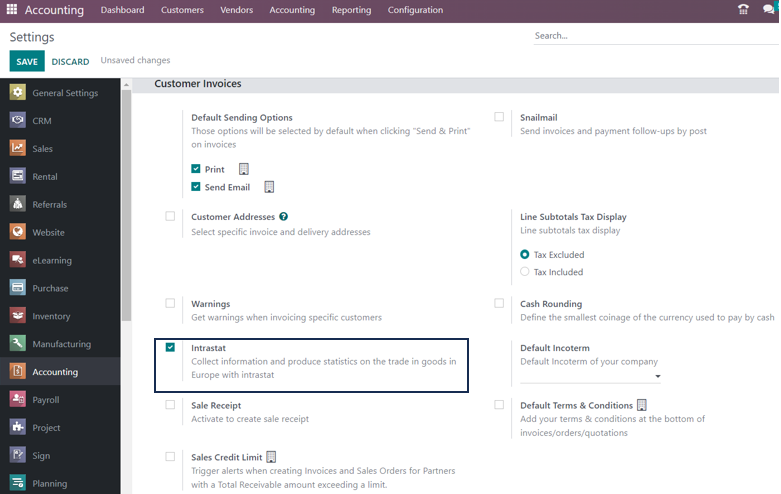
Accounting Application → Configuration menu → Settings → Customer Invoices section → Intrastat → Save
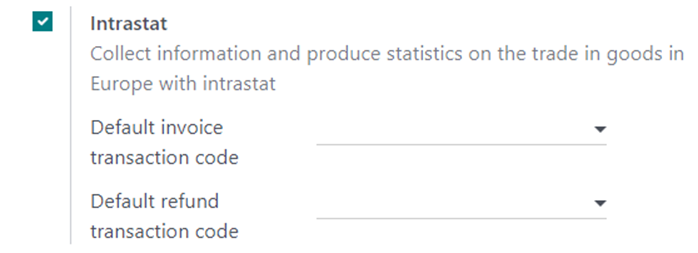
Once you enable the Intrastat feature, Odoo 16 provides the option to select the Default Invoice Transaction Code and Default Refund Transaction Code.
These settings automatically generate and display specific codes for each invoice and refund created. After setting the default transaction codes, businesses also need to specify the Commodity Code for each product used in relevant transactions.
Configuring Commodity Codes in Odoo 16
To configure the commodity code, select the Products option from the Customers tab of the Accounting module.
Go to the Accounting tab on the product configuration page of the selected product. Here, you can enter its commodity code.
A commodity code, often referred to as a Harmonized System (HS) code or tariff code, is a standardized classification code used to identify and categorize goods for international trade and customs purposes. These codes simplify and harmonize the process of classifying and identifying products as they cross international borders and enter different customs territories.
In addition to the commodity code, Odoo 16 allows users to specify other product-related details, such as Supplementary Units and Country of Origin. Maintaining this information at the product level can help businesses keep their Intrastat data consistent across relevant accounting transactions.
Adding Intrastat Information to Odoo Invoice Lines
Additional specifications can be added to the order lines created for transactions that require Intrastat information. In addition to the default transaction codes configured in the settings, users can specify transaction details directly on individual invoices and bills.
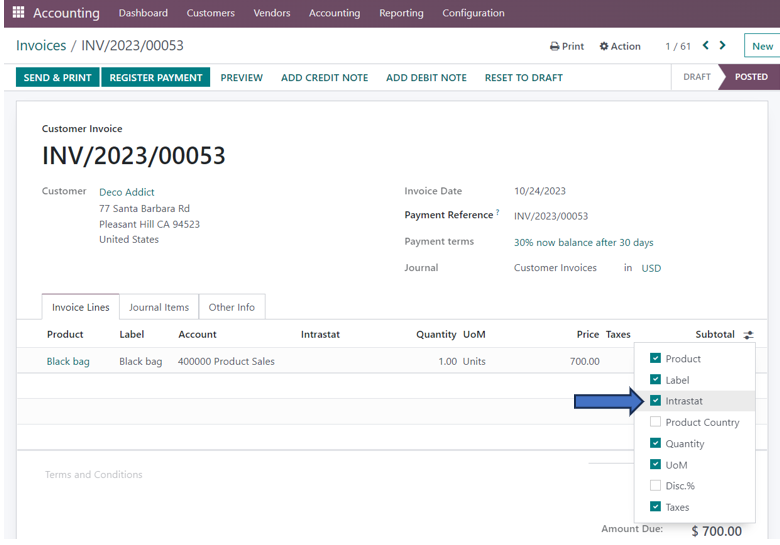
When you select the Intrastat option in the additional fields under Invoice Lines, Odoo displays a new Intrastat column. Users can then add a transaction code for the particular invoice.
This provides greater flexibility when different transactions require different Intrastat codes. As a result, businesses can manage transaction-specific information while continuing to use the standard Odoo Accounting workflow.
Configuring Intrastat Country and Transport Mode
In the Other Info tab of the customer invoice, users can also specify the partner country in the Intrastat Country field.
After selecting the Intrastat Country, the Intrastat Transport Mode field appears below it. Users can then specify the mode of transportation used to move the goods associated with the invoice.
This information helps businesses maintain the required details for EU trade reporting. Moreover, keeping the country and transportation information within the accounting transaction makes it easier to review the data when preparing an Intrastat report.
Intrastat Reporting in Odoo 16
The Intrastat Reporting feature in Odoo enables users to track important information about the movement of goods. This includes the system or process involved, country, transaction code, region code, commodity code, country of origin, partner VAT, transport code, Incoterm code, weight, supplementary units, and value.
Odoo can obtain certain details, such as VAT and country information, from the partner’s contact details. Therefore, maintaining accurate customer and vendor records is also important when managing Intrastat reporting in Odoo 16.
By bringing these details together within the Accounting application, Odoo helps businesses maintain a more organized record of their intra-EU transactions.
How to Access the Intrastat Report in Odoo 16
To view the Intrastat report in Odoo 16, follow this menu path:
Accounting Application → Reporting Menu → Audit Reports section → Intrastat Report
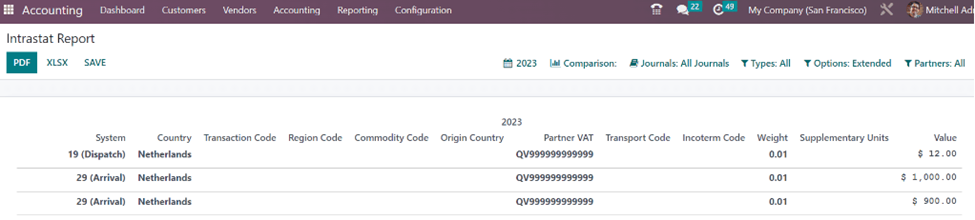
The Intrastat Report in Odoo 16 provides users with access to the relevant information associated with intra-community trade transactions. Businesses can use this report to review their trade data and support their applicable Intrastat reporting process.
Because the information comes from configured products, partners, and accounting transactions, businesses should verify the underlying data regularly. Accurate product classifications, transaction codes, countries, values, and other relevant information can contribute to more reliable reporting.
Viewing Intrastat Codes in Odoo 16
If you want to view the codes used for transactions between EU member countries, go to the Configuration menu and select the Intrastat Code option under the Invoicing section.
The page displays the Name, Code, Description, Country, and Supplementary Unit.
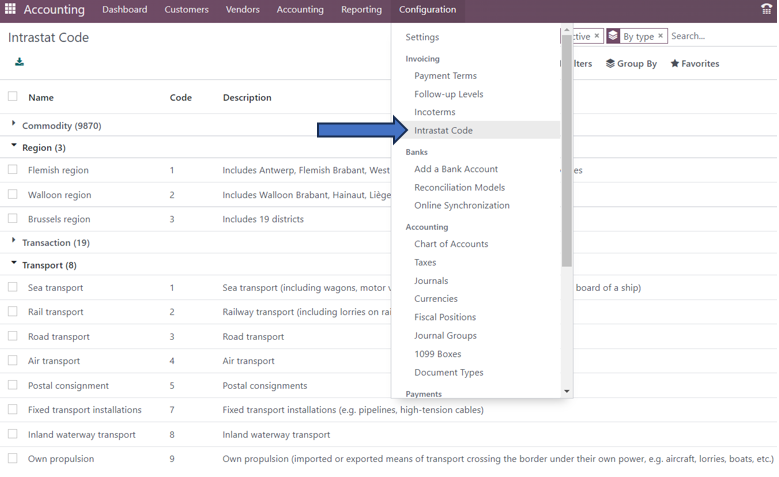
These Intrastat codes help classify and organize the information associated with the movement of goods. Consequently, businesses can use the available configuration options in Odoo 16 to maintain the information required for their EU Intrastat reporting workflow.
Simplify Intra-Community Trade Management with Odoo 16
Intrastat plays a crucial role in the functioning of the EU single market by providing valuable insights into the trade of goods between member states. It helps promote transparency and efficiency in cross-border trade while also assisting governments and other stakeholders in developing and evaluating trade policies within the EU.
For businesses, managing Intrastat information accurately can become challenging as the volume of intra-EU transactions increases. Therefore, using an integrated ERP platform can help businesses organize product, customer, vendor, invoice, and trade-related information in one place.
With Odoo 16 Intrastat reporting, businesses can manage important information such as commodity codes, transaction codes, countries, transport modes, product origins, weights, supplementary units, and values within their accounting workflow. This can help reduce repetitive data entry and provide better visibility into intra-community trade transactions.
Managing Intrastat is therefore an important part of operating across EU markets. Infintor Solutions, your trusted Odoo ERP Partner, helps businesses implement and configure Odoo solutions to support their accounting and international trade processes while addressing applicable business and reporting requirements.
Why Businesses Need Intrastat Reporting for EU Trade
The EU single market allows businesses to trade goods between member states without traditional customs controls at internal borders. However, authorities still need reliable statistics about the movement of goods between EU countries. Intrastat reporting helps provide this information. Therefore, businesses involved in intra-EU trade need to maintain accurate transaction data and understand the reporting requirements that apply to them.
For accounting teams, collecting this information manually can consume significant time. Each transaction may involve product classifications, quantities, values, partner information, VAT details, country information, and transport data. In addition, businesses may need to prepare reports at regular intervals. With Odoo 16 Intrastat reporting, companies can connect these details with their accounting transactions and make the reporting process more organized.
How Odoo 16 Simplifies Intra-EU Trade Data Management
Odoo 16 Accounting provides a centralized environment for managing financial transactions and related trade information. Instead of maintaining separate spreadsheets for every Intrastat requirement, users can configure relevant information directly within the Odoo system. Consequently, accounting teams can access important data from invoices, bills, products, and partner records.
Furthermore, Odoo can associate product information with the corresponding commodity code and country of origin. Users can also configure transaction codes and transportation details when they process relevant transactions. This creates a more consistent data structure for Intrastat reporting in Odoo 16. As a result, businesses can spend less time collecting information manually and more time reviewing the accuracy of their reports.
Key Intrastat Data to Maintain in Odoo 16
Accurate data forms the foundation of effective Intrastat reporting. For this reason, businesses should configure the necessary information before processing a large number of intra-EU transactions. Product-related information is especially important because the commodity code determines how goods appear in trade statistics.
Odoo 16 also allows businesses to maintain information such as the country of origin and supplementary units. At the transaction level, users can work with details such as the Intrastat country, transaction code, and transport mode. Partner records can provide additional information, including VAT-related details. When users maintain these fields consistently, the resulting Odoo Intrastat report can provide a clearer overview of the company’s intra-community trade.
Commodity Codes and Product Classification
Commodity codes play an important role in international and intra-EU trade reporting. Businesses use these codes to classify products according to standardized trade categories. Therefore, selecting the correct commodity code for each product is an important part of preparing reliable Intrastat data.
In Odoo 16, users can add the commodity code from the product configuration. This makes the classification available when the product appears in relevant accounting transactions. In addition, businesses can maintain the country of origin and supplementary unit information alongside the commodity code. By setting up this information at the product level, accounting users can reduce repetitive data entry and improve consistency across transactions.
Intrastat and Odoo Accounting Transactions
One of the major advantages of integrating Intrastat information with Odoo Accounting involves connecting trade data directly with financial transactions. Customer invoices and vendor bills already contain important information about products, quantities, values, and business partners. Odoo can use this information as part of the Intrastat reporting workflow.
For example, an invoice for goods sold to a business in another EU member state may require additional Intrastat information. Users can provide the relevant transaction code, country, and transportation details within the accounting transaction. Similarly, purchase transactions can include the information needed for reporting goods received from another EU country. Therefore, integrating Intrastat with Odoo Accounting helps businesses maintain trade information alongside their financial records.
Managing Intra-Community Sales and Purchases
Businesses often manage both intra-EU sales and purchases. Each transaction can contribute to the overall trade statistics that a company needs to report. As transaction volumes increase, maintaining accurate records becomes increasingly important.
With Odoo 16, businesses can manage these transactions through their standard accounting workflow while adding the necessary Intrastat information. This reduces the need to create a separate process for every cross-border transaction. Moreover, users can review the information associated with individual invoices and bills before generating or analyzing the Intrastat report.
This integrated approach also helps accounting teams identify missing information earlier. For instance, if a product does not have the appropriate commodity code or a transaction lacks relevant country information, users can review the source transaction and update it. Consequently, businesses can improve data quality before completing their Intrastat reporting process.
Improving Intrastat Data Accuracy with Odoo 16
Accurate Intrastat reporting depends on the quality of the underlying accounting data. Even a well-configured reporting system cannot compensate for incomplete or incorrect product and transaction information. Therefore, businesses should establish a consistent process for maintaining Intrastat-related fields in Odoo.
First, companies should configure commodity codes for products that frequently appear in intra-EU transactions. Next, they should review partner information and ensure that relevant country and VAT details remain accurate. Finally, accounting teams should verify transaction codes, transport modes, values, weights, and supplementary units where applicable. By following these practices, businesses can create more reliable Intrastat reports in Odoo 16.
Benefits of Using Odoo 16 for Intrastat Reporting
Using Odoo for Intrastat management offers several practical benefits for businesses involved in European trade. Most importantly, it brings accounting and trade information into a single ERP environment. Users do not need to rely entirely on disconnected spreadsheets or manually maintained records.
Additionally, Odoo helps businesses organize product and transaction information in a structured way. Since users can maintain commodity codes and related product details directly within the product configuration, the same information can support multiple accounting transactions. This can reduce repetitive work and improve consistency.
Another benefit involves easier access to reporting information. Businesses can review their Intrastat data through the Accounting application and use the available information to support their reporting processes. Therefore, Odoo Intrastat reporting can help accounting teams create a more organized workflow for managing intra-community trade.
Intrastat Reporting for Growing European Businesses
As a business expands into additional EU markets, the volume and complexity of intra-community transactions can increase quickly. More customers and suppliers mean more invoices, bills, products, countries, and trade-related information to manage. Consequently, businesses need an ERP system that can scale with their accounting and reporting requirements.
Odoo 16 provides a flexible foundation for businesses that want to manage accounting and intra-EU trade information in one platform. Companies can configure products, customers, vendors, invoices, bills, and reporting information within the same system. As a result, businesses can create a more connected workflow while reducing the administrative effort associated with maintaining trade data.
Common Challenges in Intrastat Management
Businesses often face several challenges when they manage Intrastat reporting manually. Missing commodity codes, incorrect product classifications, incomplete partner information, and inconsistent transaction data can all affect reporting accuracy. Furthermore, maintaining information across multiple spreadsheets can make it difficult to identify the latest and most reliable data.
Odoo 16 can help address these challenges by keeping relevant information within the ERP system. Instead of storing product classification details separately, businesses can configure them within the product record. Similarly, accounting teams can maintain transaction-specific information directly within invoices and bills. This centralized approach makes it easier to review and update data as part of the normal accounting workflow.
Streamline EU Trade Reporting with Odoo 16
Intrastat reporting represents an important part of managing intra-community trade for businesses operating across the European Union. Although the specific reporting requirements and thresholds depend on the relevant EU member state, businesses still need a reliable process for collecting and organizing trade information.
With Odoo 16 Accounting, companies can connect Intrastat information with their everyday accounting operations. Product classifications, commodity codes, transaction details, partner information, transport modes, and other relevant data can work together within the ERP environment. Therefore, businesses can improve visibility into their intra-EU trade while creating a more structured reporting workflow.
For companies looking to simplify Intrastat reporting in Odoo 16, proper configuration is an important first step. Once the required product, partner, and transaction information is configured, users can manage cross-border accounting transactions more efficiently. In addition, regular data reviews can help businesses maintain accurate records and prepare their Intrastat information more effectively.
Odoo ERP for EU Accounting and Compliance
Managing European accounting requirements involves more than recording invoices and payments. Businesses that operate across borders may also need to manage VAT information, product classifications, partner details, and statistical trade data. An integrated ERP system can help bring these activities together and provide better visibility across the accounting process.
Odoo 16 offers businesses a broad accounting environment where financial transactions and trade-related information can work together. Consequently, companies can use Odoo to create a more efficient workflow for managing EU trade data. However, businesses should always review the Intrastat requirements that apply in their specific country and ensure that their reporting process follows the latest regulations and local authority requirements.
If your business needs help configuring Odoo Intrastat reporting, managing EU accounting requirements, or implementing Odoo for cross-border operations, working with an experienced Odoo implementation partner can make the process easier. A properly configured Odoo system can help your team manage accounting data, organize Intrastat information, and build a scalable ERP workflow for European business operations.