
Understanding Odoo 16 Timesheet Validation
Odoo 16 Timesheet Validation gives businesses a structured way to review employee time entries before managers rely on them for reporting, billing, project analysis, or other business activities. Employees can record the time they spend on projects and tasks, while authorized managers can review those entries for accuracy. This additional review creates a practical control between time tracking and management reporting. As a result, businesses can identify incorrect projects, unusual durations, missing descriptions, or other timesheet issues before they affect important business processes.
Accurate time tracking becomes particularly important when employee hours influence customer invoices or project profitability. A consulting company, software development firm, digital agency, or IT service provider may use employee timesheets to calculate billable hours. In such cases, even a small error can affect the final invoice. Therefore, an effective Odoo timesheet approval process helps businesses maintain reliable information while reducing the need for manual corrections later.
Why Odoo Timesheet Validation Matters
Employee time represents a valuable business resource. Once working hours have passed, managers need accurate information about how employees used that time. Odoo Timesheets can capture this information across projects, tasks, customers, departments, and activities. However, recording hours alone does not guarantee data accuracy. A consistent validation process adds the management control required to make the information more dependable.
Managers can use timesheet validation to identify entries that require clarification. For example, an employee might record several hours against the wrong task or select a non-billable activity instead of a billable project. Similarly, unusually high durations may indicate an estimation problem, a complex customer requirement, or an incorrect entry. By reviewing these records regularly, managers can correct issues before they affect invoicing or project reports.
Furthermore, validation creates a clear responsibility structure. Employees remain responsible for recording their working hours, while managers review the information and approve it according to company procedures. This approach gives organizations better control without requiring managers to monitor every activity throughout the working day.
Odoo Timesheet Management for Better Time Tracking
Effective employee time management starts with reliable information. When staff members record their hours directly in Odoo, managers gain visibility into how working time is distributed across projects and activities. Instead of relying on estimates or informal updates, management can review actual time records when evaluating workloads and project progress.
Consider a software company working on several customer projects. Developers may spend part of the day writing code, another portion resolving support requests, and additional time attending meetings or testing new features. Without detailed time tracking, management may have difficulty understanding the real workload. Odoo employee timesheets provide a clearer picture by connecting recorded hours with the appropriate projects and tasks.
This information can also improve resource planning. If a particular team spends more time on support work than expected, management can investigate the reason. Perhaps the product requires improvement, customer documentation needs updating, or the support team requires additional resources. Consequently, accurate time tracking can reveal operational issues that might otherwise remain hidden.
Configuring Odoo Timesheet Validation
Timesheets help track and record the hours employees work. This is crucial for ensuring that employees are present and accountable for their scheduled work hours. Supervisors and managers use timesheets to evaluate employee performance. It allows them to assess productivity, identify areas for improvement, and recognize employees who consistently contribute significant effort. For businesses that bill clients based on the time spent on a project, timesheets are essential for accurate invoicing. They provide a detailed breakdown of the time spent on specific tasks or projects, ensuring that clients are billed accurately. Timesheets also help businesses understand their staffing needs by providing insights into when employees are most productive and when additional staff may be required.
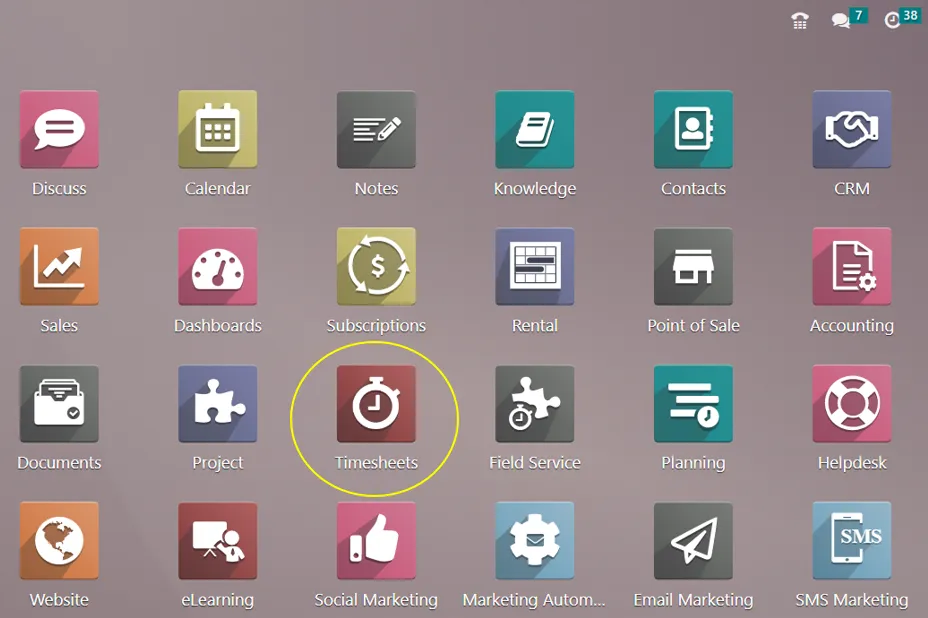
With its easy-to-use design, the Odoo 16 ‘Timesheet’ app lets users log actions at any time—during work hours or after they’ve finished it. Access permissions, timesheet approval, and reminders are all under the manager’s power. The program analyzes timesheets for billable hours, billable amounts, and non-invoiced sums, limits visibility, and tracks employee performance by project or activity. Better control over time spent is made possible by integrated leave management, and employee performance can be easily reviewed with timesheet. Payroll integration, billing and invoicing automation, human resource management, and time tracking by jobs, clients, or projects are just a few examples of integrations.
Timesheet Validation
It is the manager’s responsibility to confirm the working hours. With this method, the employer can evaluate the success of the worker in terms of hours worked as well as the necessary wage. Users can validate a timesheet from the previous week or month, as well as an “All Timesheet” dashboard, in the Odoo 16 Timesheet module by selecting the “To Validate” menu option.
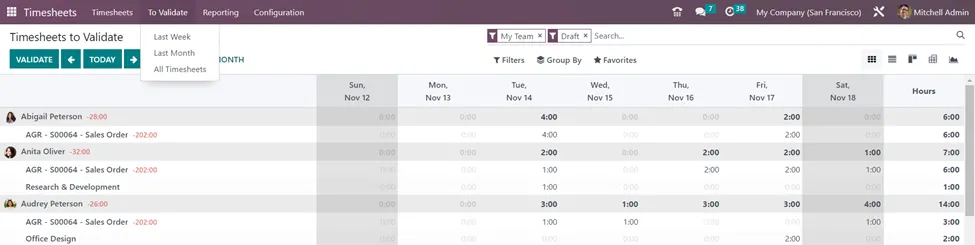
The ‘Last Week’ option allows you to view the work hours for each employee on every day of the week and the total work hours of that employee in that week.
The ‘Last Month’ option computes total work hours by each employee in a month. On selecting a particular day of an employee from the timesheets to validate, we can view the Project, Task, Date, Sales Order Item, and Hours spent for that task of that project by the employee.
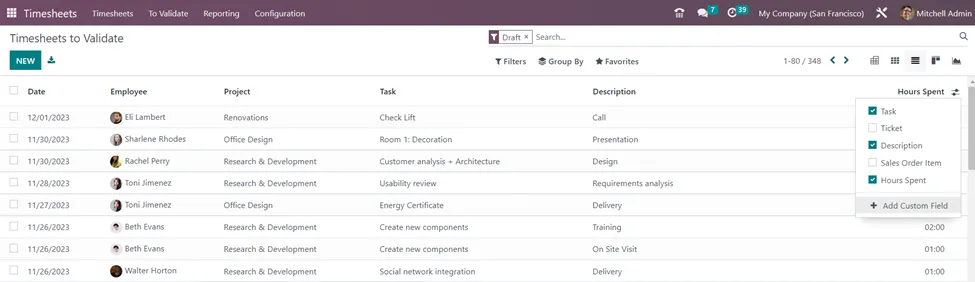
The List view of the ‘All Timesheets’ window provides more information on all tasks assigned to employees that need to be validated by the manager or the supervisor. The details include the date, employee, project, task, description, and hours spent. We can also select additional columns such as the ticket and sales Order Item from the additional options icon.
Filter options in Timesheets to Validate
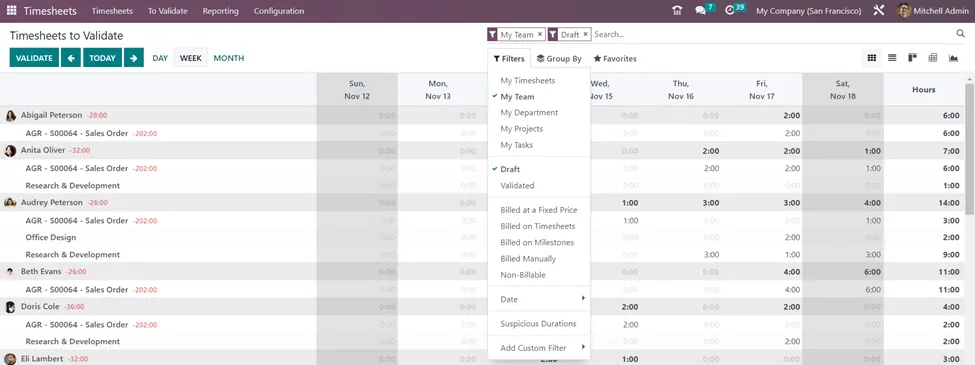
We can use different filters to customize the records based on our required information. The filter options available for Timesheets to Validate include My Timesheets, My Team, My Department, My Projects, My Tasks, Draft, Validated, Billed at a Fixed Price, Billed on Timesheets, Billed on Milestones, Billed Manually, Non-Billable, Date, Suspicious Durations and custom filters as shown in screenshot above.
Group By options in Timesheets to Validate
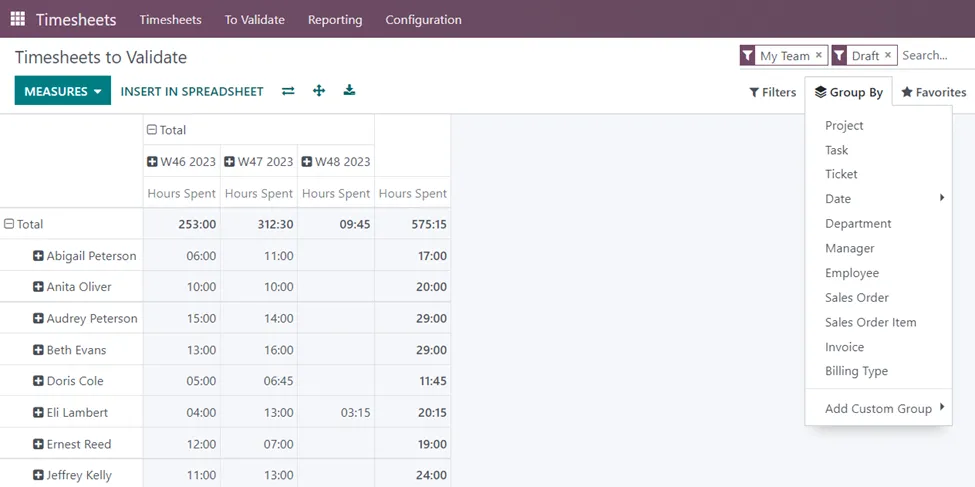
The Group By options available include categorizing timesheets to be validated based on Projects, Tasks, Tickets, Dates, Departments, Managers, Employees, Sales Orders, Sales Order Items, Invoices, Billing Types, and Custom groups. The views of the timesheets can also be changed by selecting the required view.
In the ‘Pivot View’ of the Timesheets to Validate, you can select different measures such as Hours spent, Timesheet Costs, and Count. You also have the option to ‘Insert in Spreadsheet’, Flip the axis, Expand the axis, and Export.
Timesheet Controls
We can set reminders for the employees to enter their details in timesheets and for the managers to validate timesheets periodically. For that, there are separate settings in the Timesheets Application.
Timesheets Application => Configuration menu => Settings => Timesheets Control => Save
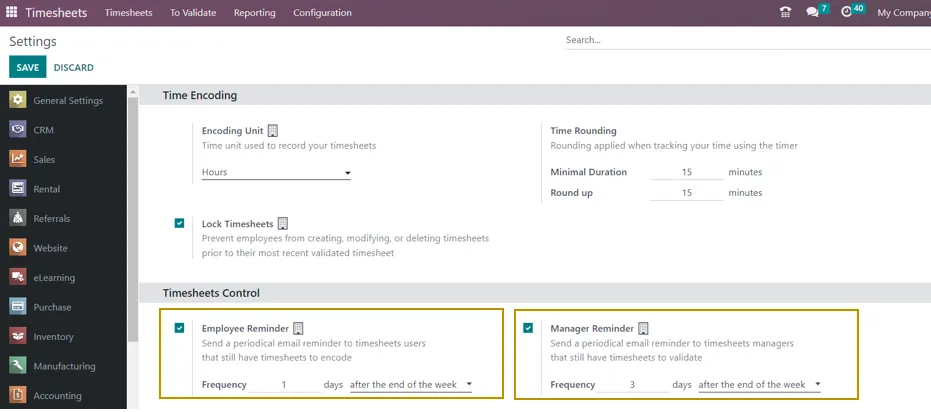
Activate both ‘Employee Reminder’ and ‘Manager Reminder’ to send notification e-mails for both parties to consider timesheets periodically. Select the “Employee Reminder” option to notify staff members who haven’t turned in their timesheets by sending them regular email reminders. Depending on the frequency you enter in the “Frequency” section, the email should be sent either after the end of the week or after the end of the month.
Reminders to turn in their timesheets can also be sent to the supervisors of the timesheets. By ticking the box next to the “Manager Remainder” option, you can send emails to the managers. In addition to the email-sending timeframe that best fits your needs—for example, after the end of the week or month—you can provide other information in the “Frequency” box.
Timesheets play a crucial role in various aspects of business operations, from payroll processing to project management and compliance with labor laws. They provide accurate and detailed information about employee work hours, which is essential for effective business management.
Odoo Timesheet Approval Process for Managers
The Odoo timesheet approval process allows managers to review employee entries before the organization uses them for important business activities. A practical review should confirm that employees selected the correct project, task, date, duration, and activity. Managers can also examine descriptions to determine whether the recorded work provides enough context.
Different managers may need different views of the same information. A project manager might focus on customer projects, while a department manager may review the hours submitted by an entire team. Finance personnel may be more interested in billable hours and invoicing information. Odoo’s filtering and grouping options make it easier to examine timesheet records according to these different responsibilities.
Regular validation also helps establish accountability. Employees know that their entries receive managerial review, while managers have a defined process for identifying unusual or incomplete records. Over time, this routine can improve the quality of timesheet information throughout the organization.
Odoo Timesheet Controls for Accurate Records
Odoo timesheet controls help businesses establish consistent rules around time entry, submission, and validation. Without clear controls, employees may forget to record hours, enter time several days later, select incorrect projects, or leave descriptions incomplete. Such errors can gradually reduce the reliability of project and financial reports.
A good control system combines employee responsibility with managerial oversight. Employees should know when they need to record their working hours, while managers should understand when they need to review and validate the submitted records. The organization should also define how employees should correct mistakes and how managers should handle unusual entries.
For a small business, weekly validation may be sufficient. Larger service organizations may prefer daily time entry with weekly approval because customer billing and project reporting depend heavily on accurate data. The ideal process depends on the company’s project structure, billing cycle, workforce size, and operational requirements.
Odoo Timesheet Reminders for Employees and Managers
Forgetting to submit timesheets is one of the most common problems in manual time-tracking processes. Managers often need to send repeated emails or messages to employees who have incomplete records. As the workforce grows, this follow-up can consume a considerable amount of administrative time.
Odoo timesheet reminders provide a more systematic solution. Businesses can configure reminders that encourage employees to complete their timesheets and prompt managers to review submitted records. Consequently, the organization can establish a predictable routine without relying entirely on manual follow-up.
Regular reminders are especially useful for companies that bill customers according to actual working hours. If an employee forgets several billable hours, the company may need to reconstruct the work later. That process can delay invoicing and increase the risk of missing revenue. A timely reminder helps employees maintain accurate records while supporting a smoother billing cycle.
Odoo Timesheets for Project Management
Project management and time tracking work closely together because employee hours represent one of the most important project resources. Every project normally includes estimated effort, assigned employees, deadlines, and expected deliverables. Actual timesheet data allows managers to compare those assumptions with the work completed.
Suppose a project task has an estimated effort of 40 hours. After several days, employees may already have recorded 35 hours while substantial work remains. This information gives the project manager an early warning. Instead of discovering the problem after the deadline, the manager can investigate the cause and adjust resources or priorities.
Historical timesheet information can also improve future project estimates. When similar tasks repeatedly take longer than expected, managers can use the recorded data to create more realistic estimates. Therefore, Odoo project timesheets support both current project control and future planning.
Monitoring Project Effort Through Timesheets
A detailed view of project effort can reveal where teams spend the most time. Managers may discover that certain tasks require significantly more effort than expected or that customer changes are creating additional work.
Such information supports better decision-making. Project managers can discuss scope changes with customers, reassign resources, update deadlines, or improve internal processes. Rather than relying on assumptions, they can use actual time records as evidence.
Odoo Timesheet Billing and Billable Hours
Many service businesses invoice customers according to the amount of time employees spend on a project. Odoo timesheet billing can connect recorded service hours with sales and invoicing workflows when the relevant configuration is enabled.
This capability is valuable for consulting companies, IT service providers, software development firms, engineering businesses, digital agencies, and other professional service organizations. Employees can record time against customer projects, while managers review the information before billing.
The quality of customer invoices depends heavily on the quality of timesheet records. Incorrect project assignments, duplicate entries, or missing billable hours can create billing discrepancies. Therefore, timesheet validation should form an important part of the process before businesses generate invoices.
Managing Billable and Non-Billable Time
Not every working hour creates direct customer revenue. Employees also spend time on meetings, internal administration, training, research, documentation, and other activities. Separating billable and non-billable hours helps management understand how employee capacity is distributed.
For example, a consulting firm may discover that consultants spend a larger percentage of their time on internal administration than expected. Management can then investigate whether some activities can be automated or streamlined. Similarly, unusually low billable utilization may indicate a need for improved sales planning or resource allocation.
Odoo Timesheets for Project Profitability
Project profitability depends on both revenue and cost. For many service businesses, employee time represents a significant project cost. Consequently, accurate timesheet information plays an important role in understanding whether a project remains financially healthy.
A project can generate substantial revenue and still produce disappointing profits if employees spend significantly more hours than expected. Timesheet data can reveal this difference by showing the actual effort invested in each project.
Managers can compare recorded hours with project estimates and billing information to identify deviations. If a project repeatedly exceeds its expected effort, the business can investigate the cause. Scope changes, inaccurate estimates, technical problems, or inefficient processes may all contribute to the additional time.
Odoo Timesheet Reporting and Analytics
Odoo timesheet reporting helps organizations convert individual time entries into useful management information. Instead of examining employee records one by one, managers can analyze hours by project, task, employee, department, customer, date, or other available dimensions.
This broader view can reveal patterns that are difficult to identify from individual records. For example, a particular customer may consistently require more support hours than expected. Another project may consume substantial development resources without generating proportional revenue. Such insights can influence pricing, staffing, project planning, and service strategy.
Using Timesheet Pivot Reports
Pivot reports can help managers analyze measures such as hours spent, timesheet costs, and record counts. The information can be grouped according to projects, employees, departments, dates, or other relevant dimensions.
Such reports become more valuable when employees maintain accurate records. Therefore, reporting quality begins with disciplined time entry and continues through regular validation. Clean data creates more reliable management information.
Odoo Timesheets for Resource Planning
Resource planning becomes more effective when managers understand how employees actually spend their working hours. Timesheet records provide historical evidence that can support staffing decisions, project scheduling, and workload management.
For example, one team may consistently spend most of its capacity supporting existing customers. Meanwhile, another team may have additional capacity for new projects. Management can use this information to redistribute work or adjust staffing plans.
Historical data also helps identify seasonal patterns. A business may experience significantly higher workloads during certain months or around specific customer events. With accurate Odoo time tracking, managers can recognize these patterns and prepare resources in advance.
Odoo Employee Timesheets and Workload Management
Employee workload analysis should consider more than the number of hours recorded. Managers should also evaluate project results, deadlines, quality, customer satisfaction, and the complexity of the assigned work.
Timesheet information nevertheless provides valuable context. If one employee consistently records a high number of hours across several projects, management can investigate whether the workload is sustainable. Perhaps tasks need redistribution, additional resources are required, or the employee is handling particularly complex assignments.
A balanced approach helps organizations use timesheet data responsibly. The objective should be better workload management rather than simply encouraging employees to record more hours.
Odoo Timesheets for Remote and Hybrid Teams
Remote and hybrid work environments can make traditional time-tracking methods difficult to manage. Employees may work from different locations while contributing to multiple projects. Spreadsheets and manual reports can quickly become difficult to maintain.
Odoo provides a centralized environment where employees can record time against projects and tasks. Managers can then review the information without collecting separate files from different team members.
Clear company procedures remain important, however. Employees should understand when to enter time, how to select projects, and how to describe their activities. With consistent guidelines and regular validation, remote teams can maintain reliable time records.
Odoo Timesheet Access Rights and User Permissions
Access control is an important part of effective timesheet management. Employees do not necessarily need access to every timesheet in the organization. Managers, supervisors, and administrators may require broader permissions according to their responsibilities.
A suitable access structure allows employees to manage their own records while giving managers the visibility required for team supervision. At the same time, sensitive information can remain restricted to authorized users.
Businesses should review access rights during Odoo implementation. A carefully designed permission structure improves security while allowing employees and managers to complete their responsibilities efficiently.
Odoo Timesheets and Time Off Management
Employee availability affects project planning and workload analysis. If approved leave does not appear correctly in the organization’s time records, managers may misunderstand employee capacity.
Odoo can connect Time Off with timesheet-related processes when the relevant configuration is enabled. This integration helps businesses maintain a more complete view of employee availability and working time.
Project managers can therefore consider approved leave when planning deadlines and assigning work. If several team members have planned absences during an important project phase, management can prepare additional resources before the capacity gap affects delivery.
Odoo Timesheets and Payroll-Related Processes
Timesheet information can form part of a broader HR and payroll environment, depending on the organization’s configuration and local requirements. Odoo connects several HR applications, including Employees, Timesheets, Time Off, Attendances, and Payroll.
However, businesses should distinguish project time tracking from payroll work entries. The exact relationship depends on employee contracts, payroll configuration, localization, and company policy.
For that reason, organizations should review payroll requirements carefully before connecting timesheet information with salary calculations. A professional Odoo implementation can help map the appropriate workflow without creating unnecessary dependencies.
Common Odoo Timesheet Errors
Even with an ERP system, employees can make mistakes when entering working hours. Common examples include selecting the wrong project, entering an incorrect date, recording duplicate time, forgetting to submit hours, or assigning billable work to a non-billable activity.
Regular validation can reduce the impact of these errors. Managers can focus on unusual entries rather than manually reviewing every record in the same level of detail.
Over time, recurring mistakes can also reveal process weaknesses. If many employees select the wrong project, the project structure may need improvement. Similarly, repeated errors in billing classification may indicate a training requirement.
Best Practices for Odoo Timesheet Validation
A strong Odoo timesheet validation process should remain simple enough for employees to follow every day. Complicated procedures often create resistance and increase the likelihood of inaccurate entries.
Daily time entry is usually a useful starting point because employees can record activities while the details remain fresh. Managers can then review the submitted records weekly or according to the company’s billing cycle.
Clear project and task naming also makes a significant difference. Employees should quickly understand where different types of work belong. In addition, managers should focus their attention on exceptions such as unusually long durations, missing descriptions, or significant deviations from project estimates.
Create a Consistent Validation Schedule
Consistency is more important than complexity. Employees should know when timesheets are due, while managers should know when validation needs to happen.
For example, an organization may require employees to complete their timesheets every Friday and managers to approve them the following Monday. Another business may use daily approval because its customer billing process requires faster turnaround.
The schedule should match the organization’s operational requirements rather than follow a generic rule.
Improving Odoo Timesheet Accuracy
Accurate timesheet data begins with employee understanding. Staff members should know why the organization tracks time and how the information affects projects, customers, billing, and resource planning.
Managers also influence data quality. When supervisors consistently review timesheets, employees are more likely to maintain accurate records. Constructive feedback can further reduce repeated mistakes.
At the same time, businesses should avoid using timesheets as the only measure of employee performance. Working longer hours does not automatically mean an employee delivers better results. Project outcomes, work quality, deadlines, and customer satisfaction should remain part of the wider performance picture.
Odoo Timesheets for Professional Services
Professional service businesses often depend heavily on employee expertise and working hours. Consulting firms, IT providers, software companies, engineering organizations, and agencies can therefore gain significant value from structured Odoo time tracking.
Consultants can record their hours against customer projects and tasks. Managers can review the entries before billing, while project leaders can compare actual effort with planned hours.
This information can also highlight scope changes. If a customer repeatedly requests work outside the original agreement, timesheet data can show the additional effort involved. As a result, businesses can discuss scope, pricing, or project timelines with customers using clearer information.
Odoo Timesheets for IT and Software Companies
Software teams often divide their time between development, testing, bug fixing, meetings, documentation, maintenance, and customer support. Without detailed time tracking, management may struggle to understand how much effort each activity requires.
Odoo timesheets can connect development work with projects and tasks. Managers can then review the actual time spent on specific activities and compare it with project estimates.
Historical data can also improve future planning. If similar development tasks repeatedly exceed their estimates, project managers can adjust future forecasts. Consequently, time tracking becomes a useful source of project intelligence rather than simply an administrative record.
Odoo Timesheets for Customer Support
Support teams often handle many small tasks throughout the day. Agents may investigate issues, respond to customers, document solutions, escalate technical problems, and follow up on unresolved tickets.
Recording this time against support tickets can help managers understand the actual effort required to provide customer service. Recurring high-effort issues may indicate product problems or opportunities for process improvement.
For billable support services, validated timesheets can also contribute to customer invoicing. This creates a connected workflow from support ticket management to time tracking and, where appropriate, billing.
Odoo Timesheet Customization for Business Requirements
Every organization has its own approach to time tracking. A consulting company may require customer-based billing, while an internal IT department may focus more on project cost and workload analysis. Consequently, businesses may need different fields, approval rules, reports, or access permissions.
Odoo can be configured to support many of these requirements through its standard functionality. When standard features do not fully address a specific business need, customization or integration may provide an appropriate solution.
However, customization should not become the first option. Businesses should first determine whether configuration can solve the requirement. Standard functionality generally simplifies maintenance and future upgrades, while carefully selected customizations can address genuine business-specific needs.
Odoo Timesheet Implementation Services
Successful Odoo timesheet implementation starts with understanding the organization’s current workflow. The implementation team should examine how employees record time, how managers approve entries, how projects are structured, and how billing uses the information.
After that analysis, the business can map its requirements to Odoo’s standard Timesheets functionality. Access rights, reminders, project structures, reporting requirements, and approval procedures can then be configured accordingly.
Employee training should form part of the implementation as well. Users need to understand both the system and the company’s internal timesheet policy. Proper training can significantly improve adoption and data quality after launch.
Odoo Timesheet Migration
Businesses moving from spreadsheets or another ERP platform may already have large amounts of historical time data. Migrating everything without reviewing the existing information can create unnecessary complexity.
A better approach involves identifying which records the new Odoo system actually needs. Active projects, relevant historical information, open billing records, and important employee data may require migration, while outdated or duplicate records can remain archived.
Data cleaning before migration can also improve reporting quality. Consistent employee names, project structures, task names, and billing categories make the new Odoo timesheet environment easier to manage.
Odoo Timesheet Integration with Other Applications
One of Odoo’s major advantages is its integrated ERP structure. Timesheets can work alongside Project, Sales, Invoicing, Accounting, Helpdesk, Employees, Time Off, and other applications.
Such integration reduces duplicate data entry. For example, a customer project can contain its tasks, assigned employees, recorded hours, sales information, and billing details within a connected workflow.
Different departments can therefore work with related information without maintaining separate spreadsheets. Project managers gain operational visibility, finance teams can review billing information, and management can analyze project effort and profitability.
Odoo Timesheet Reporting for Management Decisions
Timesheet reports can support strategic business decisions when organizations use them correctly. Management can analyze project effort, employee utilization, customer support requirements, billable hours, and internal activities.
For instance, a customer may generate significant revenue but require far more support hours than expected. That information could lead management to review pricing or service processes.
Another project may consistently finish below its estimated hours. Historical data from such projects can help improve future estimates and resource planning. Therefore, the value of Odoo timesheet reporting extends beyond simple hour tracking.
Odoo Timesheet Validation and Business Compliance
Accurate employee time records can contribute to stronger internal controls and administrative processes. Depending on the country, industry, employment arrangement, and applicable regulations, businesses may also have specific requirements concerning working hours and employee records.
Organizations should obtain appropriate professional advice when dealing with local labor or employment regulations. Nevertheless, maintaining consistent time records can support transparency and improve internal documentation.
Odoo provides a centralized environment for recording and reviewing timesheet information. With appropriate access controls and company procedures, businesses can maintain a more organized record of employee time.
Odoo Timesheets for Growing Businesses
A small company may manage employee hours using a spreadsheet without major difficulty. As the organization grows, however, the same approach becomes increasingly difficult to maintain.
More employees mean more records. More projects create additional categories for time tracking. Additional customers increase billing complexity. Eventually, manual spreadsheets can create duplicate information, inconsistent formulas, missing records, and reporting problems.
Odoo Timesheets provides a centralized solution that can scale with the organization’s operational needs. Businesses can establish standardized processes early and expand their configuration as project and workforce requirements grow.
Improving Project Estimates with Odoo Timesheet Data
Project estimates are often based on previous experience and assumptions. Actual timesheet data provides a stronger foundation for improving those estimates over time.
Suppose a company estimates that a particular type of implementation task requires 20 hours. After completing several projects, the historical data may show that the average effort is closer to 28 hours. Managers can use this information to adjust future estimates.
The same approach works in software development, consulting, support, engineering, and other professional services. Historical Odoo timesheet data can become a valuable planning resource when employees record their work consistently.
Odoo Timesheet Validation for Better Customer Transparency
Customers often want clarity when a service agreement involves time-based billing. Detailed timesheet records can help businesses explain how employees used their time on a project.
Managers can review the records before invoices reach customers. This additional check reduces the likelihood of incorrect charges and improves billing transparency.
Clear project and task descriptions can make the information even more useful. When the recorded time connects with recognizable activities, customers can better understand the work behind the invoice.
Common Challenges During Odoo Timesheet Implementation
Technology alone cannot guarantee successful time tracking. Employees need clear instructions, managers need consistent validation procedures, and the project structure needs to remain understandable.
Employee resistance is one common challenge. Some users may initially view timesheet entry as unnecessary administration. Explaining how the data supports project planning, customer billing, and resource management can improve adoption.
Another issue is excessive complexity. If employees must choose between hundreds of unclear projects or tasks, incorrect entries become more likely. A simple project structure and clear naming conventions can make the process much easier.
Training Employees to Use Odoo Timesheets
Employee training should explain more than the location of the Timesheets application. Users need to understand what they should record, which project or task they should select, how they should describe their work, and when they need to submit their entries.
Managers require additional training because their responsibilities include reviewing, filtering, grouping, validating, and analyzing records. They should also understand how to identify unusual entries without turning the process into unnecessary micromanagement.
Ongoing training can help when the business introduces new projects, changes billing procedures, or updates its internal timesheet policy.
Building an Effective Odoo Timesheet Policy
A technology platform works best when employees have clear rules to follow. Businesses should therefore establish a simple timesheet policy covering time-entry frequency, submission deadlines, approval responsibilities, billing classifications, and correction procedures.
The policy should also explain how employees should record internal meetings, training, customer work, support activities, and other common tasks. Clear instructions reduce uncertainty and improve consistency.
Managers should communicate the policy during onboarding and revisit it whenever the organization’s workflow changes. This approach keeps the Odoo timesheet process aligned with actual business operations.
A Typical Odoo Timesheet Validation Workflow
A typical service organization can follow a straightforward process. Employees complete their work and record the relevant time against the correct project and task. Before submission, they review the entries for accuracy. Managers then examine the records, investigate unusual information, and validate the timesheets according to company policy.
Once approved, the information can support project reporting, customer billing, profitability analysis, and management decisions. The exact workflow will vary depending on the organization’s requirements, but the underlying principle remains consistent.
Accurate information should enter the system once, receive appropriate review, and then support multiple connected business processes.
Odoo Timesheets and Digital Transformation
Digital transformation involves more than replacing paper records with software. Businesses also need connected processes that turn operational information into useful insights.
Odoo Timesheets can contribute to this transformation by connecting employee time tracking with projects, sales, invoicing, HR, Helpdesk, and reporting. Instead of maintaining separate spreadsheets for each department, organizations can work with shared information inside an integrated ERP environment.
This structure reduces information silos and improves visibility. Over time, businesses can use historical timesheet information to improve project estimates, staffing decisions, customer billing, and operational efficiency.
Benefits of Odoo 16 Timesheet Controls
A well-configured Odoo timesheet system can improve the accuracy of employee time records while reducing manual follow-up. Managers gain better visibility into project effort, employee workloads, and billable activities.
Project teams can compare actual hours with estimated effort. Finance teams can use validated information to support billing workflows. Management can examine profitability and resource utilization. Meanwhile, employees receive a clear process for recording their work.
The greatest benefit comes from connecting these activities. Instead of treating time tracking as an isolated administrative task, businesses can make it part of their broader ERP workflow.
When Should a Business Implement Odoo Timesheets?
Businesses should consider structured Odoo time tracking when employee hours have a meaningful impact on projects, customer billing, profitability, or resource planning.
Several signs can indicate that a company has outgrown manual methods. Managers may spend too much time collecting employee hours, spreadsheets may contain inconsistent information, customer invoices may require manual calculations, or project profitability may remain difficult to measure.
Implementing a standardized system before these problems become severe can help businesses establish better processes while preserving reliable historical data.
Why Choose Odoo for Timesheet Management?
Odoo combines timesheet management with a broader ERP environment. This integration allows organizations to connect employee time with Project, Sales, Invoicing, Accounting, Helpdesk, Employees, Time Off, and other business functions.
Such connectivity reduces the need to maintain separate applications for related processes. Employees can enter information once, while different departments can use the relevant data for their own responsibilities.
The modular structure also gives businesses room to grow. An organization may begin with Timesheets and Project and later add CRM, Sales, Accounting, Helpdesk, HR, or other applications as operational needs increase.
Odoo Timesheet Implementation and Customization Services
A successful Odoo implementation should begin with a review of the company’s existing time-tracking workflow. The implementation team can identify how employees currently record time, how managers approve it, and how the information flows into billing and reporting.
Once those requirements are clear, the system can be configured around the organization’s actual processes. Standard Odoo functionality should generally remain the first choice because it supports easier maintenance and upgrades.
Where a genuine business requirement exists, customization or integration can extend the system. Such work may involve reports, approval rules, additional fields, access controls, dashboards, or connections with external applications.
Final Thoughts on Odoo 16 Timesheet Validation
Odoo 16 Timesheet Validation gives organizations a practical way to control employee time records while improving project and business visibility. Rather than treating timesheets as simple records of hours worked, companies can use them to understand project performance, customer effort, employee workloads, billable time, and resource utilization.
A successful process combines accurate employee time entry with regular managerial review. Automated reminders, appropriate access rights, clear project structures, and useful reports can further strengthen the workflow.
For service-based businesses, the benefits can extend directly into customer billing and profitability analysis. When timesheets connect with Project, Sales, Invoicing, Accounting, Helpdesk, and HR processes, employee time becomes a valuable part of the organization’s overall ERP data.
Ultimately, the goal is not to collect as many timesheet records as possible. The objective is to collect accurate information, validate it efficiently, and use it to make better business decisions. With the right Odoo implementation strategy, businesses can improve project control, reduce manual administration, strengthen billing accuracy, and gain clearer visibility into how employee time contributes to business performance.
Conclusion
Odoo 16 Timesheet Validation provides businesses with more than a simple method for recording employee hours. It creates a structured process for capturing, reviewing, and using time information across projects and business operations.
Accurate timesheets can help managers monitor project effort, improve resource planning, support customer billing, analyze profitability, and identify operational inefficiencies. At the same time, reminders and validation controls can reduce administrative work and encourage employees to maintain reliable records.
For growing organizations, an integrated Odoo timesheet solution can replace disconnected spreadsheets and manual processes with a centralized workflow. When configured correctly, the system gives employees a straightforward way to record time while giving managers the visibility required to make informed decisions.
Whether a company needs Odoo timesheet implementation, customization, migration, integration, or ongoing support, the right configuration can turn employee time data into a valuable business resource. The result is a more organized approach to time tracking, project management, billing, and operational control.